Dell EMC PowerEdge R240 Statement of Volatility
Summary
Statement of volatility for the Dell EMC PowerEdge R240 rack server, providing detailed volatile and non-volatile memory component information including data write capabilities, write protection status, and clearing procedures. Non-volatile items include 256-byte PCH CMOS RAM (battery-backed, cleared via NVRAM_CLR jumper or coin cell removal for 30 seconds), 16-byte BIOS password storage, BIOS SPI Flash, iDRAC SPI Flash, and BMC EMMC. Volatile components include iDRAC DDR4 and system memory up t
Page 1 Text Content
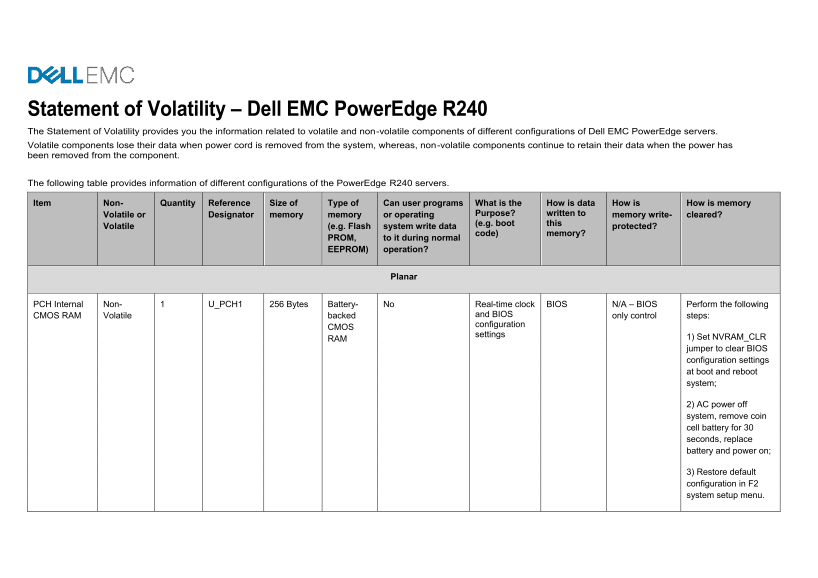
Statement of Volatility – Dell EMC Power Edge R240 The Statement of Volatility provides you the information related to volatile and non-volatile components of different configurations of Dell EMC Power Edge servers. Volatile components lose their data when power cord is removed from the system, whereas, non-volatile components continue to retain their data when the power has been removed from the component.
The following table provides information of different configurations of the Power Edge R240 servers.
Item Non- Quantity Reference Size of Type of Can user programs What is the How is data How is How is memory
Volatile or Designator memory memory or operating Purpose? written to memory write- cleared? (e.g. boot this
Volatile (e.g. Flash system write data protected?
code) memory?
PROM, to it during normal EEPROM) operation?
Planar
PCH Internal Non- 1 U_PCH1 256 Bytes Battery- No Real-time clock BIOS N/A – BIOS Perform the following CMOS RAM Volatile backed and BIOS only control steps:
configuration
settings
RAM 1) Set NVRAM_CLR
jumper to clear BIOS configuration settings at boot and reboot system; 2) AC power off system, remove coin cell battery for 30 seconds, replace battery and power on; 3) Restore default configuration in F2 system setup menu.
Page Summary Contents For Dell EMC PowerEdge R240 Statement of Volatility
Manual Details
| Brand | Dell |
|---|---|
| Pages | 12 |
| File Size | 611.65 KB |
| Published | June 17, 2026 |
Enter the captcha to get the download link:

Frequently Asked Questions
What defines volatile vs. non-volatile components?
Volatile components lose data when power is removed, while non-volatile components retain data even after power loss.
How do I clear the BIOS configuration settings manually?
Set the NVRAM_CLR jumper to clear BIOS configuration settings or use AC power off followed by removing and replacing the coin cell battery for 30 seconds.
Which memory areas cannot be cleared by the user, even with advanced utilities?
Users cannot clear the SPI Flash (BIOS_SPI1), iDRAC firmware, CPU Vcore registers, or the System CPLD FLASH memory.
Can I update and configure the iDRAC system's secure software parameters?
Yes, configuration changes can be made as part of an iDRAC update using a command set provided by iDRAC.