Dell Setup Guide Dell™ Axim™ X5 User's Manual
Summary
Dell Axim X3 handheld device quick start guide for Dell's Windows Mobile Pocket PC. Covers battery installation, charging, touch screen operation, scroll dial usage, and wireless setup. Details hardware components including stylus, SD card slot, infrared sensor, and headphone connector. Intended for consumers and mobile professionals setting up the Axim X3 PDA.
Page 1 Text Content
G2511cc1.qxd 2/6/2004 10:42 AM Page 1
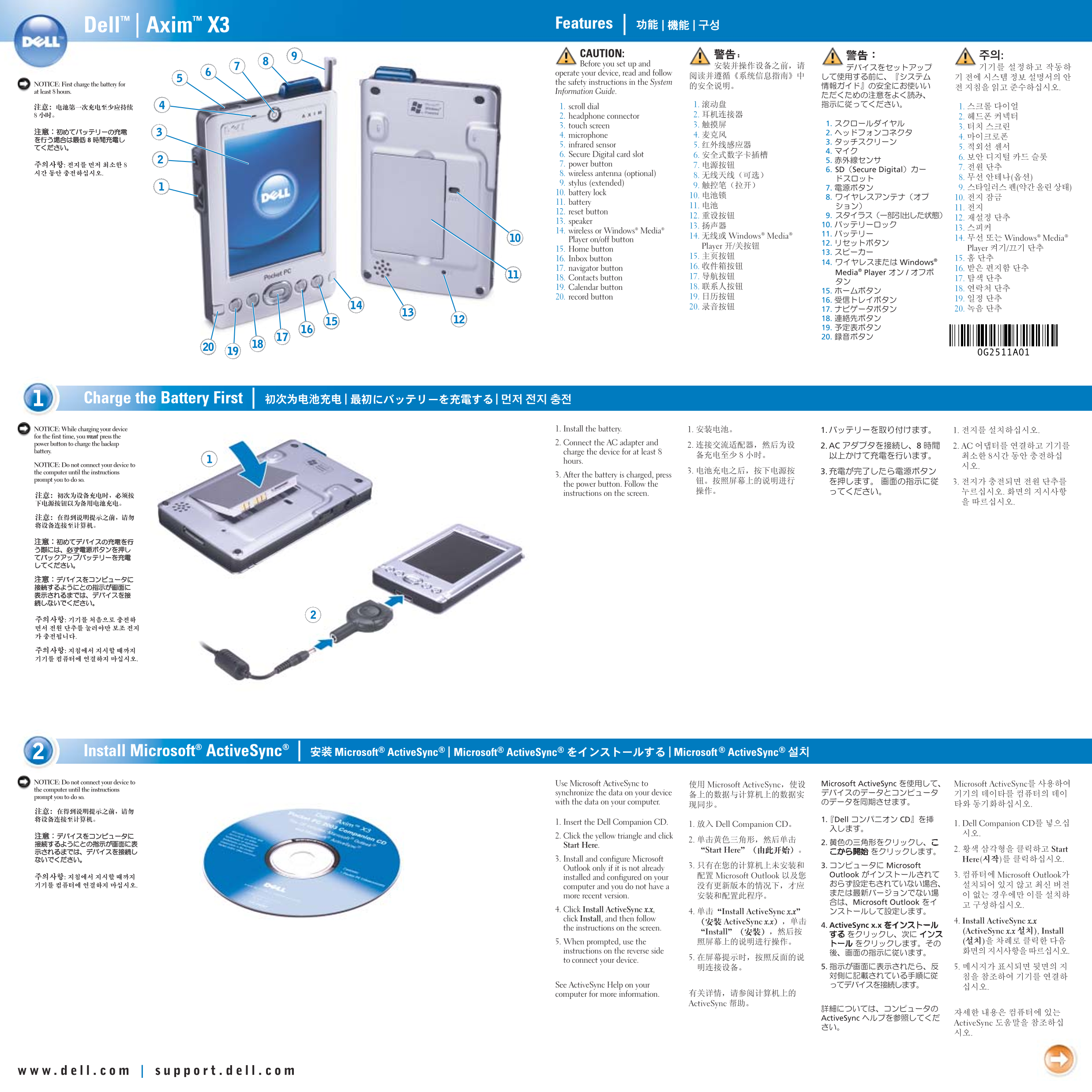
Axim™ X3 Features Dell™ | |
CAUTION: Before you set up and operate your device, read and follow NOTICE: First charge the battery for the safety instructions in the System
at least 8 hours. Information Guide.
1. scroll dial 2. headphone connector 3. touch screen 4. microphone 5. infrared sensor 6. Secure Digital card slot 7. power button 8. wireless antenna (optional) 9. stylus (extended) 10. battery lock 11. battery 12. reset button 13. speaker
14. wireless or Windows® Media®
Player on/off button 15. Home button 16. Inbox button 17. navigator button 18. Contacts button 19. Calendar button 20. record button
Charge the Battery First | |
NOTICE: While charging your device 1. Install the battery. for the first time, you must press the
power button to charge the backup 2. Connect the AC adapter and
battery. charge the device for at least 8
hours.
NOTICE: Do not connect your device to the computer until the instructions
3. After the battery is charged, press
prompt you to do so.
the power button. Follow the instructions on the screen.
Active Sync® | | Install Microsoft®
NOTICE: Do not connect your device to Use Microsoft Active Sync to the computer until the instructions
synchronize the data on your device
prompt you to do so.
with the data on your computer.
1. Insert the Dell Companion CD. 2. Click the yellow triangle and click Start Here. 3. Install and configure Microsoft Outlook only if it is not already installed and configured on your computer and you do not have a more recent version. 4. Click Install Active Sync x.x, click Install, and then follow the instructions on the screen. 5. When prompted, use the instructions on the reverse side to connect your device.
See Active Sync Help on your computer for more information.
Page Summary Contents For Dell Setup Guide Dell™ Axim™ X5 User's Manual
Manual Details
| Brand | Dell |
|---|---|
| Pages | 2 |
| File Size | 2.62 MB |
| Published | June 27, 2026 |
Enter the captcha to get the download link:

Frequently Asked Questions
What is the first step when setting up the device?
First, charge the battery for at least 8 hours before operating the device.
How do I connect the device to a computer for data synchronization?
Connect either the Sync Cable or the Cradle cable USB connector to your computer.
What should I use to synchronize data with my computer?
Use Microsoft ActiveSync, installing it via the Dell Companion CD if necessary.
How can I adjust the screen brightness on the device?
Press and hold the scroll dial and press the top or bottom of the navigator button.