Dell Setup Diagram User's Manual
Summary
Setup guide for the Dell PowerVault DL Backup to Disk Appliance powered by Symantec Backup Exec. Covers hardware setup, network configuration, IP addressing, licensing, and solution components including DL2000 system and MD1000 storage enclosure. Target users are system administrators deploying backup solutions in enterprise data centers.
Page 1 Text Content
X641Ham1.qxd 10/14/2008 9:08 PM Page 1
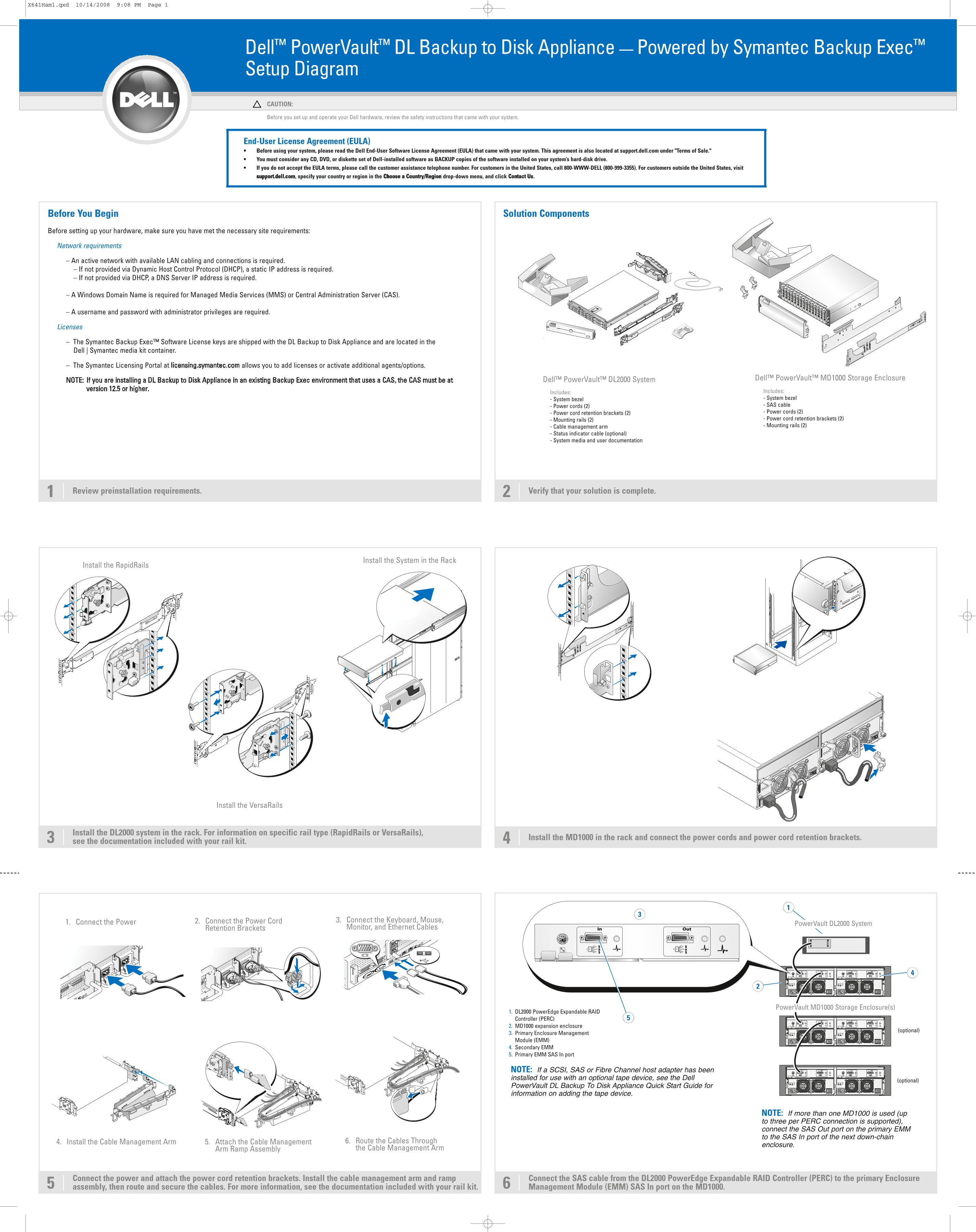
Dell™ Power Vault™ DL Backup to Disk Appliance — Powered by Symantec Backup Exec™ Setup Diagram CAUTION: Before you set up and operate your Dell hardware, review the safety instructions that came with your system. End-User License Agreement (EULA) Before using your system, please read the Dell End-User Software License Agreement (EULA) that came with your system. This agreement is also located at support.dell.com under "Terms of Sale." You must consider any CD, DVD, or diskette set of Dell-installed software as BACKUP copies of the software installed on your system’s hard-disk drive. If you do not accept the EULA terms, please call the customer assistance telephone number. For customers in the United States, call 800-WWW-DELL (800-999-3355). For customers outside the United States, visit support.dell.com, specify your country or region in the Choose a Country/Region drop-down menu, and click Contact Us.
Before You Begin Solution Components Before setting up your hardware, make sure you have met the necessary site requirements: Network requirements – An active network with available LAN cabling and connections is required. – If not provided via Dynamic Host Control Protocol (DHCP), a static IP address is required. – If not provided via DHCP, a DNS Server IP address is required.
– A Windows Domain Name is required for Managed Media Services (MMS) or Central Administration Server (CAS).
– A username and password with administrator privileges are required.
Licenses
The Symantec Backup Exec™ Software License keys are shipped with the DL Backup to Disk Appliance and are located in the Dell | Symantec media kit container.
The Symantec Licensing Portal at licensing.symantec.com allows you to add licenses or activate additional agents/options.
Dell™ Power Vault™ DL2000 System Dell™ Power Vault™ MD1000 Storage Enclosure
NOTE: If you are installing a DL Backup to Disk Appliance in an existing Backup Exec environment that uses a CAS, the CAS must be at version 12.5 or higher.
Includes: Includes: - System bezel - System bezel - Power cords (2) - SAS cable - Power cord retention brackets (2) - Power cords (2) - Mounting rails (2) - Power cord retention brackets (2) - Cable management arm - Mounting rails (2)
- Status indicator cable (optional) - System media and user documentation
Review preinstallation requirements. Verify that your solution is complete.
Install the System in the Rack
Install the Rapid Rails
Install the Versa Rails
Install the DL2000 system in the rack. For information on specific rail type (Rapid Rails or Versa Rails),
Install the MD1000 in the rack and connect the power cords and power cord retention brackets.
see the documentation included with your rail kit.
Connect the Power Cord 3. Connect the Keyboard, Mouse,
1. Connect the Power 2. Power Vault DL2000 System
Retention Brackets Monitor, and Ethernet Cables
Power Vault MD1000 Storage Enclosure(s)
1. DL2000 Power Edge Expandable RAID Controller (PERC) 2. MD1000 expansion enclosure
(optional)
3. Primary Enclosure Management Module (EMM) 4. Secondary EMM 5. Primary EMM SAS In port
NOTE: If a SCSI, SAS or Fibre Channel host adapter has been installed for use with an optional tape device, see the Dell
(optional)
Power Vault DL Backup To Disk Appliance Quick Start Guide for information on adding the tape device.
NOTE: If more than one MD1000 is used (up to three per PERC connection is supported), connect the SAS Out port on the primary EMM to the SAS In port of the next down-chain
4. Install the Cable Management Arm 5. Attach the Cable Management 6. Route the Cables Through
enclosure.
Arm Ramp Assembly the Cable Management Arm
Connect the power and attach the power cord retention brackets. Install the cable management arm and ramp Connect the SAS cable from the DL2000 Power Edge Expandable RAID Controller (PERC) to the primary Enclosure assembly, then route and secure the cables. For more information, see the documentation included with your rail kit. Management Module (EMM) SAS In port on the MD1000.
Page Summary Contents For Dell Setup Diagram User's Manual
Manual Details
| Brand | Dell |
|---|---|
| Pages | 2 |
| File Size | 6.22 MB |
| Published | June 26, 2026 |
Enter the captcha to get the download link:

Frequently Asked Questions
What requirements are needed for a network connection?
You need an active network with LAN cabling; if DHCP isn't used, static IP and a DNS Server IP address are required.
How do I log into the system for the first time?
Use the default Windows password: Stor@ge!. The Configuration Wizard will automatically launch after logging in.
What is needed for Managed Media Services (MMS) or Central Administration Server (CAS)?
A Windows Domain Name and administrator credentials, including a unique username and password, are required.
Which components should be powered on first?
Power on the MD1000 expansion enclosure(s), followed by the DL2000 system and monitor.