Dell Dimension 9100 Setup Diagram
Summary
The Dell Dimension Desktop Setup Guide provides step-by-step instructions for setting up a Dell Dimension desktop computer. The manual covers connecting the monitor (DVI or VGA), keyboard, mouse, network cable, and modem. It includes guidance on power connections, integrated sound setup, and USB device connections. The guide also references the Owner's Manual for additional setup instructions and Dell Support website resources. Intended for home users, small office users, and first-time computer buyers who need clear visual guidance for initial system setup.
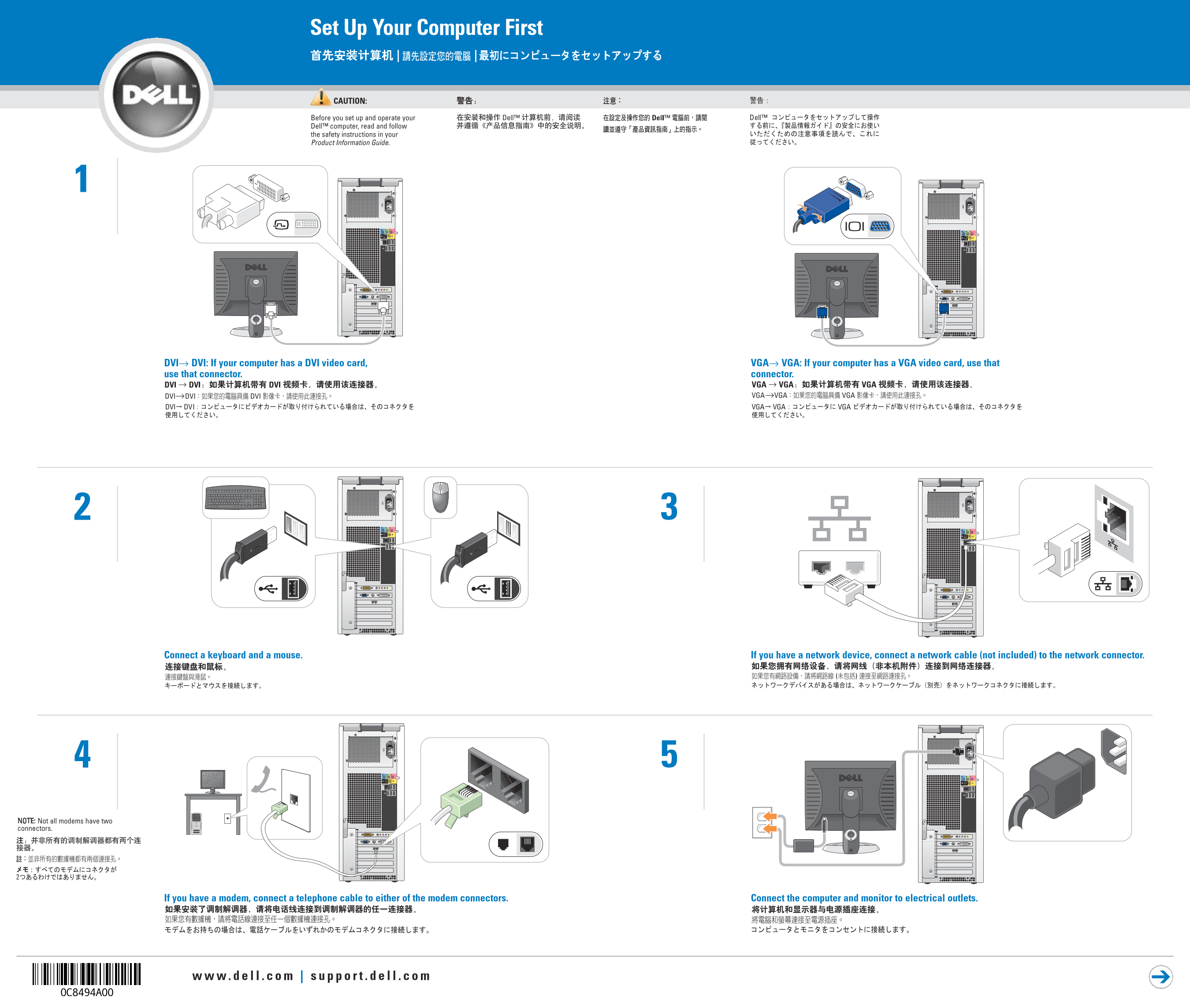
Page 1 Text Content
Set Up Your Computer First | |
CAUTION: Before you set up and operate your Dell™ computer, read and follow the safety instructions in your Product Information Guide.
DVI→ DVI: If your computer has a DVI video card, VGA→ VGA: If your computer has a VGA video card, use that use that connector. connector.
Connect a keyboard and a mouse. If you have a network device, connect a network cable (not included) to the network connector.
NOTE: Not all modems have two connectors.
If you have a modem, connect a telephone cable to either of the modem connectors. Connect the computer and monitor to electrical outlets.
Page Summary Contents For Dell Dimension 9100 Setup Diagram
Manual Details
| Brand | Dell |
|---|---|
| Pages | 2 |
| File Size | 3.11 MB |
| Published | June 27, 2026 |
Enter the captcha to get the download link:

Frequently Asked Questions
What is the first thing I must do before operating the computer?
You must read and follow safety instructions found in your Product Information Guide.
How should I connect a modem to the device?
Connect a telephone cable to either of the two designated modem connectors.
Which video card connector should I use for my monitor?
Use DVI if your computer has a DVI video card, or use VGA if it has a VGA video card.
Where can I find additional setup instructions or technical support?
Check your Owner’s Manual, or visit the Dell Support website at support.dell.com.