Dell Axim X51 Setup Diagram
Summary
This features and setup guide covers Dell Axim X51/X51v handheld PDA devices. It includes device features, accessories, component identification, and initial setup. Diagrams show touch screen, wireless controls, CompactFlash and SD card slots, and navigation buttons. Intended for mobile professionals setting up Dell Axim Pocket PC devices.
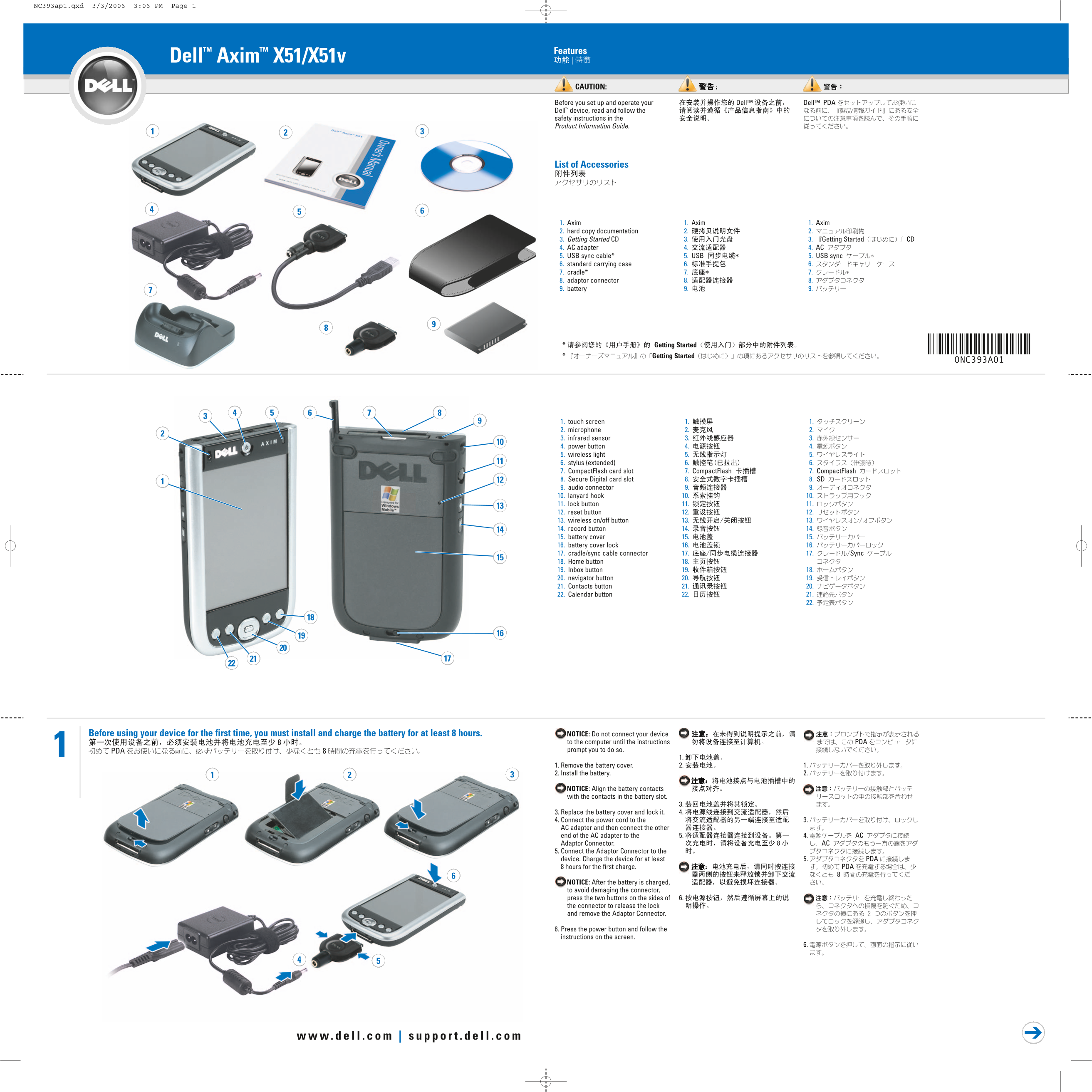
Page 1 Text Content
NC393ap1.qxd 3/3/2006 3:06 PM Page 1
Features
Dell™ Axim™ X51/X51v
CAUTION:
Before you set up and operate your Dell™ Dell™ PDA Dell™ device, read and follow the safety instructions in the Product Information Guide.
List of Accessories
1. Axim 1. Axim 1. Axim
2. hard copy documentation 2. 2. 3. Getting Started CD 3. 3. Getting Started CD 4. AC adapter 4. 4. AC 5. USB sync cable* 5. USB 5. USB sync 6. standard carrying case 6. 6. 7. cradle* 7. 7. 8. adaptor connector 8. 8. 9. battery7 9. 9.
* Refer to the list of accessories in the Getting Started section of your Owner’s Manual.
Getting Started Getting Started
0NC393A01
1. touch screen 1. 1.
2. microphone 2. 2. 3. infrared sensor 3. 3.
4. power button 4. 4.
5. wireless light 5. 5. 6. stylus (extended) 6. 6.
7. Compact Flash card slot 7. Compact Flash 7. Compact Flash
8. Secure Digital card slot 8. 8. SD 9. audio connector 9. 9.
10. lanyard hook 10. 10.
11. lock button 11. 11. 12. reset button 12. 12.
13. wireless on/off button 13. 13.
14. record button 14. 14. 15. battery cover 15. 15.
16. battery cover lock 16. 16. 17. cradle/sync cable connector 17. 17. Sync 18. Home button 18. 19. Inbox button 19. 18. 20. navigator button 20. 19.
21. Contacts button 21. 20.
22. Calendar button 22. 21.
Before using your device for the first time, you must install and charge the battery for at least 8 hours. NOTICE: Do not connect your device
to the computer until the instructions PDA
PDA prompt you to do so.
1. 1. Remove the battery cover. 2. 1.
2. Install the battery. 2.
NOTICE: Align the battery contacts with the contacts in the battery slot.
3. 3. Replace the battery cover and lock it. 4.
4. Connect the power cord to the 3.
AC adapter and then connect the other
end of the AC adapter to the 5. 4. AC
Adaptor Connector. AC
5. Connect the Adaptor Connector to the
device. Charge the device for at least 5. PDA
hours for the first charge. PDA
NOTICE: After the battery is charged, to avoid damaging the connector,
press the two buttons on the sides of 6.
the connector to release the lock and remove the Adaptor Connector.
6. Press the power button and follow the instructions on the screen.
Page Summary Contents For Dell Axim X51 Setup Diagram
Manual Details
| Brand | Dell |
|---|---|
| Pages | 2 |
| File Size | 665.35 KB |
| Published | June 29, 2026 |
Enter the captcha to get the download link:

Frequently Asked Questions
How long must I charge the device for the first time?
For its initial use, the battery must be charged for at least 8 hours.
What software do I need to sync my PDA data with a computer?
You must install the Microsoft ActiveSync Program to synchronize your data with your PC.
How should I safely disconnect the sync cable after charging?
Before removing the cradle, press the two buttons on the sides of the connector to release the lock.
What types of memory cards are supported by this device?
The device features both a CompactFlash card slot and a Secure Digital card slot.
In what order should I connect power and synchronization cables?
First, connect the AC adapter; then, connect the Adaptor Connector, followed by the USB sync cable.