Dell Precision 5510 Quick User Guide
Summary
Comprehensive guide designed for new users setting up their Dell Precision laptop. This manual covers everything from initial operating system installation and secure password setup to expert hardware connectivity, detailing all ports including HDMI, Thunderbolt™ 3, and PowerShare USB. Use this resource to navigate network configurations, understand component labels (like camera status lights and service tags), run diagnostics with SupportAssist, and ensure your computer is fully operational right out of the box.
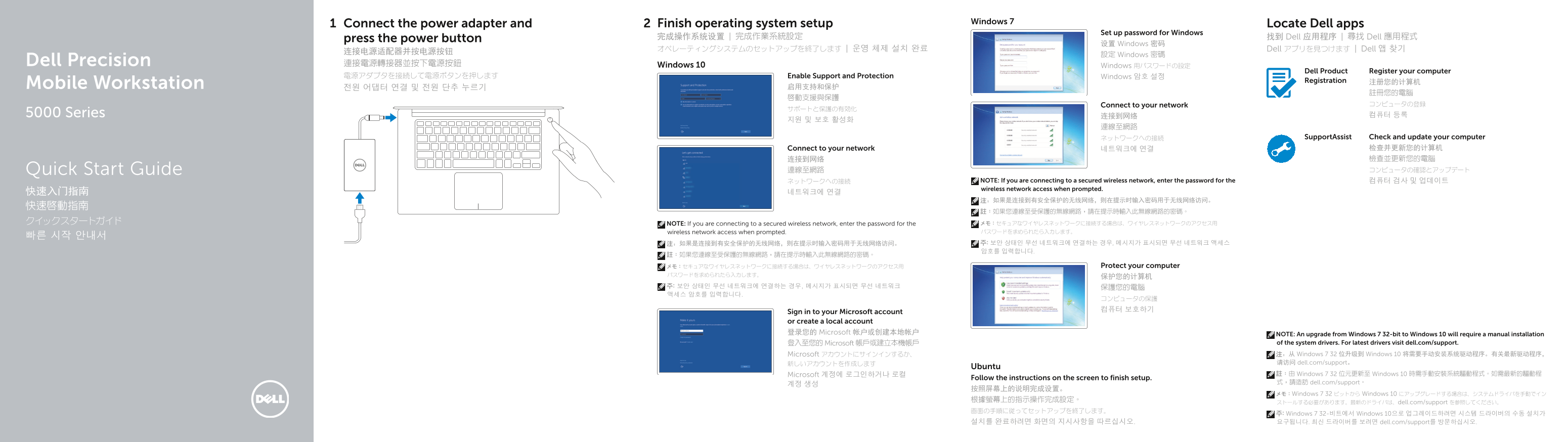
Page 1 Text Content
Finish operating system setup Windows 7
Connect the power adapter and Locate Dell apps
Set up password for Windows
press the power button 完成操作系统设置 | 完成作業系統設定 找到 Dell 应用程序 | 尋找 Dell 應用程式
设置 Windows 密码
オペレーティングシステムのセットアップを終了します | 운영 체제 설치 완료 Dell アプリを見つけます | Dell 앱 찾기
設定 Windows 密碼
Dell Precision 連接電源轉接器並按下電源按鈕 Windows 10 Windows 用パスワードの設定
Dell Product Register your computer
電源アダプタを接続して電源ボタンを押します Enable Support and Protection Windows 암호 설정
Registration 注册您的计算机
Mobile Workstation 전원 어댑터 연결 및 전원 단추 누르기 启用支持和保护
Connect to your network コンピュータの登録
5000 Series 连接到网络 컴퓨터 등록
ネットワークへの接続 Support Assist Check and update your computer
Connect to your network 네트워크에 연결 检查并更新您的计算机 连接到网络 檢查並更新您的電腦 Quick Start Guide 連線至網路 コンピュータの確認とアップデート
ネットワークへの接続 NOTE: If you are connecting to a secured wireless network, enter the password for the 컴퓨터 검사 및 업데이트 wireless network access when prompted.
クイックスタートガイド NOTE: If you are connecting to a secured wireless network, enter the password for the メモ:セキュアなワイヤレスネットワークに接続する場合は、ワイヤレスネットワークのアクセス用
wireless network access when prompted. パスワードを求められたら入力します。
メモ:セキュアなワイヤレスネットワークに接続する場合は、ワイヤレスネットワークのアクセス用 Protect your computer
Sign in to your Microsoft account or create a local account 登录您的 Microsoft 帐户或创建本地帐户 NOTE: An upgrade from Windows 7 32-bit to Windows 10 will require a manual installation
登入至您的 Microsoft 帳戶或建立本機帳戶 of the system drivers. For latest drivers visit dell.com/support. Microsoft アカウントにサインインするか、 注:从 Windows 7 32 位升级到 Windows 10 将需要手动安装系统驱动程序。有关最新驱动程序, 新しいアカウントを作成します 请访问 dell.com/support。
Ubuntu
Microsoft 계정에 로그인하거나 로컬 註:由 Windows 7 32 位元更新至 Windows 10 時需手動安裝系統驅動程式。如需最新的驅動程
Follow the instructions on the screen to finish setup.
계정 생성 式,請造訪 dell.com/support。
メモ:Windows 7 32 ビットから Windows 10 にアップグレードする場合は、システムドライバを手動でイン
ストールする必要があります。最新のドライバは、dell.com/support を参照してください。
주: Windows 7 32-비트에서 Windows 10으로 업그레이드하려면 시스템 드라이버의 수동 설치가
설치를 완료하려면 화면의 지시사항을 따르십시오. 요구됩니다. 최신 드라이버를 보려면 dell.com/support를 방문하십시오.
Page Summary Contents For Dell Precision 5510 Quick User Guide
Manual Details
| Brand | Dell |
|---|---|
| Pages | 2 |
| File Size | 788.28 KB |
| Published | June 23, 2026 |
Enter the captcha to get the download link:
