Dell Precision Tower 3420 Quick User Guide
Summary
Dell Precision Tower 3420 Quick Start Guide providing multilingual setup instructions (English, Chinese, Japanese, Korean) for this entry-level workstation. Covers physical connection steps: connecting keyboard and mouse, optional network cable connection, display connection with guidance to use the discrete graphics card port if equipped, and power cable connection with power button activation. Documents Windows 8.1 operating system setup including Microsoft account sign-in, security and update
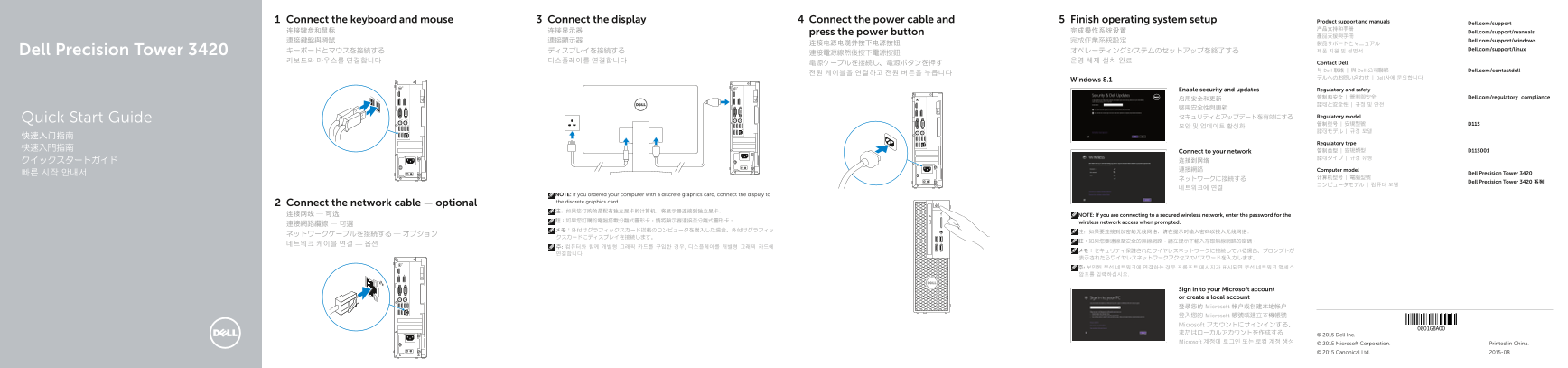
Page 1 Text Content
Connect the keyboard and mouse Connect the display Connect the power cable and Finish operating system setup Product support and manuals
Dell.com/support
连接键盘和鼠标 连接显示器 press the power button 完成操作系统设置 Dell.com/support/manuals
連接鍵盤與滑鼠 連接顯示器 完成作業系統設定 Dell.com/support/windows
Dell.com/support/linux
Dell Precision Tower 3420 キーボードとマウスを接続する ディスプレイを接続する オペレーティングシステムのセットアップを終了する 제품 지원 및 설명서
키보드와 마우스를 연결합니다 디스플레이를 연결합니다 운영 체제 설치 완료 Contact Dell
与 Dell 联络 | 與 Dell 公司聯絡 Dell.com/contactdell
デルへのお問い合わせ | Dell사에 문의합니다
Windows 8.1
Enable security and updates Regulatory and safety 管制和安全 | 管制與安全 Dell.com/regulatory_compliance
セキュリティとアップデートを有効にする Regulatory model
Quick Start Guide
Regulatory type
Connect to your network
クイックスタートガイド 连接到网络 連接網路 Computer model
빠른 시작 안내서 Dell Precision Tower 3420
Dell Precision Tower 3420 系列
NOTE: If you ordered your computer with a discrete graphics card, connect the display to the discrete graphics card.
Connect the network cable — optional
连接网线 — 可选 NOTE: If you are connecting to a secured wireless network, enter the password for the
註:如果您訂購的電腦搭載分離式圖形卡,請將顯示器連接至分離式圖形卡。 wireless network access when prompted.
Sign in to your Microsoft account or create a local account 登录您的 Microsoft 帐户或创建本地帐户 登入您的 Microsoft 帳號或建立本機帳號 Microsoft アカウントにサインインする、 またはローカルアカウントを作成する
© 2015 Dell Inc.
Microsoft 계정에 로그인 또는 로컬 계정 생성 © 2015 Microsoft Corporation. Printed in China.
© 2015 Canonical Ltd. 2015-08
Page Summary Contents For Dell Precision Tower 3420 Quick User Guide
Manual Details
| Brand | Dell |
|---|---|
| Pages | 2 |
| File Size | 1.30 MB |
| Published | May 19, 2026 |
Enter the captcha to get the download link:

Frequently Asked Questions
如果连接到一个加密的无线网络,需要做什么?
在提示时输入无线网络的密码以进行接入。
要在设置过程中查找预装的电脑软件应用,去哪里看?
您可以在 Windows 8.1 系统中找到 Dell 应用程序。
笔记本或台式机是否提供安全挂锁端口和管理功能?
是的,该型号设备包含了一个专门的安全缆线插孔以及一个可用于物理连接的挂锁扣环。
如何进行操作系统升级所需的最新驱动程序安装?
如果需要升级系统驱动程序,请访问 dell.com/support 来查找最新的驱动程序。