Dell Precision Tower 3420 Won 10 Quick User Guides
Summary
The comprehensive guide for the Dell Precision Tower 3420 provides step-by-step instructions for unboxing and system setup. This manual covers everything from initial connectivity—including linking displays, networking cables, and peripherals—to completing the Windows 10 operating system install. Users will find detailed insights into the hardware layout, identifying critical ports such as USB 3.0, HDMI, DisplayPort, and specialized serial connectors, ensuring smooth operation of your high-performance desktop workstation.
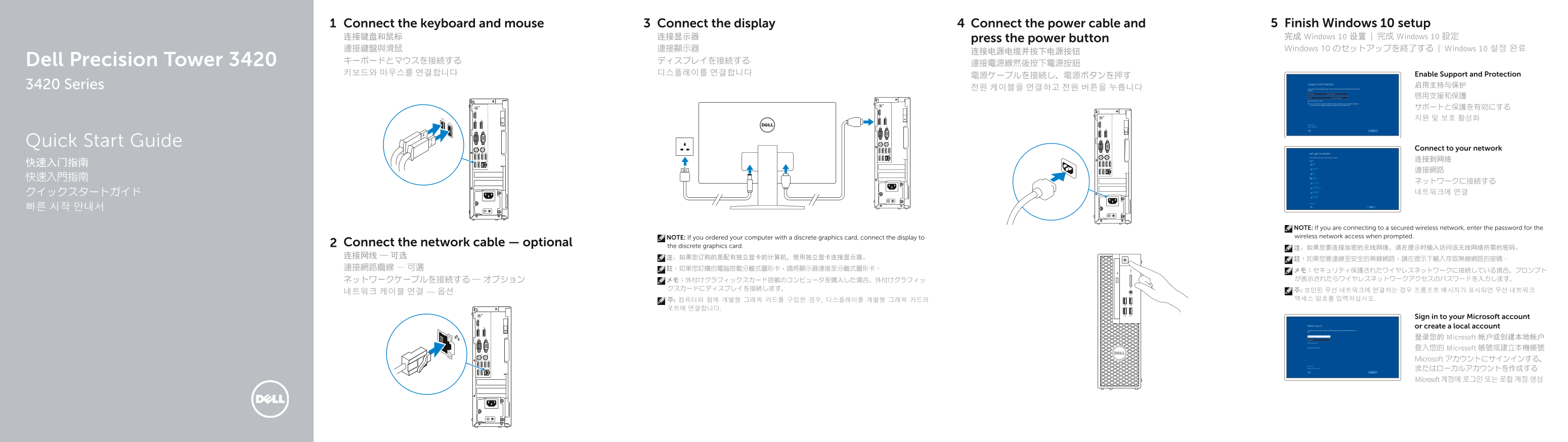
Page 1 Text Content
Connect the keyboard and mouse Connect the display Connect the power cable and Finish Windows 10 setup 连接键盘和鼠标 连接显示器 press the power button 完成 Windows 10 设置 | 完成 Windows 10 設定 連接鍵盤與滑鼠 連接顯示器 Windows 10 のセットアップを終了する | Windows 10 설정 완료
Dell Precision Tower 3420 キーボードとマウスを接続する ディスプレイを接続する
키보드와 마우스를 연결합니다 디스플레이를 연결합니다 Enable Support and Protection
3420 Series 启用支持与保护
Quick Start Guide
Connect to your network 连接到网络
NOTE: If you are connecting to a secured wireless network, enter the password for the NOTE: If you ordered your computer with a discrete graphics card, connect the display to wireless network access when prompted.
Connect the network cable — optional the discrete graphics card.
Sign in to your Microsoft account or create a local account 登录您的 Microsoft 帐户或创建本地帐户 登入您的 Microsoft 帳號或建立本機帳號 Microsoft アカウントにサインインする、 またはローカルアカウントを作成する Microsoft 계정에 로그인 또는 로컬 계정 생성
Page Summary Contents For Dell Precision Tower 3420 Won 10 Quick User Guides
Manual Details
| Brand | Dell |
|---|---|
| Pages | 2 |
| File Size | 620.44 KB |
| Published | June 23, 2026 |
Enter the captcha to get the download link:

Frequently Asked Questions
How should I connect the display if I have an independent graphics card?
Connect the display to the discrete graphics card (the dedicated port).
What is the purpose of PowerShare on the USB 2.0 connector?
It indicates a feature that shares power via the USB 2.0 connector.
Do I need an Ethernet cable for networking?
Connecting a network cable is optional, but necessary if you are connecting to a secured wireless network and prompted for the password.
What models or software help with system maintenance?
You can use SupportAssist to check and update your computer, and find Dell apps at Dell.com/support.