Dell Precision 15 5520 Quick User Guide
Summary
This Quick Start Guide for the Dell Precision 5520 mobile workstation provides setup instructions in English, Simplified Chinese, Traditional Chinese, Japanese, and Korean. It covers power adapter connection, operating system setup for both Windows 10 and Ubuntu, network connectivity, Microsoft account sign-in, and SupportAssist system check. Hardware features include Thunderbolt 3 port, USB 3.0 with PowerShare, memory card reader, and regulatory compliance details for professional mobile workstation users.
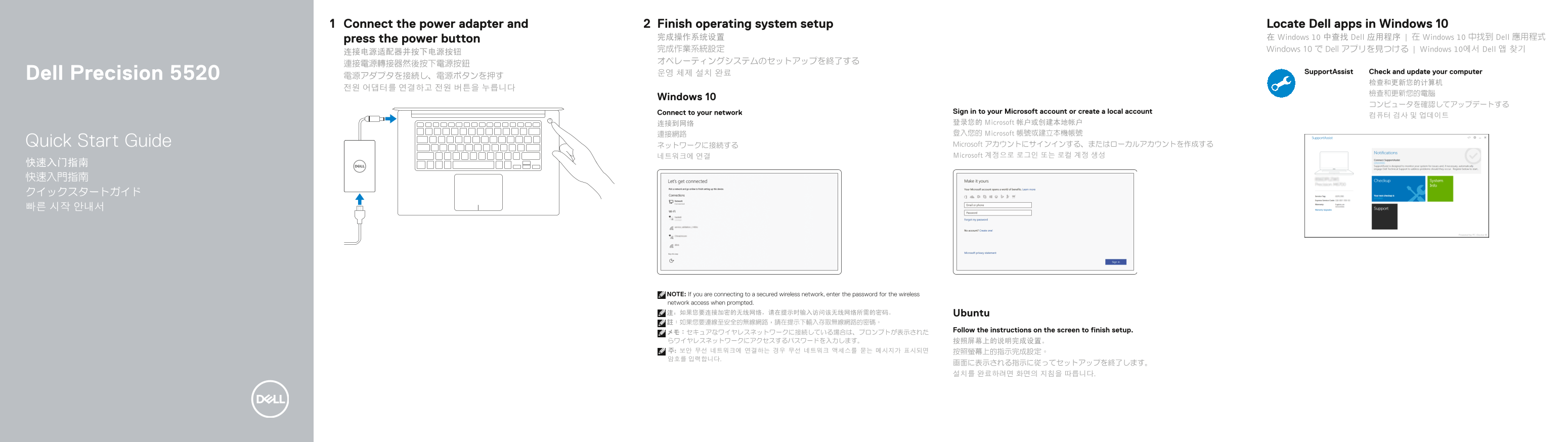
Page 1 Text Content
Connect the power adapter and Finish operating system setup Locate Dell apps in Windows 10
press the power button 完成操作系统设置 在 Windows 10 中查找 Dell 应用程序 | 在 Windows 10 中找到 Dell 應用程式
完成作業系統設定 Windows 10 で Dell アプリを見つける | Windows 10에서 Dell 앱 찾기
운영 체제 설치 완료 Support Assist Check and update your computer
Dell Precision 5520 電源アダプタを接続し、電源ボタンを押す
Windows 10
Connect to your network Sign in to your Microsoft account or create a local account
连接到网络 登录您的 Microsoft 帐户或创建本地帐户 連接網路 登入您的 Microsoft 帳號或建立本機帳號 Quick Start Guide ネットワークに接続する Microsoft アカウントにサインインする、またはローカルアカウントを作成する 네트워크에 연결 Microsoft 계정으로 로그인 또는 로컬 계정 생성
NOTE: If you are connecting to a secured wireless network, enter the password for the wireless network access when prompted. 注:如果您要连接加密的无线网络,请在提示时输入访问该无线网络所需的密码。 Ubuntu 註:如果您要連線至安全的無線網路,請在提示下輸入存取無線網路的密碼。
メモ:セキュアなワイヤレスネットワークに接続している場合は、プロンプトが表示された Follow the instructions on the screen to finish setup.
Page Summary Contents For Dell Precision 15 5520 Quick User Guide
Manual Details
| Brand | Dell |
|---|---|
| Pages | 2 |
| File Size | 632.42 KB |
| Published | July 01, 2026 |
Enter the captcha to get the download link:

Frequently Asked Questions
What should I do if I am connecting to a secured wireless network?
When prompted during setup, you must enter the password required to access that specific wireless network.
Which USB ports can charge other devices?
The computer is equipped with USB 3.0 ports that feature PowerShare capability.
How do I finish setting up the operating system?
You need to complete the operating system setup and then link your account or create a local one, followed by connecting to your network.
Where can I find product support manuals and assistance?
Product documentation and manuals are available at Dell.com/support and Dell.com/manuals.