Dell Precision 7720 Quick User Guide
Summary
Dell Precision 7720 Quick Start Guide. This multilingual guide provides initial setup instructions for the Precision 7720 mobile workstation, including power connection, Windows setup, network connection, and feature overview. Target users: professional users and mobile workstation customers setting up their new Dell Precision laptop.
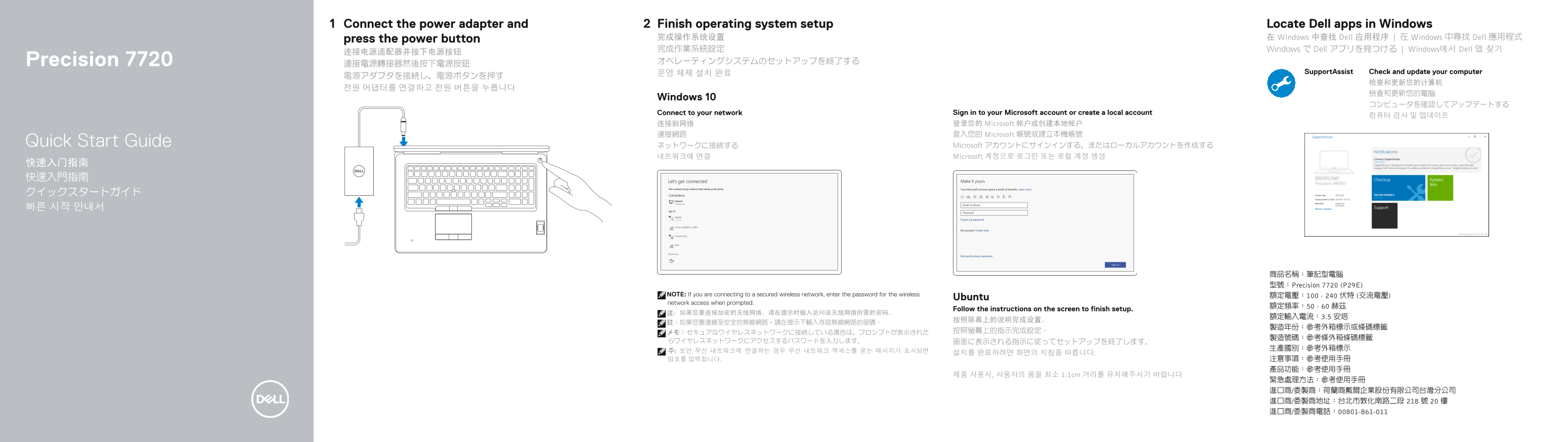
Page 1 Text Content
Connect the power adapter and Finish operating system setup Locate Dell apps in Windows
press the power button 完成操作系统设置 在 Windows 中查找 Dell 应用程序 | 在 Windows 中尋找 Dell 應用程式
完成作業系統設定 Windows で Dell アプリを見つける | Windows에서 Dell 앱 찾기
Precision 7720 オペレーティングシステムのセットアップを終了する
운영 체제 설치 완료 Support Assist Check and update your computer
Windows 10
Connect to your network Sign in to your Microsoft account or create a local account
连接到网络 登录您的 Microsoft 帐户或创建本地帐户 連接網路 登入您的 Microsoft 帳號或建立本機帳號
Quick Start Guide ネットワークに接続する Microsoft アカウントにサインインする、またはローカルアカウントを作成する
네트워크에 연결 Microsoft 계정으로 로그인 또는 로컬 계정 생성
商品名稱:筆記型電腦 型號:Precision 7720 (P29E)
NOTE: If you are connecting to a secured wireless network, enter the password for the wireless 額定電壓:100 - 240 伏特 (交流電壓)
Ubuntu
network access when prompted.
Follow the instructions on the screen to finish setup.
제품 사용시, 사용자의 몸을 최소 1.1cm 거리를 유지해주시기 바랍니다
Page Summary Contents For Dell Precision 7720 Quick User Guide
Manual Details
| Brand | Dell |
|---|---|
| Pages | 2 |
| File Size | 703.83 KB |
| Published | June 24, 2026 |
Enter the captcha to get the download link:

Frequently Asked Questions
How do I begin the initial setup process for this laptop?
Connect the power adapter, press the power button, and follow the on-screen prompts to complete all required settings.
What ports are available for connecting external displays?
The device supports multiple display outputs via a Mini DisplayPort, an HDMI port, and a Thunderbolt™ 3 over Type-C port.
Does this laptop include optional biometric security features?
Optional features listed include a fingerprint reader and a non-contact smart card reader.
What distance should I maintain when using the product?
Users must ensure they maintain a minimum physical distance of 1.1cm from the unit while operating it.