Dell Precision 3520 Quick User Guide
Summary
This Quick Start Guide for the Dell Precision 3520 mobile workstation (3000 Series) provides multilingual setup instructions covering power adapter connection, Windows 10 and Ubuntu operating system setup, network connectivity, and SupportAssist for system health monitoring. It includes a detailed hardware features diagram identifying 22 components including network port, camera, HDMI port, USB 3.0 ports, smart card reader, pointing stick, and touchpad. Taiwan RoHS compliance documentation is included. Designed for professional users and IT administrators.
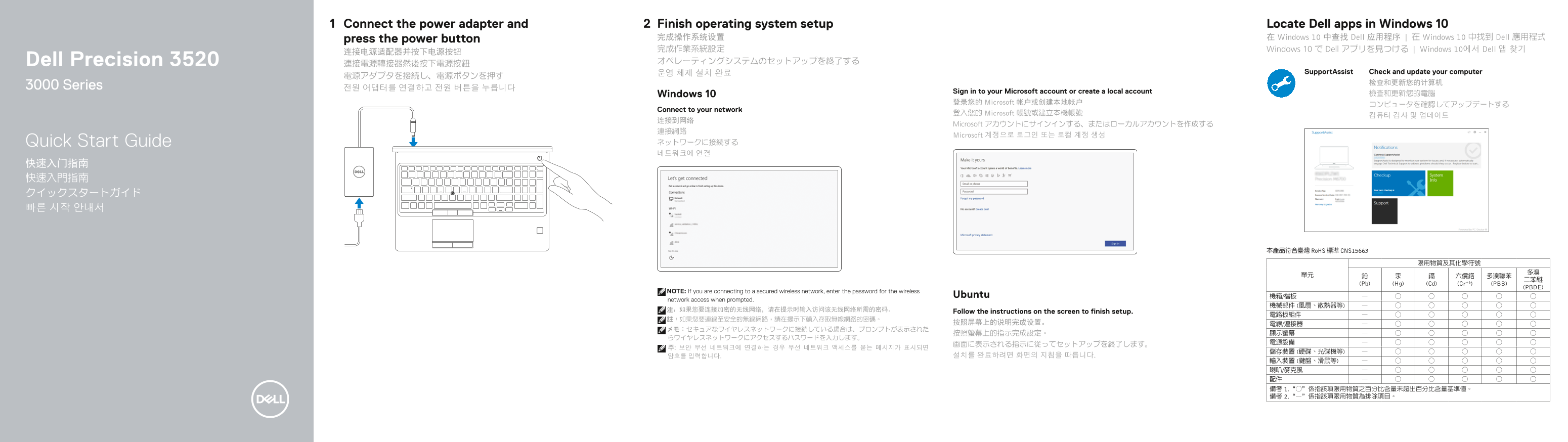
Page 1 Text Content
Connect the power adapter and Finish operating system setup Locate Dell apps in Windows 10 press the power button 完成操作系统设置 在 Windows 10 中查找 Dell 应用程序 | 在 Windows 10 中找到 Dell 應用程式 完成作業系統設定 Windows 10 で Dell アプリを見つける | Windows 10에서 Dell 앱 찾기
Dell Precision 3520 オペレーティングシステムのセットアップを終了する
운영 체제 설치 완료 Support Assist Check and update your computer
3000 Series 전원 어댑터를 연결하고 전원 버튼을 누릅니다
Sign in to your Microsoft account or create a local account
Windows 10 檢查和更新您的電腦
登录您的 Microsoft 帐户或创建本地帐户
Connect to your network
登入您的 Microsoft 帳號或建立本機帳號
Microsoft アカウントにサインインする、またはローカルアカウントを作成する
Microsoft 계정으로 로그인 또는 로컬 계정 생성
Quick Start Guide ネットワークに接続する 네트워크에 연결
本產品符合臺灣 Ro HS 標準 CNS15663
(Pb) (Hg) (Cd) (Cr+6) (PBB)
(PBDE)
NOTE: If you are connecting to a secured wireless network, enter the password for the wireless
Ubuntu 機箱/檔板
network access when prompted.
Follow the instructions on the screen to finish setup.
Page Summary Contents For Dell Precision 3520 Quick User Guide
Manual Details
| Brand | Dell |
|---|---|
| Pages | 2 |
| File Size | 714.74 KB |
| Published | July 01, 2026 |
Enter the captcha to get the download link:

Frequently Asked Questions
How do I complete the initial operating system setup?
Connect the power adapter, then press the power button and follow the on-screen instructions to finish setup.
What credentials are needed for a secured wireless network connection?
If connecting via a secured wireless network, you must enter the specific network password when prompted.
Does the laptop offer specialized charging or connectivity features?
Yes, one of the USB 3.0 ports includes PowerShare functionality, and it supports Type-C DisplayPort over Type-C connector.
Is the device compliant with restricted substance guidelines?
Yes, the product complies with Taiwan's RoHS standard (CNS15663).