Dell Optiplex 7020 Quick User Guide
Summary
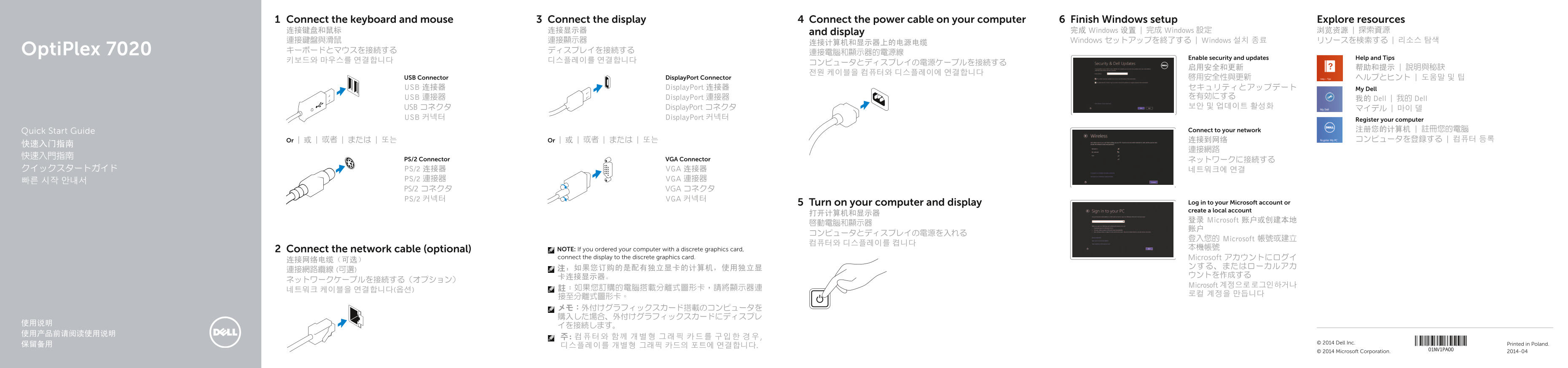
Dell OptiPlex 7020 Quick Start Guide (2014) with multilingual setup covering keyboard/mouse connection (PS/2 or USB), optional network cable, display connection via DisplayPort or VGA (noting discrete graphics card port usage), power cable activation, Windows setup with security and updates, and My Dell app registration.
Page 1 Text Content
Connect the keyboard and mouse Connect the display Connect the power cable on your computer Finish Windows setup Explore resources 连接键盘和鼠标 连接显示器 and display 完成 Windows 设置 | 完成 Windows 設定 浏览资源 | 探索資源 連接鍵盤與滑鼠 連接顯示器 Windows セットアップを終了する | Windows 설치 종료 リソースを検索する | 리소스 탐색
Opti Plex 7020 キーボードとマウスを接続する ディスプレイを接続する
Enable security and updates Help and Tips
USB Connector Display Port Connector 啟用安全性與更新 ヘルプとヒント | 도움말 및 팁 USB 连接器 Display Port 连接器 セキュリティとアップデート My Dell
USB 連接器 Display Port 連接器 を有効にする
我的 Dell | 我的 Dell
USB コネクタ Display Port コネクタ 보안 및 업데이트 활성화
USB 커넥터 Display Port 커넥터
Register your computer Quick Start Guide Connect to your network 注册您的计算机 | 註冊您的電腦 Or | 或 | 或者 | または | 또는 Or | 或 | 或者 | または | 또는 连接到网络 コンピュータを登録する | 컴퓨터 등록
PS/2 Connector VGA Connector ネットワークに接続する
クイックスタートガイド PS/2 连接器 VGA 连接器 네트워크에 연결
PS/2 連接器 VGA 連接器
PS/2 コネクタ VGA コネクタ PS/2 커넥터 VGA 커넥터
Turn on your computer and display Log in to your Microsoft account or create a local account
登录 Microsoft 账户或创建本地
登入您的 Microsoft 帳號或建立
Connect the network cable (optional) NOTE: If you ordered your computer with a discrete graphics card, 本機帳號
connect the display to the discrete graphics card. Microsoft アカウントにログイ
Microsoft 계정으로 로그인하거나
© 2014 Dell Inc. Printed in Poland.
© 2014 Microsoft Corporation. 2014-04
Page Summary Contents For Dell Optiplex 7020 Quick User Guide
Manual Details
| Brand | Dell |
|---|---|
| Pages | 2 |
| File Size | 428.96 KB |
| Published | July 03, 2026 |
Enter the captcha to get the download link:

Frequently Asked Questions
How should I connect the display if I have a discrete graphics card?
Connect the display to the dedicated or discrete graphic card port, not the motherboard ports.
What connectors are available on the computer for connecting peripherals?
The unit features various ports including USB 2.0, USB 3.0, DisplayPort, VGA, audio (headphone/microphone), and serial connector.
Is a network cable required for setup?
Connecting the network cable is optional; you can connect to your network later.
What can I use the security features on this model?
You can utilize slots for a safety cable and an external padlock ring for added physical protection.