Dell OptiPlex 3020M 9020M Quick User Guide
Summary
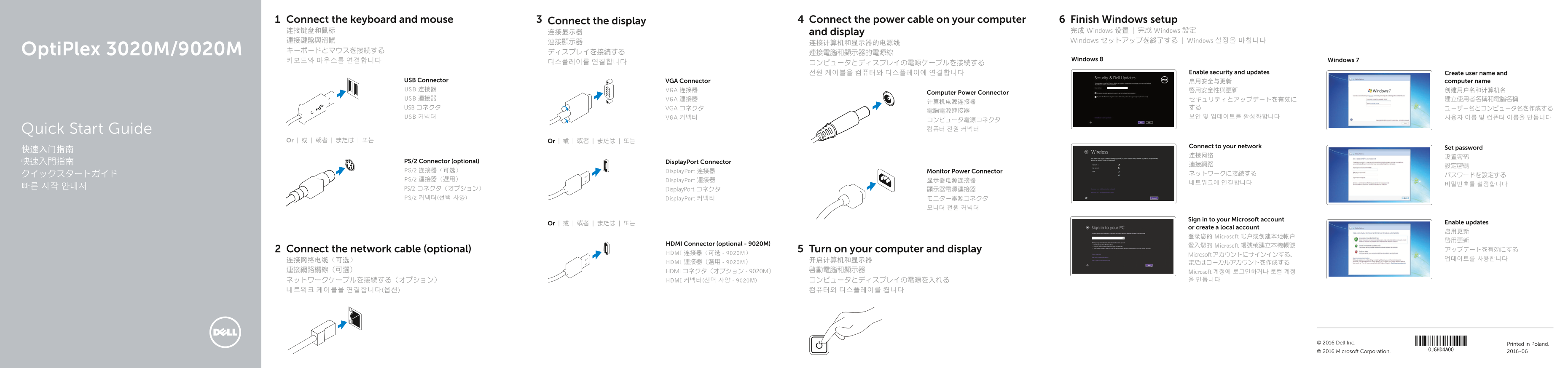
This Quick Start Guide for the Dell OptiPlex 3020M and 9020M micro desktop computers provides multilingual setup instructions covering keyboard and mouse connection, optional network cable installation, display connectivity via VGA, DisplayPort, or optional HDMI (9020M only), power cable connection, and Windows 7 and Windows 8 operating system configuration. It documents hardware features via labeled diagrams, user account creation, password setup, security and updates configuration, and Microso
Page 1 Text Content
Connect the keyboard and mouse Connect the display Connect the power cable on your computer Finish Windows setup 连接键盘和鼠标 连接显示器 and display 完成 Windows 设置 | 完成 Windows 設定 連接鍵盤與滑鼠 連接顯示器 Windows セットアップを終了する | Windows 설정을 마칩니다
Opti Plex 3020M/9020M キーボードとマウスを接続する ディスプレイを接続する
키보드와 마우스를 연결합니다 Windows 8 Windows 7
전원 케이블을 컴퓨터와 디스플레이에 연결합니다 Enable security and updates Create user name and
USB Connector VGA Connector 启用安全与更新 computer name USB 连接器 VGA 连接器 啟用安全性與更新 创建用户名和计算机名
Computer Power Connector
USB 連接器 VGA 連接器 セキュリティとアップデートを有効に 建立使用者名稱和電腦名稱
USB コネクタ VGA コネクタ する ユーザー名とコンピュータ名を作成する
USB 커넥터 VGA 커넥터 보안 및 업데이트를 활성화합니다 사용자 이름 및 컴퓨터 이름을 만듭니다
コンピュータ電源コネクタ Quick Start Guide 컴퓨터 전원 커넥터
Or | 或 | 或者 | または | 또는 Or | 或 | 或者 | または | 또는
Connect to your network Set password
快速入門指南 PS/2 Connector (optional) Display Port Connector
PS/2 连接器(可选) Display Port 连接器 Monitor Power Connector
PS/2 連接器(選用) Display Port 連接器 显示器电源连接器
빠른 시작 안내서 PS/2 コネクタ(オプション)
Display Port コネクタ 顯示器電源連接器
PS/2 커넥터(선택 사양) Display Port 커넥터 モニター電源コネクタ
Sign in to your Microsoft account
Or | 或 | 或者 | または | 또는 Enable updates
or create a local account
登录您的 Microsoft 帐户或创建本地帐户
HDMI Connector (optional - 9020M)
登入您的 Microsoft 帳號或建立本機帳號
Connect the network cable (optional) Turn on your computer and display アップデートを有効にする
HDMI 连接器(可选 - 9020M)
Microsoft アカウントにサインインする、
HDMI 連接器(選用 - 9020M) またはローカルアカウントを作成する
連接網路纜線(可選) HDMI コネクタ(オプション - 9020M) 啟動電腦和顯示器 Microsoft 계정에 로그인하거나 로컬 계정
ネットワークケーブルを接続する(オプション) HDMI 커넥터(선택 사양 - 9020M) コンピュータとディスプレイの電源を入れる 을 만듭니다
© 2016 Dell Inc. Printed in Poland. © 2016 Microsoft Corporation. 2016-06
Page Summary Contents For Dell OptiPlex 3020M 9020M Quick User Guide
Manual Details
| Brand | Dell |
|---|---|
| Pages | 2 |
| File Size | 867.70 KB |
| Published | July 02, 2026 |
Enter the captcha to get the download link:

Frequently Asked Questions
哪些接口是可选的?
PS/2 Connector, HDMI Connector(9020M),Wi-Fi antennae connector等都是可选组件。
如何连接和设置网络?
可以使用网络网线连接到设备,并在系统内完成网络连接和密码设置。
哪些端口可以用来连接外部设备?
可选的接口包括USB 2.0/3.0、HDMI/DisplayPort、VGA、序列(Serial)和PS/2端口。