Dell OptiPlex 3240 AIO Quick User Guide
Summary
This Quick Start Guide for the Dell OptiPlex 3240 All-in-One desktop (Model W14B, Regulatory Type W14B001) provides setup instructions covering power cable and device connection, optional torx screw removal from the cable cover, optional cable cover installation, stand installation, power-on, and operating system setup for Windows 8.1 and Ubuntu. It includes security and updates configuration, network connectivity guidance, and Taiwan RoHS compliance documentation. Designed for business and institutional users deploying space-saving all-in-one computers.
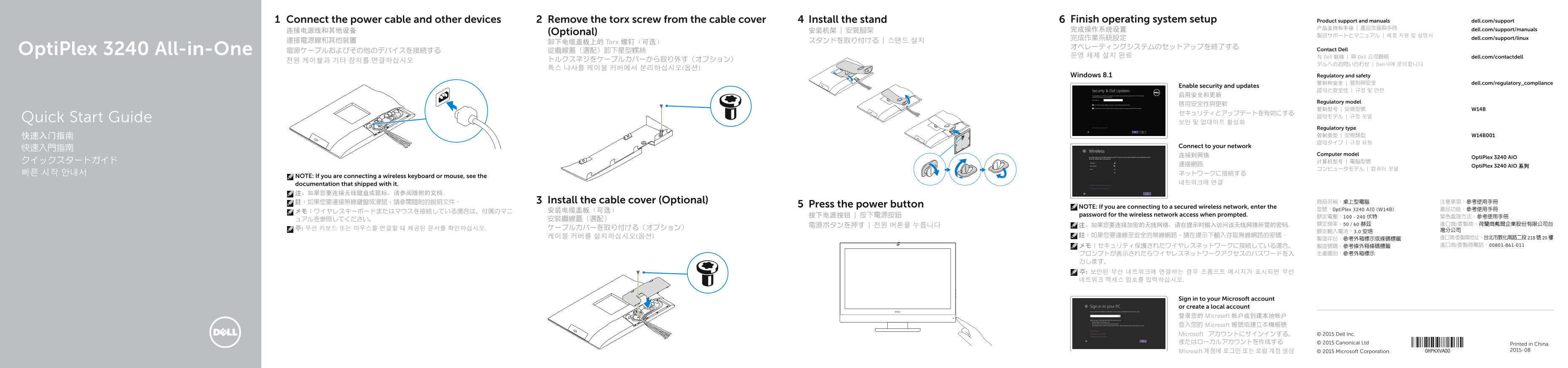
Page 1 Text Content
Connect the power cable and other devices Remove the torx screw from the cable cover Install the stand Finish operating system setup Product support and manuals dell.com/support
完成操作系统设置 产品支持和手册 | 產品支援與手冊 dell.com/support/manuals
连接电源线和其他设备 (Optional) 安装机架 | 安裝腳架
完成作業系統設定 dell.com/support/linux
連接電源線和其他裝置 卸下电缆盖板上的 Torx 螺钉(可选) スタンドを取り付ける | 스탠드 설치
Opti Plex 3240 All-in-One 電源ケーブルおよびその他のデバイスを接続する 從纜線蓋(選配)卸下星型螺絲 Contact Dell
운영 체제 설치 완료 与 Dell 联络 | 與 Dell 公司聯絡 dell.com/contactdell
デルへのお問い合わせ | Dell사에 문의합니다
Windows 8.1 Regulatory and safety
管制和安全 | 管制與安全 dell.com/regulatory_compliance
Enable security and updates
Regulatory model
Quick Start Guide 認可モデル | 규정 모델
Regulatory type 快速入门指南 管制类型 | 安規類型 W14B001 認可タイプ | 규정 유형
Connect to your network
连接到网络 Computer model
Opti Plex 3240 AIO
連接網路 Opti Plex 3240 AIO 系列
NOTE: If you are connecting a wireless keyboard or mouse, see the
documentation that shipped with it. 네트워크에 연결
註:如果您要連接無線鍵盤或滑鼠,請參閱隨附的說明文件。 Install the cable cover (Optional) 商品名稱:桌上型電腦 注意事項:參考使用手冊
Press the power button NOTE: If you are connecting to a secured wireless network, enter the
安装电缆盖板(可选) 型號:Opti Plex 3240 AIO (W14B) 產品功能:參考使用手冊
按下电源按钮 | 按下電源按鈕 password for the wireless network access when prompted.
Sign in to your Microsoft account or create a local account 登录您的 Microsoft 帐户或创建本地帐户 登入您的 Microsoft 帳號或建立本機帳號
Microsoft アカウントにサインインする、 © 2015 Dell Inc.
またはローカルアカウントを作成する © 2015 Canonical Ltd
Printed in China. Microsoft 계정에 로그인 또는 로컬 계정 생성 © 2015 Microsoft Corporation. 2015-08
Page Summary Contents For Dell OptiPlex 3240 AIO Quick User Guide
Manual Details
| Brand | Dell |
|---|---|
| Pages | 2 |
| File Size | 1.31 MB |
| Published | July 02, 2026 |
Enter the captcha to get the download link:

Frequently Asked Questions
如何连接到安全无线网络?
在提示时,需要输入访问该无线网络所需的密码。
OptiPlex 3240 AIO 支持哪些接口类型?
它包括 DisplayPort、HDMI-out、USB 3.0 和 USB 2.0 等多个连接器。
如何进行系统设置和初始化?
需要连接设备,安装配件(可选),然后按电源按钮并按照屏幕指示完成操作系统设置。
如果在设置时遇到网络问题怎么办?
如果是无线连接,请务必输入相应的网络访问密码。
该产品如何进行机身和数据保护?
可以使用安全缆线孔、Camera-privacy latch 以及通过 Dell Data Protection 等功能来保护设备。