Dell OptiPlex 3011 AIO Stand Tech Sheet
Summary
Dell OptiPlex 3011 AIO (All-in-One) stand installation guide. This multilingual manual provides step-by-step visual instructions for setting up the adjustable stand for the OptiPlex 3011 all-in-one desktop computer. The guide includes diagrams showing the assembly process in 8 languages. Target users are IT technicians and end-users who need to assemble and set up the Dell OptiPlex 3011 AIO system.
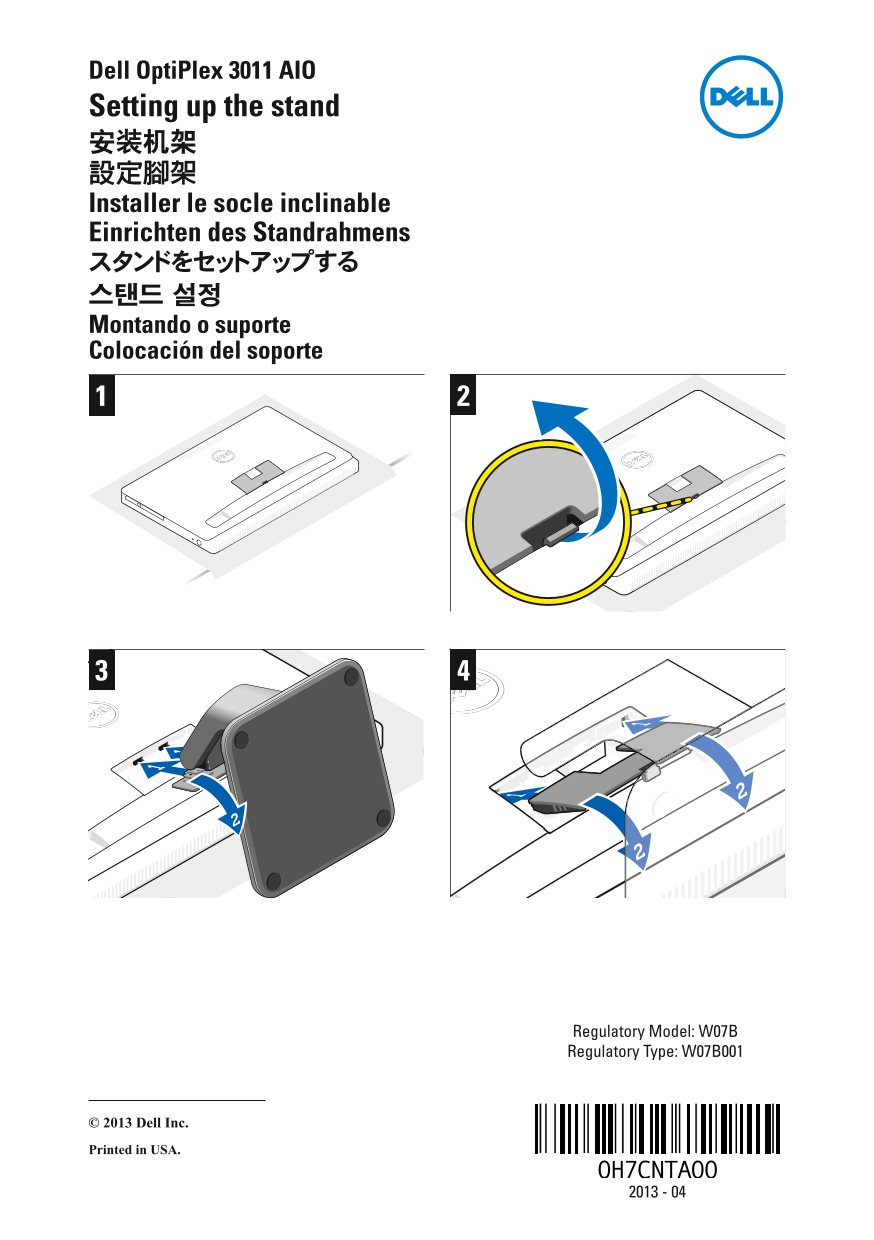
Page 1 Text Content
Dell Opti Plex 3011 AIO Setting up the stand 安装机架 設定腳架 Installer le socle inclinable Einrichten des Standrahmens スタンドをセットアップする 스탠드 설정 Montando o suporte Colocación del soporte
Regulatory Model: W07B Regulatory Type: W07B001
© 2013 Dell Inc. Printed in USA.
Page Summary Contents For Dell OptiPlex 3011 AIO Stand Tech Sheet
Page 1
Dell Opti Plex 3011 AIO Setting up the stand 安装机架 設定腳架 Installer le socle inclinable Einrichten des Standrahmens スタンドをセットアップする 스탠드 설정 Montando o suporte Colocación del soporte Regulatory Model: W07B R...
Manual Details
| Brand | Dell |
|---|---|
| Pages | 1 |
| File Size | 264.24 KB |
| Published | June 26, 2026 |
11 views
Enter the captcha to get the download link:

Frequently Asked Questions
How do I set up the stand?
Follow steps 1-4 to properly install the stand.
How do I mount the stand to the device?
Secure the stand by following the installation steps.
What are the regulatory details?
Regulatory Model: W07B, Type: W07B001.