Dell OptiPlex 3011 AIO Stand Support Specifications
Summary
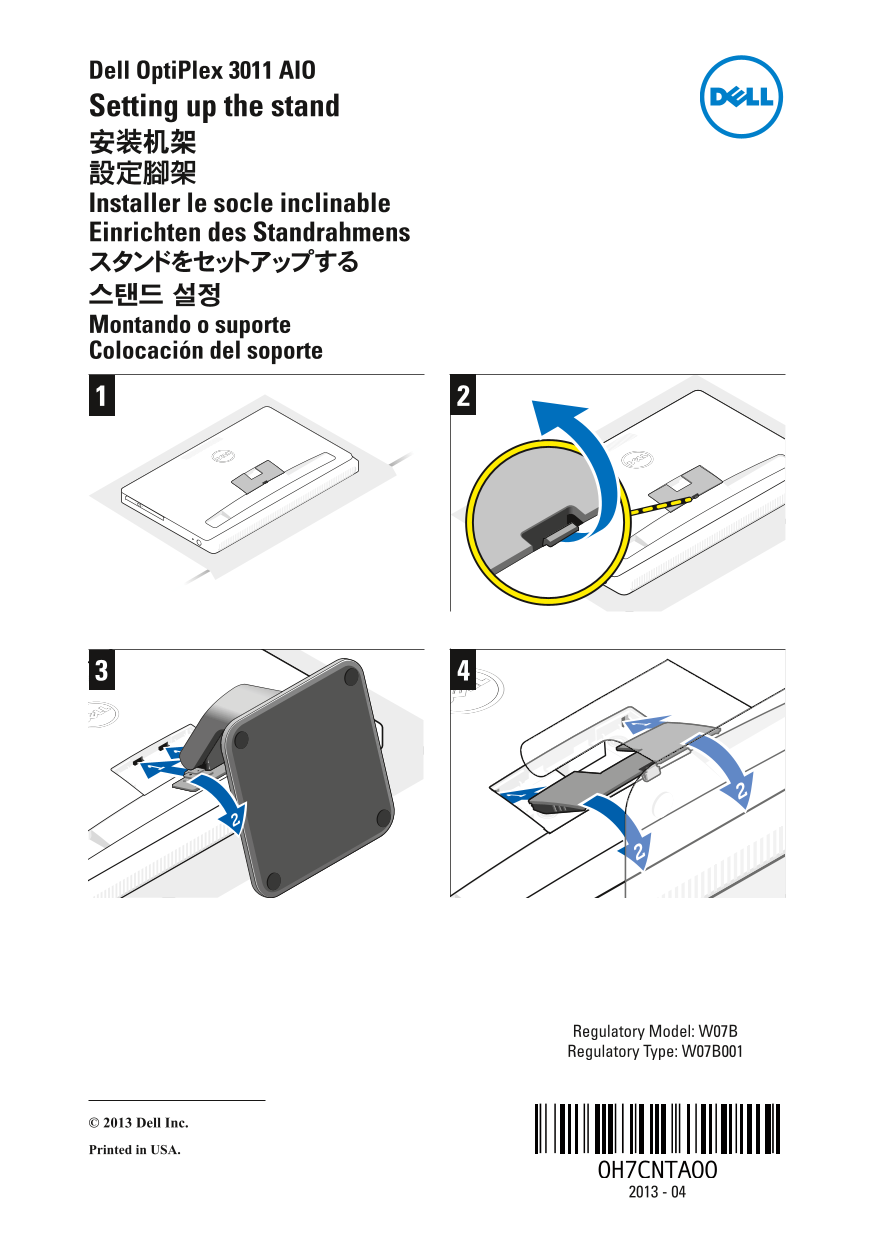
This setup instruction sheet for the Dell OptiPlex 3011 All-in-One desktop provides stand installation guidance in English, Simplified Chinese, Traditional Chinese, French, German, Japanese, Korean, Portuguese, and Spanish. It covers the step-by-step procedure for attaching the stand to the AIO chassis. Regulatory information includes model W07B and type W07B001. Suitable for IT administrators and end users performing initial hardware setup of this Dell all-in-one desktop computer.
Page 1 Text Content
Dell Opti Plex 3011 AIO Setting up the stand 安装机架 設定腳架 Installer le socle inclinable Einrichten des Standrahmens スタンドをセットアップする 스탠드 설정 Montando o suporte Colocación del soporte
Regulatory Model: W07B Regulatory Type: W07B001
© 2013 Dell Inc. Printed in USA.
Page Summary Contents For Dell OptiPlex 3011 AIO Stand Support Specifications
Manual Details
| Brand | Dell |
|---|---|
| Pages | 1 |
| File Size | 264.82 KB |
| Published | July 01, 2026 |
Enter the captcha to get the download link:

Frequently Asked Questions
What is the model number referenced in this manual?
The product model mentioned is the Dell OptiPlex 3011 AIO.
Which languages provide instructions for setting up the stand?
Instructions are provided in multiple languages, including English, Chinese, French, German, and Italian (implied by common translations).
Where was this specific unit documented as being printed?
The manual states that the device was Printed in USA.