Dell OptiPlex 3240 AIO Statement of Volatility
Summary
This security document catalogs volatile and non-volatile components present on the Dell OptiPlex 3240 system board, including BIOS, system memory, TPM, and storage devices. It provides volatility descriptions and remedial actions for data protection. Target users are IT security personnel, system administrators, and organizations requiring hardware security compliance and data destruction verification.
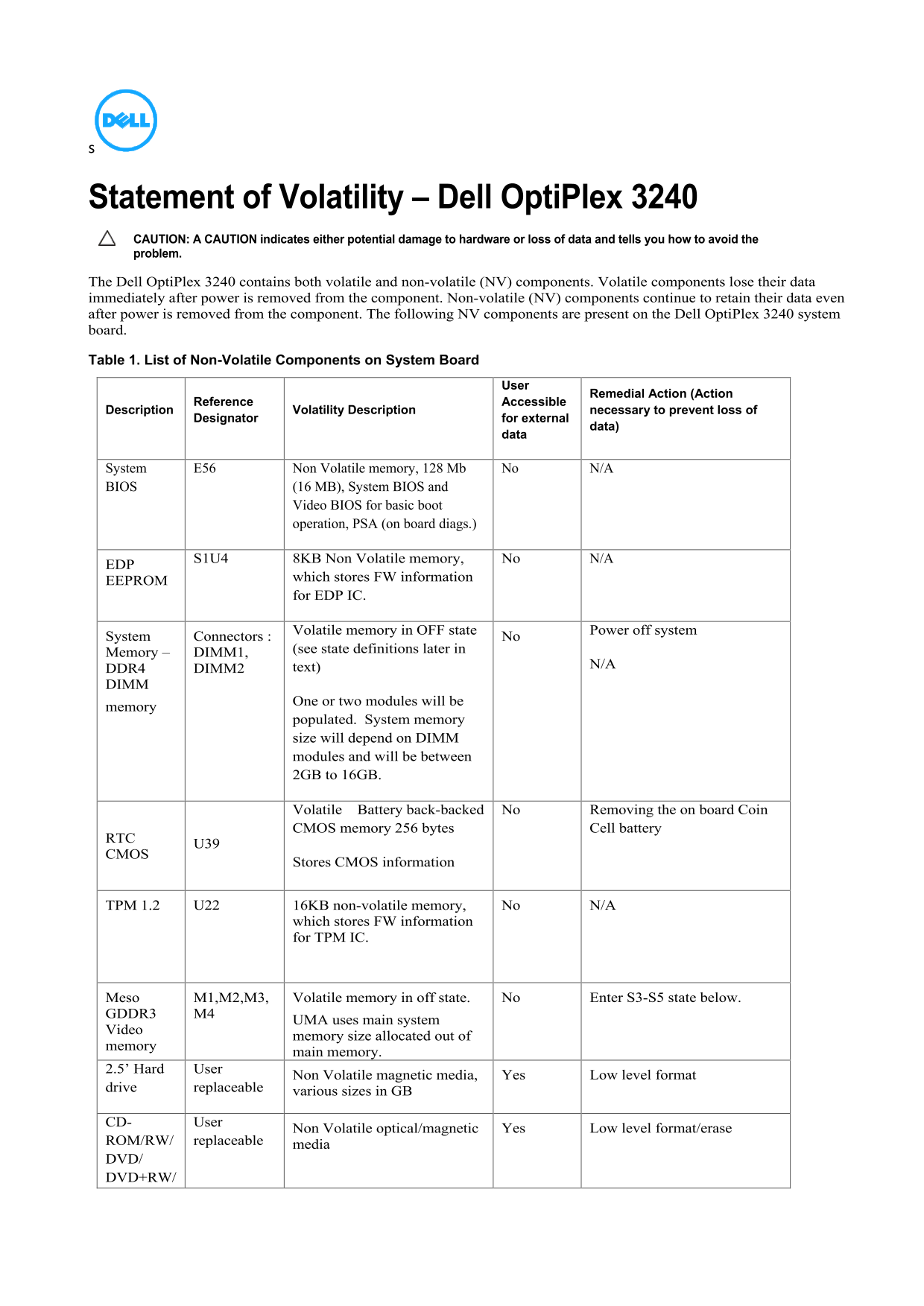
Page 1 Text Content
Statement of Volatility – Dell Opti Plex 3240 CAUTION: A CAUTION indicates either potential damage to hardware or loss of data and tells you how to avoid the problem. The Dell Opti Plex 3240 contains both volatile and non-volatile (NV) components. Volatile components lose their data immediately after power is removed from the component. Non-volatile (NV) components continue to retain their data even after power is removed from the component. The following NV components are present on the Dell Opti Plex 3240 system board. Table 1. List of Non-Volatile Components on System Board
Remedial Action (Action
Accessible
Description Reference necessary to prevent loss of
Designator Volatility Description for external
data)
System E56 Non Volatile memory, 128 Mb No N/A BIOS (16 MB), System BIOS and
Video BIOS for basic boot operation, PSA (on board diags.)
S1U4 8KB Non Volatile memory, No N/A
which stores FW information
EEPROM
for EDP IC.
Volatile memory in OFF state
System Connectors : No Power off system
(see state definitions later in
Memory – DIMM1,
text) N/A
DDR4 DIMM2 DIMM
One or two modules will be
memory
populated. System memory size will depend on DIMM modules and will be between 2GB to 16GB.
Volatile Battery back-backed No Removing the on board Coin CMOS memory 256 bytes Cell battery
Stores CMOS information
TPM 1.2 U22 16KB non-volatile memory, No N/A
which stores FW information for TPM IC.
Meso M1,M2,M3, Volatile memory in off state. No Enter S3-S5 state below.
GDDR3 M4
UMA uses main system
Video
memory size allocated out of
memory
main memory.
2.5’ Hard User
Non Volatile magnetic media, Yes Low level format
drive replaceable
various sizes in GB
CD- User
Non Volatile optical/magnetic Yes Low level format/erase
ROM/RW/ replaceable
media
DVD/ DVD+RW/
Page Summary Contents For Dell OptiPlex 3240 AIO Statement of Volatility
Manual Details
| Brand | Dell |
|---|---|
| Pages | 2 |
| File Size | 84.17 KB |
| Published | June 25, 2026 |
Enter the captcha to get the download link:

Frequently Asked Questions
Does the Dell OptiPlex 3240 support the S3 'suspend to RAM' state?
Yes, provided the OS and peripherals support S3. Windows 10, 8.1, 7, and Ubuntu support this state.
What happens to user data during a primary power loss?
All user data on the memory (LPDDR3 or DDR3L) is destroyed when the power cord is unplugged and the battery is removed.
What are the supported ACPI power states for the OptiPlex 3240?
The system supports S0 (working), S1 (low wake-up), S3 (suspend to RAM), S4 (suspend to disk/hibernate), and S5 (soft off).
What is the maximum system memory capacity supported?
The system supports between 2GB and 16GB of memory, depending on the DIMM modules installed.
How is CMOS information retained during a secondary power loss?
The CMOS information is stored in a non-volatile 256-byte battery-backed memory (RTC) that retains data when the coin-cell battery is removed.