Dell OptiPlex 3020M 9020M Install Guide - Accessories
Summary
This technical documentation provides comprehensive documentation for the Power Adapter Optical Drive Console E-Series VESA Mount 3 6. The document covers installation procedures, regulatory compliance information. Regulatory compliance and safety information are also provided. This documentation is intended for general users and IT support. The manual provides detailed guidance to ensure proper operation and maintenance of the Power Adapter Optical Drive Console E-Series VESA Mount 3 6. Users will find step-by-step instructions and technical details necessary for effective utilization of the product.
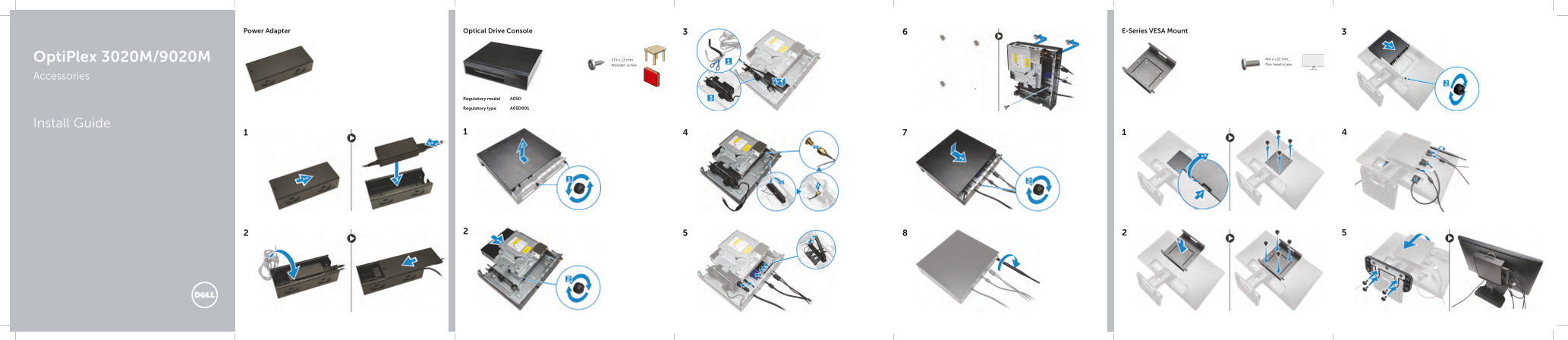
Page 1 Text Content
Optical Drive Console E-Series VESA Mount Power Adapter
Opti Plex 3020M/9020M ST4 x 13 mm, M4 x L10 mm, Wooden screw Pan head screw
Accessories
Regulatory model A05D
Regulatory type A05D001
Install Guide
Page Summary Contents For Dell OptiPlex 3020M 9020M Install Guide - Accessories
Manual Details
| Brand | Dell |
|---|---|
| Pages | 2 |
| File Size | 561.21 KB |
| Published | June 17, 2026 |
Enter the captcha to get the download link:

Frequently Asked Questions
What screws are needed for mounting the stand to Dell E-series monitors?
Use M3 x L8mm pitch 0.5mm self-tapping screws or M3 x L8mm pitch 0.35mm self-tapping screws.
Which monitors are compatible with the Universal plate (U plate)?
The Universal plate is designed for Universal monitors.
What tools are required to install the dual VESA mount?
Use M4 x L10mm Pan head screws, ST4 x L13mm Wooden screws, and machine screws.
What is the regulatory model number for this device?
The regulatory model number is A05D.