Dell OptiPlex Micro Form Factor Accessories Install Guide
Summary
Dell OptiPlex Micro Form Factor Accessories Install Guide. This guide provides installation instructions for various OptiPlex Micro accessories including VESA mounts, vertical stands, dual monitor mounts, and optical drive consoles. Target users: IT administrators and end users mounting and accessorizing Dell OptiPlex Micro desktops.
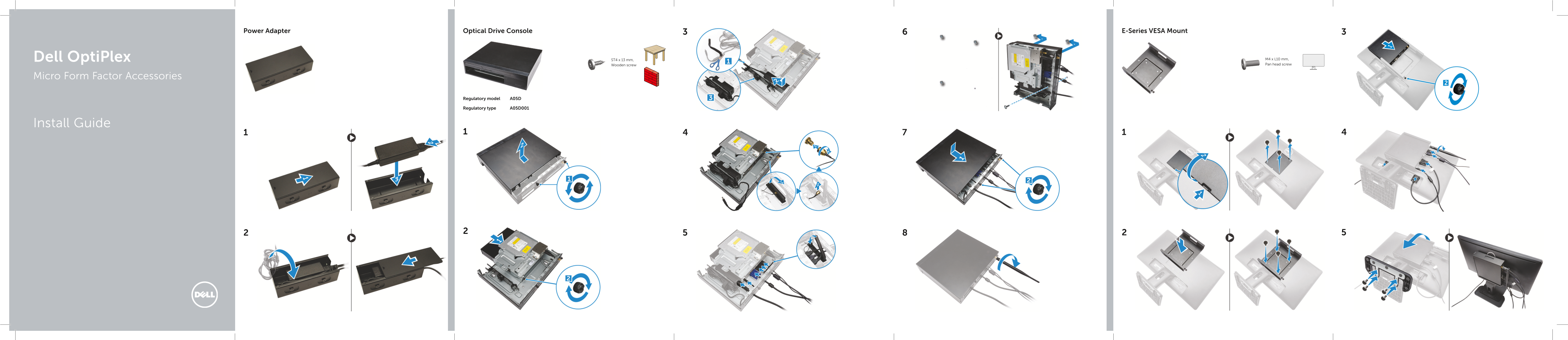
Page 1 Text Content
Optical Drive Console E-Series VESA Mount Power Adapter
Dell Opti Plex ST4 x 13 mm, M4 x L10 mm, Wooden screw Pan head screw
Micro Form Factor Accessories
Regulatory model A05D
Regulatory type A05D001
Install Guide
Page Summary Contents For Dell OptiPlex Micro Form Factor Accessories Install Guide
Manual Details
| Brand | Dell |
|---|---|
| Pages | 2 |
| File Size | 5.27 MB |
| Published | June 24, 2026 |
Enter the captcha to get the download link:

Frequently Asked Questions
What is the purpose of the PUZ plate and the U plate?
The PUZ plate supports Dell P, U, and PU series monitors in a vertical stand setup, while the U plate supports universal monitors.
Which screws are recommended for mounting E-series Dell monitors?
E-series Dell monitors require M3 X L8 mm machine screws (pitch 0.5mm) and self-tapping screws (M3 X L8 mm, pitch 0.35mm).
What is the main attachment point used with the Optical Drive Console?
The Optical Drive Console uses standardized hardware including general pan head screws (M4 x L10 mm, ST4 x L13 mm) and specific Dell OptiPlex components.