Dell OptiPlex 3020 Quick User Guide
Summary
Dell OptiPlex 3020 Quick Start Guide (2013). This multilingual setup guide covers keyboard/mouse connection, network cable setup, display connection via DisplayPort or VGA, power cable connection, Windows setup, and network connectivity. Includes discrete graphics card display connection note, Windows 8.1/7 features diagrams, and Dell app location instructions. Printed in China.
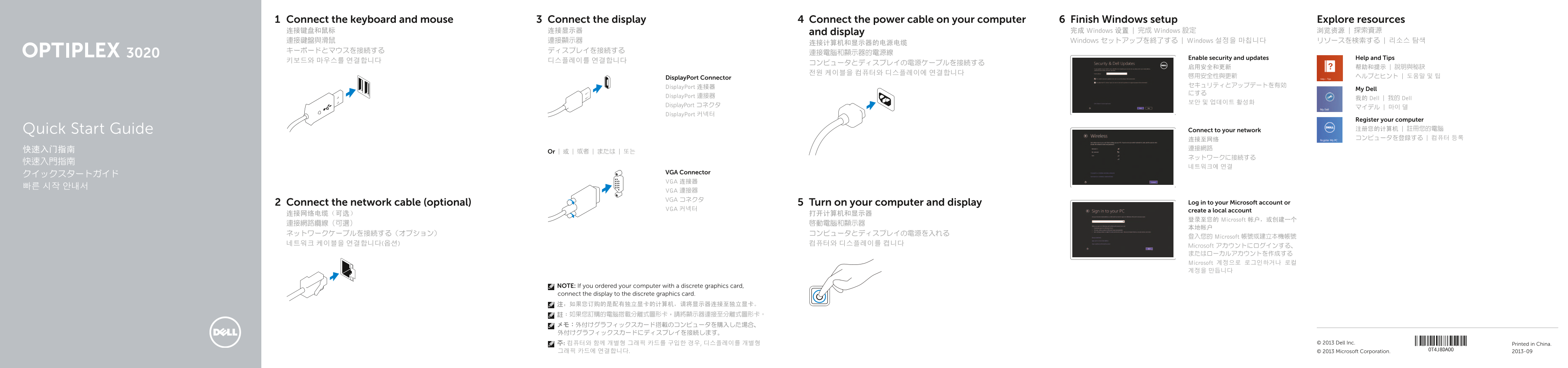
Page 1 Text Content
Connect the keyboard and mouse Connect the display Connect the power cable on your computer Finish Windows setup Explore resources 连接键盘和鼠标 连接显示器 and display 完成 Windows 设置 | 完成 Windows 設定 浏览资源 | 探索資源 連接鍵盤與滑鼠 連接顯示器 Windows セットアップを終了する | Windows 설정을 마칩니다 リソースを検索する | 리소스 탐색
Enable security and updates Help and Tips
Display Port Connector 啟用安全性與更新 ヘルプとヒント | 도움말 및 팁 Display Port 连接器 セキュリティとアップデートを有効
My Dell
Display Port 連接器
我的 Dell | 我的 Dell
Display Port コネクタ
Display Port 커넥터
Register your computer Quick Start Guide Connect to your network 注册您的计算机 | 註冊您的電腦 连接至网络 コンピュータを登録する | 컴퓨터 등록
Or | 或 | 或者 | または | 또는
VGA Connector
VGA 连接器
VGA 連接器 VGA コネクタ
Connect the network cable (optional) Turn on your computer and display Log in to your Microsoft account or
VGA 커넥터 create a local account
登录至您的 Microsoft 帐户,或创建一个
登入您的 Microsoft 帳號或建立本機帳號
Microsoft アカウントにログインする、 またはローカルアカウントを作成する Microsoft 계정으로 로그인하거나 로컬 계정을 만듭니다
NOTE: If you ordered your computer with a discrete graphics card, connect the display to the discrete graphics card. 注:如果您订购的是配有独立显卡的计算机,请将显示器连接至独立显卡。 註:如果您訂購的電腦搭載分離式圖形卡,請將顯示器連接至分離式圖形卡。 メモ:外付けグラフィックスカード搭載のコンピュータを購入した場合、 外付けグラフィックスカードにディスプレイを接続します。 주: 컴퓨터와 함께 개별형 그래픽 카드를 구입한 경우, 디스플레이를 개별형 Printed in China.© 2013 Dell Inc. 그래픽 카드에 연결합니다. © 2013 Microsoft Corporation. 2013-09
Page Summary Contents For Dell OptiPlex 3020 Quick User Guide
Manual Details
| Brand | Dell |
|---|---|
| Pages | 2 |
| File Size | 409.79 KB |
| Published | July 02, 2026 |
Enter the captcha to get the download link:

Frequently Asked Questions
If my computer has a discrete graphics card, where should I connect the display?
The manual notes that if you ordered a computer with a discrete graphics card, you must connect the display to the discrete graphics card itself.
What are some recommended troubleshooting resources?
You can find additional support and manuals on dell.com/support and also search for help under 'Help and Tips'.
Does this computer model have a microphone input?
Yes, it includes a dedicated Microphone connector (3) and Line-in/microphone connector (14).
What are the available connectivity options on the OptiPlex 3020?
Connectors include USB 3.0/2.0, DisplayPort, VGA, network cable, headphone, and power connectors.