Dell OptiPlex 3050 Quick User Guide - Windows 7
Summary
Quick start setup guide for the Dell OptiPlex 3050 All-in-One desktop computer. Provides step-by-step instructions for initial setup including connecting keyboard and mouse, attaching the power adapter, installing the optional cable cover, setting up the stand (height-adjustable or easel), and powering on the system. Includes multilingual instructions in Chinese, Japanese, Korean, and other languages. Contains regulatory compliance information, RoHS material declarations, and product specifications. Targeted at end-users setting up their OptiPlex 3050 All-in-One for the first time in home or office environments.
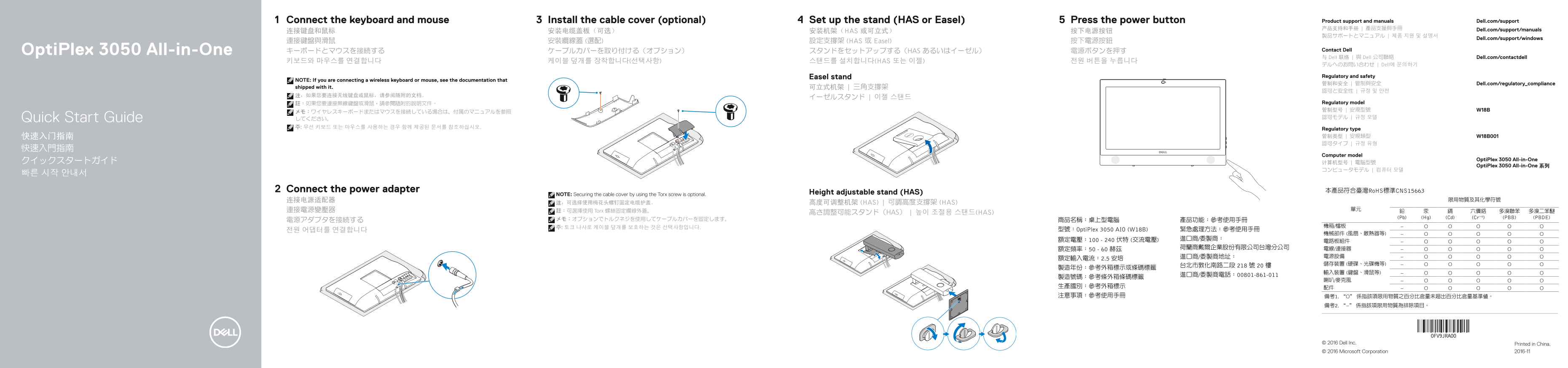
Page 1 Text Content
Connect the keyboard and mouse Install the cable cover (optional) Set up the stand (HAS or Easel) Press the power button Product support and manuals Dell.com/support 产品支持和手册 | 產品支援與手冊 Dell.com/support/manuals
连接键盘和鼠标 安装电缆盖板(可选) 安装机架(HAS 或可立式) 按下电源按钮
Dell.com/support/windows
連接鍵盤與滑鼠 安裝纜線蓋 (選配) 設定支撐架 (HAS 或 Easel) 按下電源按鈕
Opti Plex 3050 All-in-One キーボードとマウスを接続する ケーブルカバーを取り付ける(オプション) スタンドをセットアップする(HAS あるいはイーゼル) 電源ボタンを押す Contact Dell 与 Dell 联络 | 與 Dell 公司聯絡 Dell.com/contactdell
키보드와 마우스를 연결합니다 케이블 덮개를 장착합니다(선택사항) 스탠드를 설치합니다(HAS 또는 이젤) 전원 버튼을 누릅니다
デルへのお問い合わせ | Dell에 문의하기
Easel stand Regulatory and safety
NOTE: If you are connecting a wireless keyboard or mouse, see the documentation that
管制和安全 | 管制與安全 Dell.com/regulatory_compliance
shipped with it. 可立式机架 | 三角支撐架
註:如果您要連接無線鍵盤或滑鼠,請參閱隨附的說明文件。 Regulatory model 管制型号 | 安規型號 W18B
Quick Start Guide してください。 認可モデル | 규정 모델
주: 무선 키보드 또는 마우스를 사용하는 경우 함께 제공된 문서를 참조하십시오. Regulatory type
Computer model
Opti Plex 3050 All-in-One
Opti Plex 3050 All-in-One 系列
Connect the power adapter 本產品符合臺灣Ro HS標準CNS15663
NOTE: Securing the cable cover by using the Torx screw is optional. Height adjustable stand (HAS)
注:可选择使用梅花头螺钉固定电缆护盖。 高度可调整机架 (HAS) | 可調高度支撐架 (HAS)
連接電源變壓器 註:可選擇使用 Torx 螺絲固定纜線外蓋。 單元
高さ調整可能スタンド(HAS) | 높이 조절용 스탠드(HAS) 六價鉻 多溴聯苯 多溴二苯醚
メモ:オプションでトルクネジを使用してケーブルカバーを固定します。 (Pb) (Hg) (Cd) (Cr+6) (PBB) (PBDE)
전원 어댑터를 연결합니다 型號:Opti Plex 3050 AIO (W18B) 緊急處理方法:參考使用手冊
© 2016 Dell Inc. Printed in China. © 2016 Microsoft Corporation 2016-11
Page Summary Contents For Dell OptiPlex 3050 Quick User Guide - Windows 7
Manual Details
| Brand | Dell |
|---|---|
| Pages | 2 |
| File Size | 561.97 KB |
| Published | June 25, 2026 |
Enter the captcha to get the download link:

Frequently Asked Questions
How do I set up the stand?
Set up the HAS or Easel stand, connect the keyboard and mouse, and press the power button.
Is the cable cover optional?
Yes, securing the cable cover is optional; you can use a Torx screw or leave it unsecured.
What is the power requirement?
It operates on 100-240V AC at 50-60Hz with a rated current of 2.5 Amps.
What ports are available?
It features USB 2.0/3.0 ports, SD card reader, DisplayPort, VGA (optional), and headset jack.
How do I connect to a secured network?
Enter the password for the wireless network access when prompted by the system.