Dell OptiPlex 3050 Micro Quick User Guide - Windows 7 8.1
Summary
This Quick Start Guide for the Dell OptiPlex 3050 Micro desktop provides multilingual setup instructions covering keyboard and mouse connection, display connectivity with discrete graphics card guidance, optional network cable installation, power adapter connection, and both Windows 7 and Ubuntu operating system configuration. It includes hardware feature identification with numbered diagrams, SupportAssist for system health monitoring, Windows password setup guidance, and access to product supp
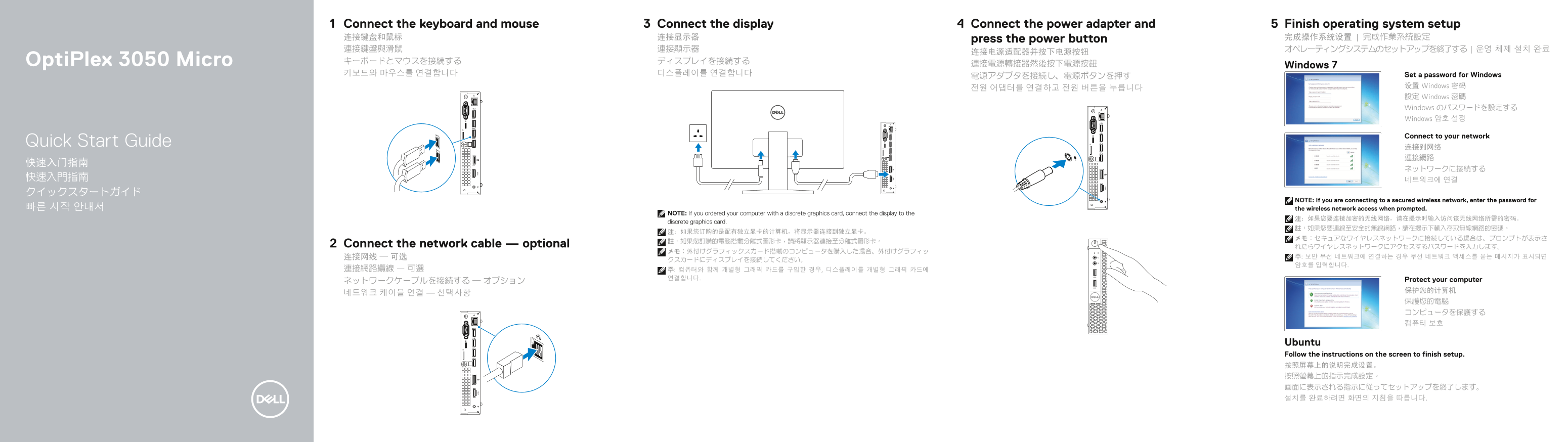
Page 1 Text Content
Connect the display Connect the power adapter and 5Connect the keyboard and mouse Finish operating system setup
连接键盘和鼠标 连接显示器 press the power button 完成操作系统设置 | 完成作業系統設定 連接鍵盤與滑鼠 連接顯示器 オペレーティングシステムのセットアップを終了する | 운영 체제 설치 완료
Opti Plex 3050 Micro キーボードとマウスを接続する ディスプレイを接続する
連接電源轉接器然後按下電源按鈕 Windows 7
키보드와 마우스를 연결합니다 디스플레이를 연결합니다 Set a password for Windows
设置 Windows 密码
設定 Windows 密碼 Windows のパスワードを設定する Windows 암호 설정
Connect to your network
Quick Start Guide
NOTE: If you are connecting to a secured wireless network, enter the password for
빠른 시작 안내서 the wireless network access when prompted.
NOTE: If you ordered your computer with a discrete graphics card, connect the display to the
discrete graphics card.
Connect the network cable — optional れたらワイヤレスネットワークにアクセスするパスワードを入力します。
연결합니다. Protect your computer
Ubuntu Follow the instructions on the screen to finish setup. 按照屏幕上的说明完成设置。 按照螢幕上的指示完成設定。 画面に表示される指示に従ってセットアップを終了します。 설치를 완료하려면 화면의 지침을 따릅니다.
Page Summary Contents For Dell OptiPlex 3050 Micro Quick User Guide - Windows 7 8.1
Manual Details
| Brand | Dell |
|---|---|
| Pages | 2 |
| File Size | 981.46 KB |
| Published | July 02, 2026 |
Enter the captcha to get the download link:

Frequently Asked Questions
如何连接显示器到独立显卡?
如果订购的是配有独立显卡的计算机,应将显示器连接至该独立显卡。
我应该在哪里查看产品支持和手册?
您可以在 Dell.com/support 和 Dell.com/support/manuals 上找到产品支持和手册。
这个电脑支持哪些端口类型?
它拥有 HDMI、DisplayPort、USB 3.0、USB 2.0,以及 VGA 或串行/PS/2 端口等多种连接选项。
如果我使用无线网络,如何设置密码?
如果连接到安全的无线网络,当系统提示时需要输入相应的访问密码。