Dell OptiPlex 3046 Micro Form Factor Quick User Guide (Windows 7 8.1)
Summary
This comprehensive guide is designed for owners of the durable OptiPlex 3046M desktop computer. It provides step-by-step instructions covering initial system setup, including connecting all necessary peripherals like monitors, keyboards, and USB devices. The manual details essential networking steps (wired or wireless), operating system completion, and advanced maintenance functions such as data backup, recovery procedures, and crucial driver updates for seamless performance.
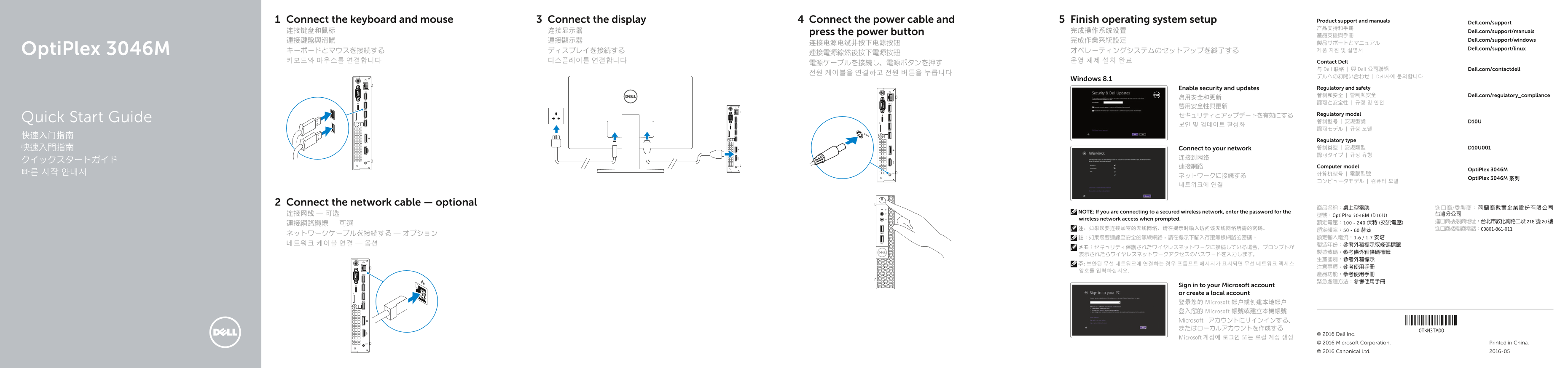
Page 1 Text Content
Connect the keyboard and mouse Connect the display Connect the power cable and Finish operating system setup Product support and manuals
Dell.com/support
连接键盘和鼠标 连接显示器 press the power button 完成操作系统设置 Dell.com/support/manuals
連接鍵盤與滑鼠 連接顯示器 完成作業系統設定 Dell.com/support/windows
Opti Plex 3046M Dell.com/support/linux
키보드와 마우스를 연결합니다 디스플레이를 연결합니다 운영 체제 설치 완료 Contact Dell
与 Dell 联络 | 與 Dell 公司聯絡 Dell.com/contactdell
デルへのお問い合わせ | Dell사에 문의합니다
Windows 8.1
Enable security and updates Regulatory and safety 管制和安全 | 管制與安全 Dell.com/regulatory_compliance
セキュリティとアップデートを有効にする Regulatory model
Quick Start Guide 管制型号 | 安規型號 D10U
Regulatory type 快速入門指南 Connect to your network 管制类型 | 安規類型 D10U001 認可タイプ | 규정 유형
連接網路 Computer model
Opti Plex 3046M
Opti Plex 3046M 系列
Connect the network cable — optional
NOTE: If you are connecting to a secured wireless network, enter the password for the
连接网线 — 可选 型號:Opti Plex 3046M (D10U) 台灣分公司
wireless network access when prompted.
Sign in to your Microsoft account or create a local account 登录您的 Microsoft 帐户或创建本地帐户 登入您的 Microsoft 帳號或建立本機帳號 Microsoft アカウントにサインインする、 またはローカルアカウントを作成する
© 2016 Dell Inc.
Microsoft 계정에 로그인 또는 로컬 계정 생성
© 2016 Microsoft Corporation. Printed in China. © 2016 Canonical Ltd. 2016-05
Page Summary Contents For Dell OptiPlex 3046 Micro Form Factor Quick User Guide (Windows 7 8.1)
Manual Details
| Brand | Dell |
|---|---|
| Pages | 2 |
| File Size | 1.43 MB |
| Published | June 23, 2026 |
Enter the captcha to get the download link:

Frequently Asked Questions
我该如何开始使用电脑?
连接键盘、鼠标、显示器和电源,然后完成操作系统设置。
如何将设备安全地连接到网络?
插入网线或无线网络密码以连接(如果是加密无线网络)。
如果需要升级到Windows 10,有什么特别要求吗?
从Windows 7 32位升级至Windows 10需手动安装系统驱动程序。
我可以在哪里找到设备支持和手册?
请访问 Dell.com/support 或戴尔官网。