Dell OptiPlex 3046 Mini Tower Quick User Guide (Windows 7 8.1)
Summary
This quick start guide provides initial setup instructions for the Dell OptiPlex 3046 Mini Tower desktop computer. It covers the essential steps for connecting keyboard and mouse, attaching a display (including discrete graphics card note), connecting network cables, plugging in power, and completing operating system setup. The guide is presented in multiple languages including English, Chinese, Japanese, Korean, and Vietnamese. Intended for first-time users and IT administrators deploying OptiPlex 3046 MT systems in office environments.
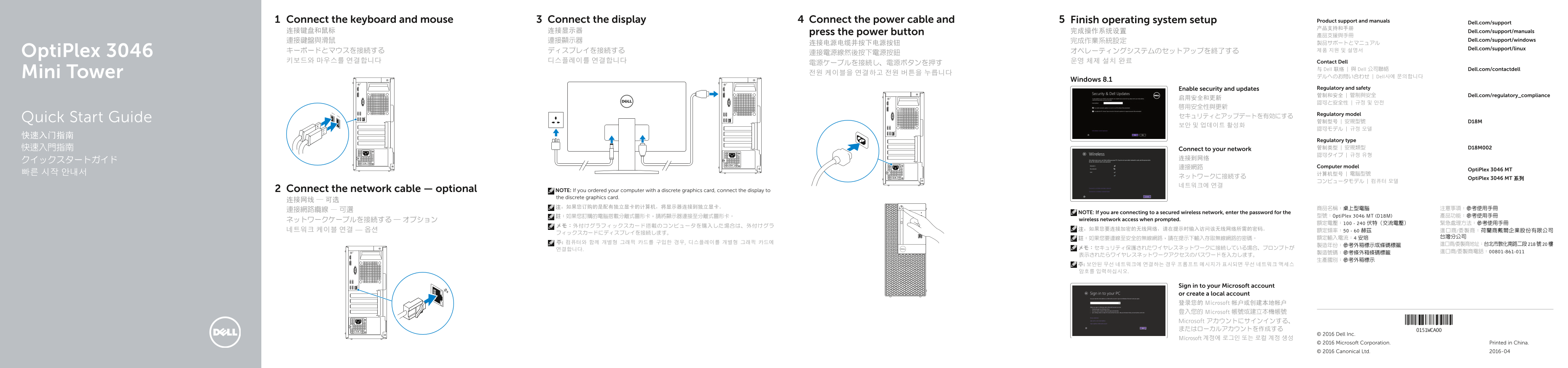
Page 1 Text Content
Connect the keyboard and mouse Connect the display Connect the power cable and Finish operating system setup Product support and manuals
Dell.com/support
连接键盘和鼠标 连接显示器 press the power button 完成操作系统设置 Dell.com/support/manuals
連接鍵盤與滑鼠 連接顯示器 完成作業系統設定 Dell.com/support/windows
Dell.com/support/linux
Opti Plex 3046 連接電源線然後按下電源按鈕
키보드와 마우스를 연결합니다 디스플레이를 연결합니다 운영 체제 설치 완료 Contact Dell
与 Dell 联络 | 與 Dell 公司聯絡 Dell.com/contactdell
Mini Tower 전원 케이블을 연결하고 전원 버튼을 누릅니다
デルへのお問い合わせ | Dell사에 문의합니다
Windows 8.1
Enable security and updates Regulatory and safety 管制和安全 | 管制與安全 Dell.com/regulatory_compliance
Regulatory model
Quick Start Guide 管制型号 | 安規型號 D18M
Regulatory type 快速入門指南 Connect to your network 管制类型 | 安規類型 D18M002 認可タイプ | 규정 유형
連接網路 Computer model
Opti Plex 3046 MT
ネットワークに接続する Opti Plex 3046 MT 系列
Connect the network cable — optional NOTE: If you ordered your computer with a discrete graphics card, connect the display to
the discrete graphics card.
NOTE: If you are connecting to a secured wireless network, enter the password for the
註:如果您訂購的電腦搭載分離式圖形卡,請將顯示器連接至分離式圖形卡。 型號:Opti Plex 3046 MT (D18M) 產品功能:參考使用手冊
ネットワークケーブルを接続する ― オプション wireless network access when prompted.
Sign in to your Microsoft account or create a local account 登录您的 Microsoft 帐户或创建本地帐户 登入您的 Microsoft 帳號或建立本機帳號 Microsoft アカウントにサインインする、 またはローカルアカウントを作成する
© 2016 Dell Inc.
Microsoft 계정에 로그인 또는 로컬 계정 생성
© 2016 Microsoft Corporation. Printed in China. © 2016 Canonical Ltd. 2016-04
Page Summary Contents For Dell OptiPlex 3046 Mini Tower Quick User Guide (Windows 7 8.1)
Manual Details
| Brand | Dell |
|---|---|
| Pages | 2 |
| File Size | 1.47 MB |
| Published | June 25, 2026 |
Enter the captcha to get the download link:

Frequently Asked Questions
How do I finish the setup process?
Follow the on-screen instructions to complete the setup.
What do I do if I want to upgrade from Windows 7 32-bit to Windows 10?
You must manually install the system drivers after upgrading.
How do I connect the display if the computer has a discrete graphics card?
Connect the display to the discrete graphics card.