Dell OptiPlex 7040 Mini Tower Quick User Guide (Windows 7 8.1)
Summary
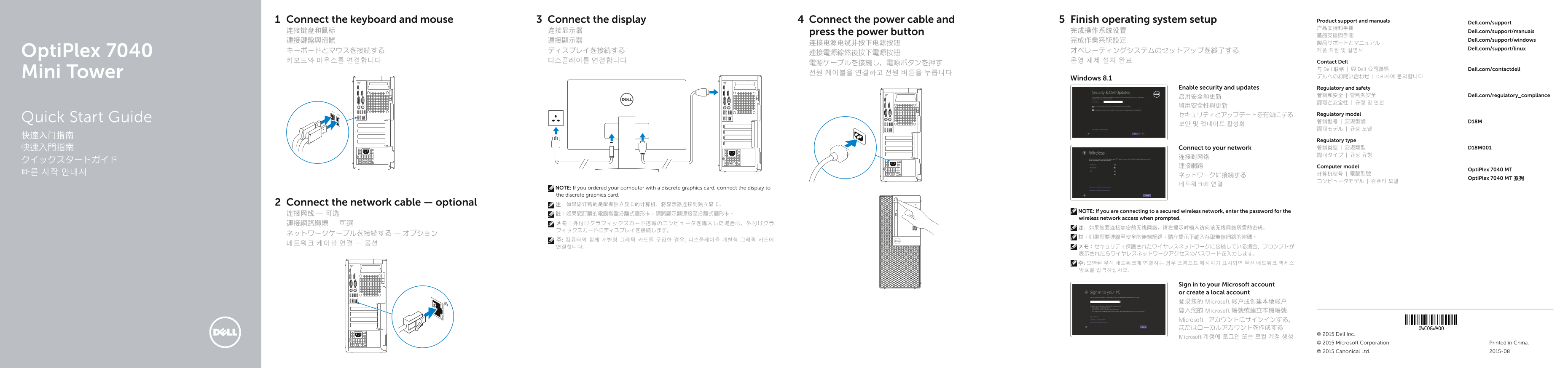
Dell OptiPlex 7040 Mini Tower Quick Start Guide with multilingual setup covering keyboard/mouse and optional network cable connection, display connection via dedicated port or discrete graphics card, power cable activation, Windows 8.1/10 OS setup, security updates, Microsoft account sign-in, and regulatory compliance for model D18M.
Page 1 Text Content
Connect the keyboard and mouse Connect the display Connect the power cable and Finish operating system setup Product support and manuals
Dell.com/support
连接键盘和鼠标 连接显示器 press the power button 完成操作系统设置 Dell.com/support/manuals
連接鍵盤與滑鼠 連接顯示器 完成作業系統設定 Dell.com/support/windows
Dell.com/support/linux
Opti Plex 7040 連接電源線然後按下電源按鈕
키보드와 마우스를 연결합니다 디스플레이를 연결합니다 운영 체제 설치 완료 Contact Dell
与 Dell 联络 | 與 Dell 公司聯絡 Dell.com/contactdell
Mini Tower 전원 케이블을 연결하고 전원 버튼을 누릅니다
デルへのお問い合わせ | Dell사에 문의합니다
Windows 8.1
Enable security and updates Regulatory and safety
启用安全和更新 管制和安全 | 管制與安全 Dell.com/regulatory_compliance 認可と安全性 | 규정 및 안전
セキュリティとアップデートを有効にする Regulatory model
Quick Start Guide 管制型号 | 安規型號 D18M
Regulatory type 快速入門指南 Connect to your network 管制类型 | 安規類型 D18M001 認可タイプ | 규정 유형
連接網路 Computer model
Opti Plex 7040 MT
Opti Plex 7040 MT 系列
NOTE: If you ordered your computer with a discrete graphics card, connect the display to the discrete graphics card.
Connect the network cable — optional 注:如果您订购的是配有独立显卡的计算机,将显示器连接到独立显卡。
NOTE: If you are connecting to a secured wireless network, enter the password for the
wireless network access when prompted.
Sign in to your Microsoft account or create a local account 登录您的 Microsoft 帐户或创建本地帐户 登入您的 Microsoft 帳號或建立本機帳號 Microsoft アカウントにサインインする、 またはローカルアカウントを作成する
© 2015 Dell Inc.
Microsoft 계정에 로그인 또는 로컬 계정 생성
© 2015 Microsoft Corporation. Printed in China. © 2015 Canonical Ltd. 2015-08
Page Summary Contents For Dell OptiPlex 7040 Mini Tower Quick User Guide (Windows 7 8.1)
Manual Details
| Brand | Dell |
|---|---|
| Pages | 2 |
| File Size | 827.17 KB |
| Published | July 03, 2026 |
Enter the captcha to get the download link:

Frequently Asked Questions
如果我购买的电脑装有独立显示卡,应该将显示器连接到哪里?
请将显示器连接到独立的显卡上。
如何为我的计算机设置登录密码?
您需要在 Windows 8.1 中找到并进行“设置 Windows 密码”的操作。
如果进行了系统升级,如何获取最新的驱动程序?
要获取最新的驱动程序,请访问 dell.com/support。
我需要连接网络的时候有什么考虑?
如果您连接的是安全的无线网络,需要在提示时输入相应的网络密码。