Dell Dell Dell OptiPlex 7050 Micro Quick User Guide - Windows 7
Summary
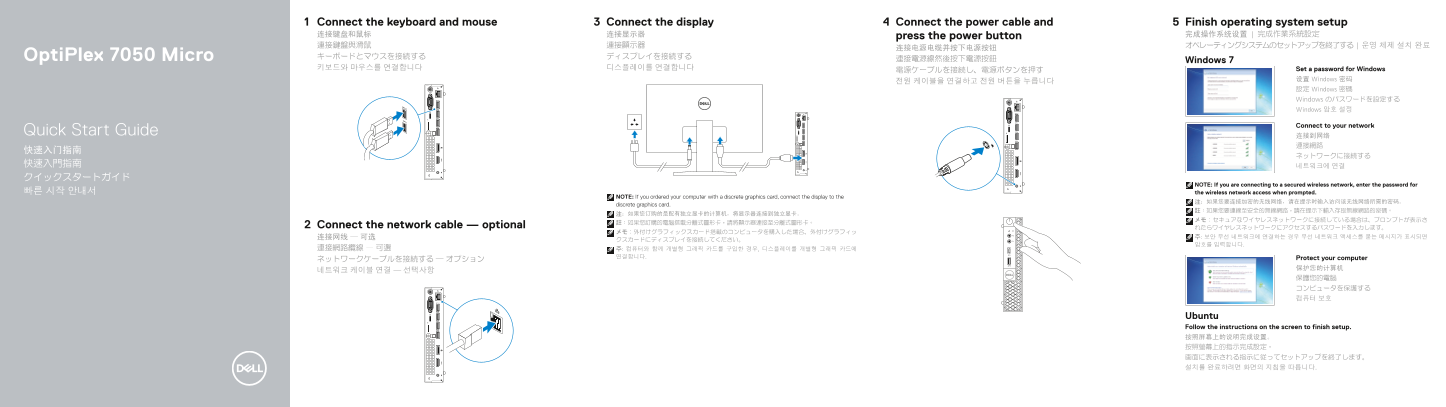
Quick start guide for the Dell OptiPlex 7050 Micro compact desktop computer, covering keyboard and mouse connection, display hookup with discrete graphics card routing guidance, optional network cable, power cable connection, and Windows 7 or Ubuntu operating system setup with password creation. Details hardware features including power button with indicator light, hard drive activity light, headset port, USB ports, HDMI, power connector, network port, and display port. Multilingual in English,
Page 1 Text Content
Connect the display Connect the power cable and 5Connect the keyboard and mouse Finish operating system setup
连接键盘和鼠标 连接显示器 press the power button 完成操作系统设置 | 完成作業系統設定 連接鍵盤與滑鼠 連接顯示器 オペレーティングシステムのセットアップを終了する | 운영 체제 설치 완료
Opti Plex 7050 Micro キーボードとマウスを接続する ディスプレイを接続する
連接電源線然後按下電源按鈕 Windows 7
키보드와 마우스를 연결합니다 디스플레이를 연결합니다 Set a password for Windows
设置 Windows 密码
設定 Windows 密碼 Windows のパスワードを設定する Windows 암호 설정
Connect to your network
Quick Start Guide
NOTE: If you are connecting to a secured wireless network, enter the password for
빠른 시작 안내서 the wireless network access when prompted.
NOTE: If you ordered your computer with a discrete graphics card, connect the display to the
discrete graphics card.
Connect the network cable — optional れたらワイヤレスネットワークにアクセスするパスワードを入力します。
연결합니다. Protect your computer
Ubuntu Follow the instructions on the screen to finish setup. 按照屏幕上的说明完成设置。 按照螢幕上的指示完成設定。 画面に表示される指示に従ってセットアップを終了します。 설치를 완료하려면 화면의 지침을 따릅니다.
Page Summary Contents For Dell Dell Dell OptiPlex 7050 Micro Quick User Guide - Windows 7
Manual Details
| Brand | Dell |
|---|---|
| Pages | 2 |
| File Size | 974.02 KB |
| Published | June 17, 2026 |
Enter the captcha to get the download link:

Frequently Asked Questions
If I have a discrete graphics card, where should I connect my display cable?
You must connect the display directly to the independent/discrete graphics card.
What output ports are available for connecting multiple displays?
Available video output options include HDMI, DisplayPort, and an optional Line-out port (and VGA).
Are there specialized USB ports on this model?
Yes, one USB 3.0 port is equipped with PowerShare functionality.
How can I physically secure the computer against theft?
The unit includes a Kensington security cable slot and accompanying padlock ring for physical immobilization.