# A B C D E F G H I J K L M N O P Q R S T U V W X Y Z

Dell Monitor Mount Tech Sheet

Summary

Dell OptiPlex FX160/160 All-in-One Stand Mounting Instructions provide detailed guidance for mounting the compact desktop chassis to a monitor using the Dell Soundbar mounting bracket and counter balance system. It covers installation steps, thermal restriction guidelines requiring 1-inch clearance, and removal procedures. The document is designed for IT technicians and system integrators deploying space-saving all-in-one configurations in office environments.
📄 Preview 📖 Table of Contents Contents PAGE OF 20

Page 1 Text Content

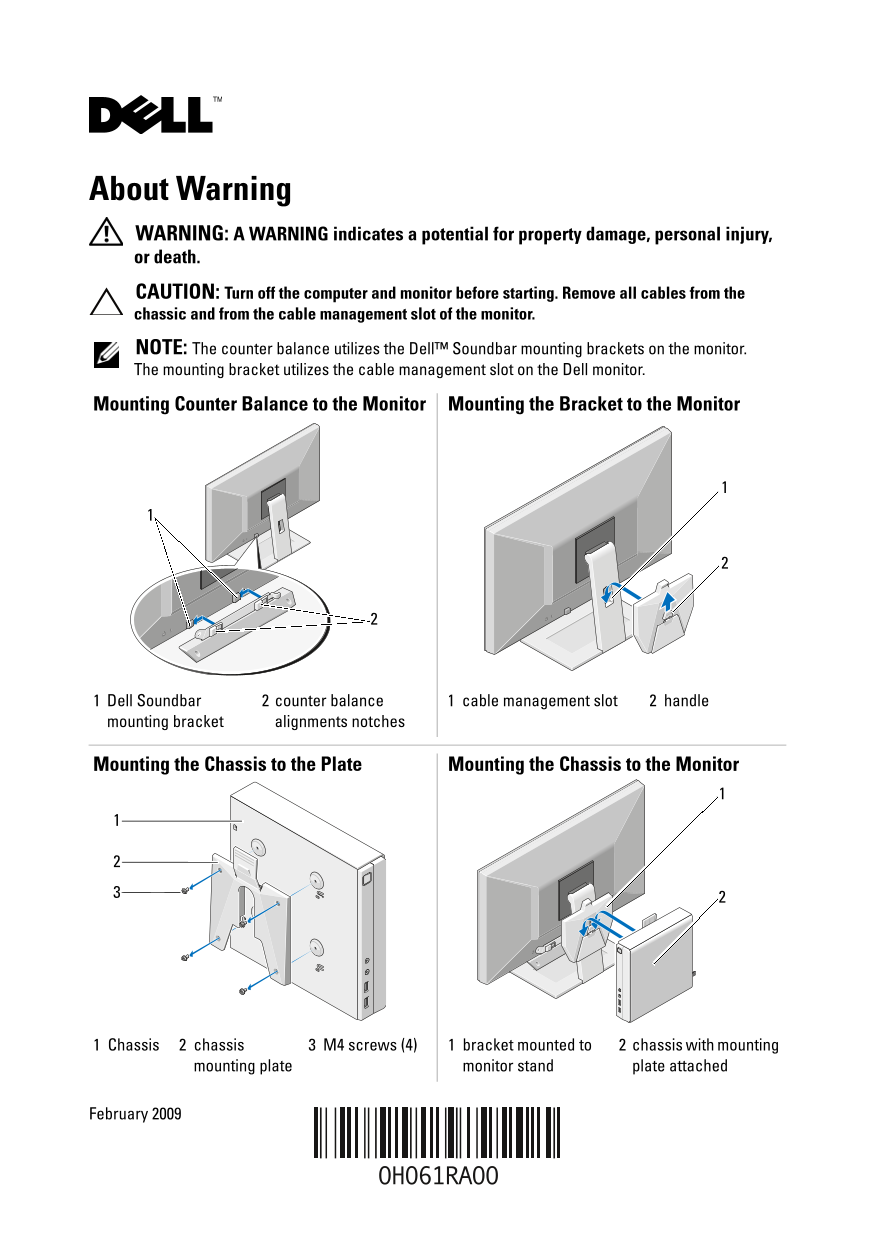
About Warning WARNING: A WARNING indicates a potential for property damage, personal injury, or death. CAUTION: Turn off the computer and monitor before starting. Remove all cables from the chassic and from the cable management slot of the monitor. NOTE: The counter balance utilizes the Dell™ Soundbar mounting brackets on the monitor. The mounting bracket utilizes the cable management slot on the Dell monitor.

Mounting Counter Balance to the Monitor Mounting the Bracket to the Monitor

Dell Soundbar counter balance cable management slot handle mounting bracket alignments notches

Mounting the Chassis to the Plate Mounting the Chassis to the Monitor

Chassis chassis M4 screws (4) bracket mounted to chassis with mounting

mounting plate monitor stand plate attached

February 2009

Page Summary Contents For Dell Monitor Mount Tech Sheet

Page 1 About Warning WARNING: A WARNING indicates a potential for property damage, personal injury, or death. CAUTION: Turn off the computer and monitor before starting. Remove all cables from the chassic an...
Page 2 WARNING: Before mounting the chassis to the monitor, ensure that none of the vents (Opti Plex™ FX160/160 has ventilation on four of the six primary surfaces) are blocked on the system. CAUTION: Before...
Page 3 关于警告 警告: “警告”表示可能会造成财产损失、人身伤害甚至死亡。 小心: 开始前关闭计算机和显示器。从机箱和显示器的电缆管理插槽拔下所有电缆。 注: 平衡臂利用了显示器上的 Dell™ Soundbar固定支架。固定支架利用了戴尔显示器上 的电缆管理插槽 1  Dell Soundbar  2  平衡臂定位闩锁 1  电缆管理插槽 2  把手
Page 4 警告: 在将机箱安装到显示器之前,请确保系统上的任何通风孔 (Opti Plex™ FX160/160在 6个主表面中的 4个上具有通风装置)均 未阻塞。 本说明文件中的信息如有更改,恕不另行通知。 Dell Inc.。版权所有,翻印必究。中国印制。用再生纸印制。 未经 Dell Inc. 书面许可,严禁以任何形式复制这些材料。 本文中使用的商标:Dell、 DELL徽标和 Opti Plex是 ...
Page 5 關於警告 警告: 「警告」表示有可能會導致財產損失、人身傷害甚至死亡。 警示: 開始前請先關閉電腦與顯示器電源。拔掉機箱及顯示器纜線管理插槽中所有的 纜線。 註: 平衡架需安裝至顯示器上的 Dell™ Soundbar 固定托架。固定托架則安裝至 Dell 顯示 器上的纜線管理插槽。 將平衡架安裝至顯示器 將固定托架安裝至顯示器 Dell Soundbar 平衡架定位槽口 纜線管理插槽 手柄 固定...
Page 6 警告: 將機箱安裝至顯示器前,請先確定系統的通風孔 (Opti Plex™ FX160/160 機箱六面內其中四面設有通風孔 ) 皆未被擋住。 本文件中的資訊如有更改,恕不另行通知。 Dell Inc.版權所有,翻印必究。中國印製。以再造紙印製。 未經 Dell Inc. 的書面許可,嚴格禁止以任何形式複製這些內容。 本文中使用的商標:Dell、DELL 徽標和 Opti Plex 是 Dell ...
Page 7 À propos de l'avertissement AVERTISSEMENT : un AVERTISSEMENT vous indique un risque d'endommagement du matériel, de blessure corporelle ou de mort. PRÉCAUTION : avant de commencer, éteignez l'ordinate...
Page 8 AVERTISSEMENT : avant de monter le châssis sur le moniteur, assurez-vous qu'aucune entrée d'air du système n'est obstruée (le système Opti Plex™ FX160/160 dispose d'entrées d'air sur quatre des six su...
Page 9 Warnhinweise WARNUNG: Mit WARNUNG wird auf eine potenziell gefährliche Situation hingewiesen, die zu Sachschäden, Verletzungen oder zum Tod führen könnte. VORSICHT: Schalten Sie Computer und Monitor a...
Page 10 WARNUNG: Bevor Sie das Gehäuse am Monitor befestigen, stellen Sie sicher, dass keine Lüftungsschlitze des Systems blockiert sind. – Vier der insgesamt sechs Hauptoberflächen des Opti Plex™ FX160/160 v...
Page 11 Informazioni sulle avvertenze AVVERTENZA Un messaggio di AVVERTENZA indica un rischio di danni alla proprietà, lesioni personali o morte. ATTENZIONE Prima di cominciare, spegnere il computer e il moni...
Page 12 AVVERTENZA Prima di montare il telaio al monitor, accertarsi che nessuna presa d'aria sia ostruita (Opti Plex™ FX160/160 dispone di ventilazione su quattro delle sei superfici principali). ATTENZIONE ...
Page 13 「警告」の表記について 危険: 物的損害、けが、または死亡の原因となる可能性があることを示しています。 注意:作業を開始する前に、コンピュータとモニタの電源を切ります。シャーシ、およびモニター のケーブル管理スロットに接続されているすべてのケーブルを取り外してください。 メモ:カウンタバランスは、Dell™ Soundbar の取り付けブラケットを使用してモニターに取り付 けます。取り付けブラケッ...
Page 14 警告: シャーシをモニターに取り付ける前に、通気孔がふさがれていな いことを確認してください(Opti Plex™ FX160/160 には 6 面のうち 4 面に 通気孔があります)。 システムの冷却効率を最適化するため、シャーシの背面に少なくとも約 25.4 mm の空間を確保してください。 この文書の情報は、事前の通知なく変更されることがあります。 © 2009 すべての著作権は Dell ...
Page 15 경고 정보 경고: "경고"는 재산상의 피해나 심각한 부상 또는 사망을 유발할 수 있는 위험이 있음을 알려줍니다. 주의: 시작하기 전에 먼저 컴퓨터와 모니터를 끄십시오. 섀시와 모니터의 케이블 관리 슬 롯에서 케이블을 모두 분리하십시오. 주: 카운터 밸런스는 모니터에 있는 Dell™ Soundbar 장착 브래킷을 사용합니다. 장착 브래 킷은...
Page 16 경고: 모니터에 섀시를 장착하기 전에 시스템에 차단된 환풍구 (Opti Plex™ FX160/160의 경우 6면 중 4면에 환풍구가 있음)가 없는지 확인하십시오. 주의: 인클로저에 컴퓨터를 설치하기 전에 컴퓨터와 함께 제공된 안전 지침을 숙지하십시오. 열 제한 사항 시스템 쿨링을 최적화할 수 있도록 섀시 뒷면에 최소 25.4mm(1인치)의 공간을 두어야 합...
Page 17 Предупреждения и примечания ВНИМАНИЕ! — указывает на потенциальную опасность повреждения оборудования, получения травм или угрозу для жизни. ОСТОРОЖНО! Выключите компьютер и монитор перед началом рабо...
Page 18 ВНИМАНИЕ! Перед установкой корпуса на монитор убедитесь, что ни одно из вентиляционных отверстий не заблокировано (вентиляционные отверстия располагаются на четырех из шести поверхностей системы Opti ...
Page 19 Acerca de las advertencias AVISO: un mensaje de AVISO indica el riesgo de daños materiales, lesiones o incluso la muerte. PRECAUCIÓN: antes de empezar, apague el ordenador y el monitor. Desconecte tod...
Page 20 AVISO: antes de fijar el chasis al monitor, asegúrese de que no ha bloqueado ninguna de las rejillas del sistema (Opti Plex™ FX160/160 cuenta con ventilación en cuatro de las seis superficies primaria...

Manual Details

Brand Dell
Pages 20
File Size 3.36 MB
Published June 29, 2026
3 views

Enter the captcha to get the download link:

captcha

Frequently Asked Questions

What clearance is needed behind the chassis for optimal cooling?

There must be at least 1 inch (25.4mm) clearance at the back of the chassis.

Can I mount the full system on the monitor without blocking vents?

Before mounting, ensure that none of the vents are blocked. The OptiPlex FX160/160 has ventilation on four of its six primary surfaces.

What must be done before removing the counter balance?

You must ensure that the chassis is removed from the monitor bracket first.

Are there restrictions on how the front face of the chassis can be placed?

The warning states that the chassis front face should not be placed in the up or down position.