Dell Monitor Mount Technical Form
Summary
This installation guide documents the Dell counter balance mounting solution for the OptiPlex FX160 ultra-small form factor desktop computer, detailing how to mount the chassis to a Dell monitor using the Soundbar mounting bracket system. It covers step-by-step procedures for mounting the bracket to the monitor, attaching the chassis to the mounting plate, connecting the chassis to the monitor stand, and safely removing components. Thermal restrictions requiring at least 1-inch rear clearance and orientation limitations are documented. Designed for IT technicians and workspace administrators.
Page 1 Text Content
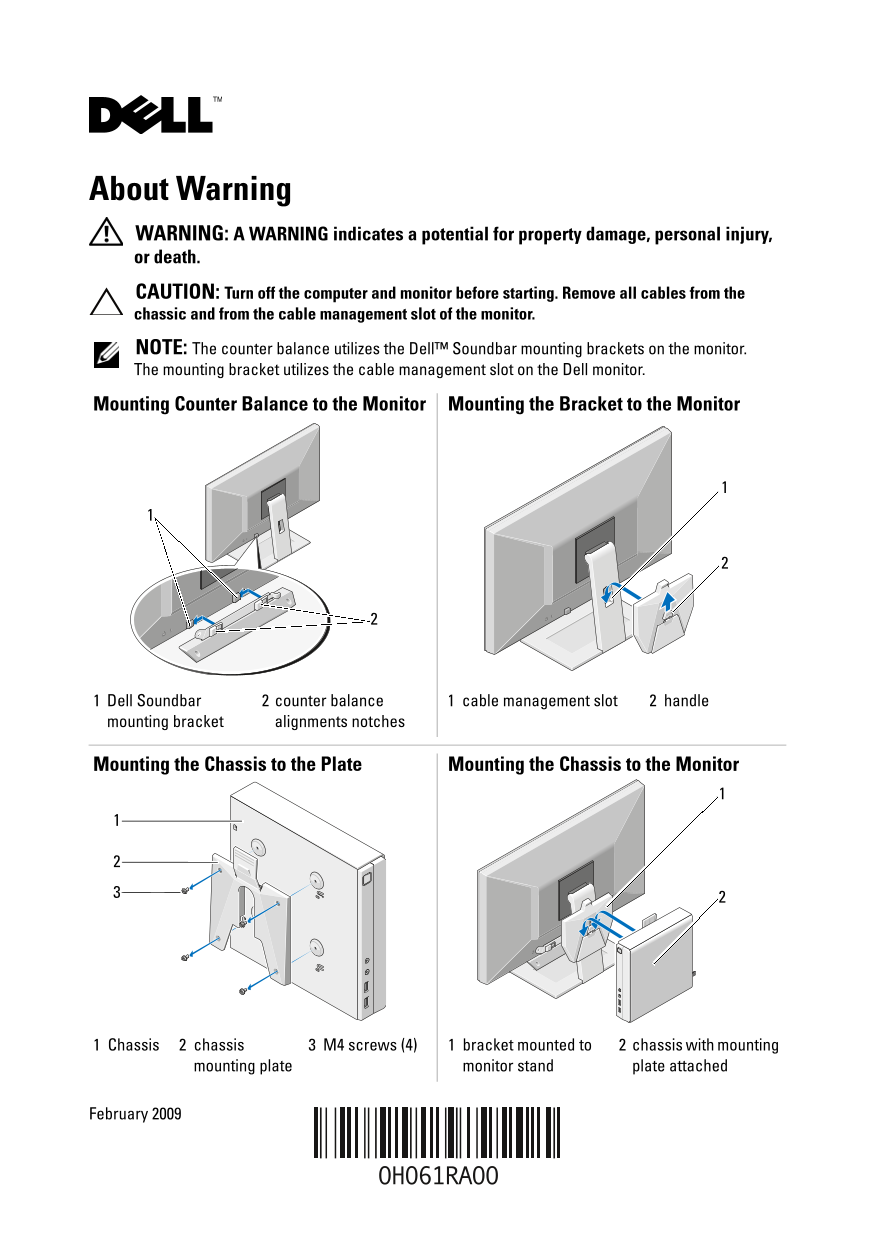
About Warning WARNING: A WARNING indicates a potential for property damage, personal injury, or death. CAUTION: Turn off the computer and monitor before starting. Remove all cables from the chassic and from the cable management slot of the monitor. NOTE: The counter balance utilizes the Dell™ Soundbar mounting brackets on the monitor. The mounting bracket utilizes the cable management slot on the Dell monitor.
Mounting Counter Balance to the Monitor Mounting the Bracket to the Monitor
Dell Soundbar counter balance cable management slot handle mounting bracket alignments notches
Mounting the Chassis to the Plate Mounting the Chassis to the Monitor
Chassis chassis M4 screws (4) bracket mounted to chassis with mounting
mounting plate monitor stand plate attached
February 2009
Page Summary Contents For Dell Monitor Mount Technical Form
Manual Details
| Brand | Dell |
|---|---|
| Pages | 20 |
| File Size | 3.36 MB |
| Published | July 02, 2026 |
Enter the captcha to get the download link:

Frequently Asked Questions
What clearance is needed at the back of the chassis for cooling?
There must be at least 1 inch (25.4mm) clearance at the back for optimal system cooling.
What precautions should I take before mounting the chassis to the monitor?
Ensure that none of the system's vents are blocked, and keep the front face from pointing up or down.
Where must all cables be removed before starting assembly?
Turn off the computer and monitor, then remove all cables from the chassis and the monitor's cable management slot.
Is there a warning about removing components?
Yes, caution is advised that before removing the counter balance, the chassis must first be detached from the monitor mount.