Dell Latitude 5290 2-in-1 Quick Install Guide
Summary
This Quick Start Guide for the Dell Latitude 5290 2-in-1 convertible laptop provides setup instructions in English, Simplified Chinese, Traditional Chinese, Japanese, and Korean. It covers micro-SIM and microSD card insertion, power adapter connection, kickstand deployment, and highlights new features including Intel 7th and 8th Gen processor support, optional Thunderbolt 3, and 2133 MHz memory support. Hardware features, regulatory information, and Dell support resources are also included.
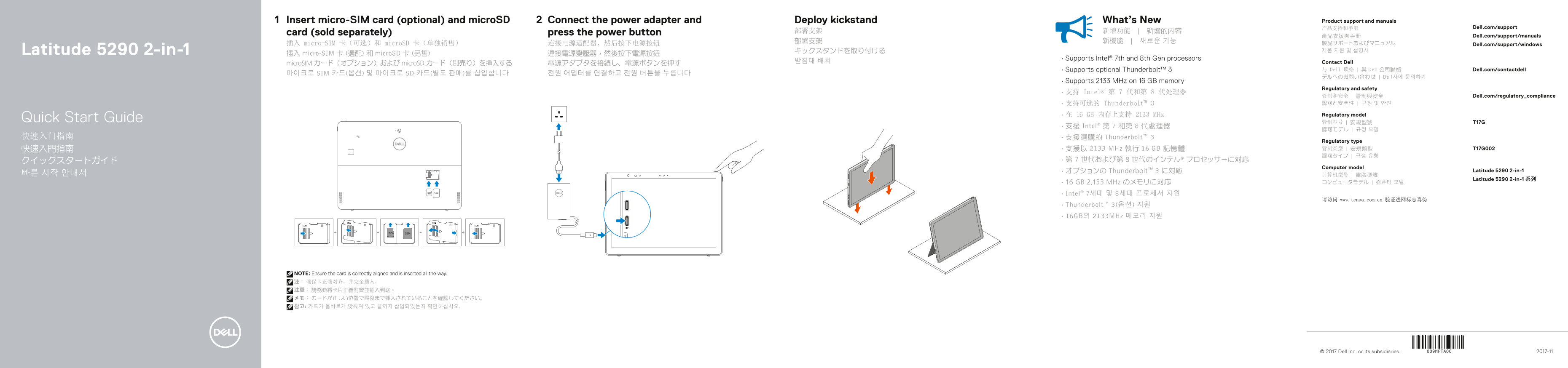
Page 1 Text Content
Insert micro-SIM card (optional) and micro SD Connect the power adapter and Deploy kickstand What’s New Product support and manuals
产品支持和手册 Dell.com/support
card (sold separately) press the power button 部署支架 新增功能 | 新增的內容
產品支援與手冊 Dell.com/support/manuals
插入 micro-SIM 卡(可选)和 micro SD 卡(单独销售) 连接电源适配器,然后按下电源按钮 Dell.com/support/windows
Latitude 5290 2-in-1 キックスタンドを取り付ける 제품 지원 및 설명서
插入 micro-SIM 卡 (選配) 和 micro SD 卡 (另售) 連接電源變壓器,然後按下電源按鈕
• Supports Intel® 7th and 8th Gen processors
받침대 배치 Contact Dell
micro SIM カード(オプション)および micro SD カード(別売り)を挿入する 電源アダプタを接続し、電源ボタンを押す
• Supports optional Thunderbolt™ 3 与 Dell 联络 | 與 Dell 公司聯絡 Dell.com/contactdell
마이크로 SIM 카드(옵션) 및 마이크로 SD 카드(별도 판매)를 삽입합니다 전원 어댑터를 연결하고 전원 버튼을 누릅니다
デルへのお問い合わせ | Dell사에 문의하기
• Supports 2133 MHz on 16 GB memory
Regulatory and safety
• 支持 Intel® 第 7 代和第 8 代处理器
管制和安全 | 管制與安全 Dell.com/regulatory_compliance • 支持可选的 Thunderbolt™ 3 認可と安全性 | 규정 및 안전
• 在 16 GB 内存上支持 2133 MHz Regulatory model
Quick Start Guide 管制型号 | 安規型號 T17G
• 支援 Intel® 第 7 和第 8 代處理器
快速入门指南 • 支援選購的 Thunderbolt™ 3
Regulatory type 快速入門指南 • 支援以 2133 MHz 執行 16 GB 記憶體 管制类型 | 安規類型 T17G002 認可タイプ | 규정 유형
Computer model
• オプションの Thunderbolt™ 3 に対応 Latitude 5290 2-in-1
Latitude 5290 2-in-1 系列
• 16 GB 2,133 MHz のメモリに対応 コンピュータモデル | 컴퓨터 모델
• Intel® 7세대 및 8세대 프로세서 지원
请访问 www.tenaa.com.cn 验证进网标志真伪
• Thunderbolt™ 3(옵션) 지원 • 16GB의 2133MHz 메모리 지원
NOTE: Ensure the card is correctly aligned and is inserted all the way. 注: 确保卡正确对齐,并完全插入。 注意: 請務必將卡片正確對齊並插入到底。 メモ: カードが正しい位置で最後まで挿入されていることを確認してください。 참고: 카드가 올바르게 맞춰져 있고 끝까지 삽입되었는지 확인하십시오.
© 2017 Dell Inc. or its subsidiaries. 2017-11
Page Summary Contents For Dell Latitude 5290 2-in-1 Quick Install Guide
Manual Details
| Brand | Dell |
|---|---|
| Pages | 2 |
| File Size | 449.92 KB |
| Published | July 01, 2026 |
Enter the captcha to get the download link:

Frequently Asked Questions
哪些内存频率是受支持的?
此设备支持在 16 GB 内存上以 2133 MHz 运行。
如何进行SIM卡和microSD卡的安装?
插入 micro-SIM 卡(可选)和 microSD 卡,确保卡片正确对齐并完全插入。
是否支持外部显示设备连接?
该电脑通过 USB Type-C 提供 DisplayPort over Thunderbolt™ 3 输出功能。
使用过程中应注意身体距离要求吗?
所有与用户身体的组件(屏幕以外)必须始终保持在 15mm 以上的距离。