Dell Latitude 3390 2-in-1 Quick Install Guide
Summary
This Quick Start Guide for the Dell Latitude 3390 2-in-1 notebook provides multilingual setup instructions in English, Simplified Chinese, Traditional Chinese, and Indonesian. It highlights new features including Intel 8th Gen Core i Quad Core and Dual Core processor support, up to 2400 MHz DDR4 memory, and USB Type-C Dell docking compatibility. The guide illustrates the four usage modes (Stand, Notebook, Tablet, and Tent) and includes a detailed hardware features diagram. Designed for education and business users.
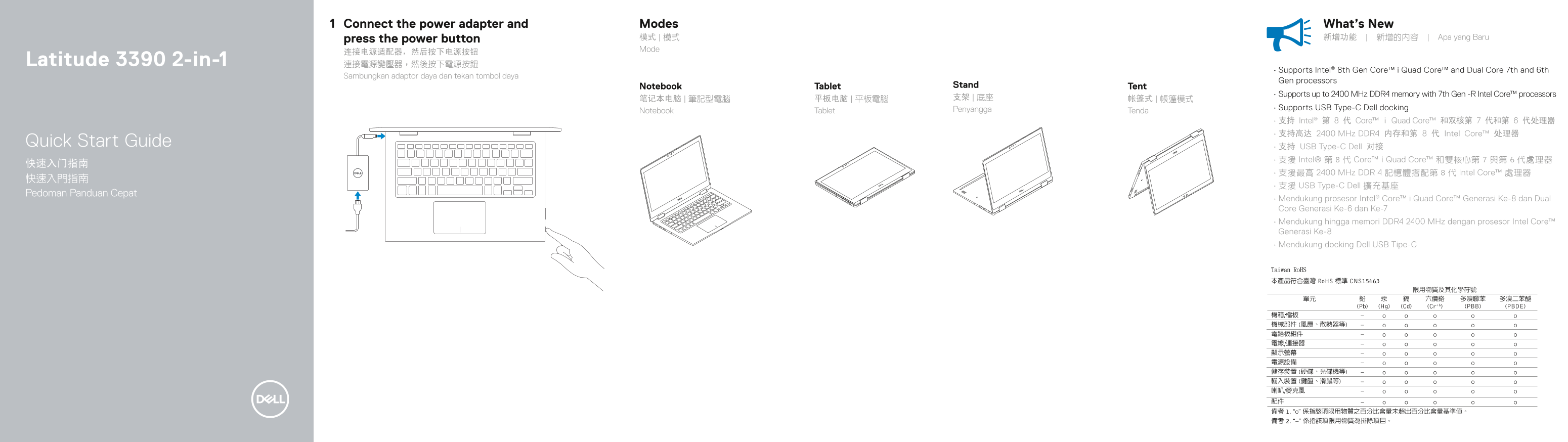
Page 1 Text Content
Connect the power adapter and Modes What’s New press the power button 模式 | 模式 新增功能 | 新增的內容 | Apa yang Baru Mode
Latitude 3390 2-in-1 連接電源變壓器,然後按下電源按鈕
• Supports Intel® 8th Gen Core™ i Quad Core™ and Dual Core 7th and 6th
Sambungkan adaptor daya dan tekan tombol daya
Gen processors
Notebook Tablet Stand Tent
• Supports up to 2400 MHz DDR4 memory with 7th Gen -R Intel Core™ processors
Penyangga • Supports USB Type-C Dell docking
Notebook Tablet Tenda
• 支持 Intel® 第 8 代 Core™ i Quad Core™ 和双核第 7 代和第 6 代处理器 • 支持高达 2400 MHz DDR4 内存和第 8 代 Intel Core™ 处理器
Quick Start Guide
• 支持 USB Type-C Dell 对接 • 支援 Intel® 第 8 代 Core™ i Quad Core™ 和雙核心第 7 與第 6 代處理器
• 支援最高 2400 MHz DDR 4 記憶體搭配第 8 代 Intel Core™ 處理器
• 支援 USB Type-C Dell 擴充基座
Pedoman Panduan Cepat
• Mendukung prosesor Intel® Core™ i Quad Core™ Generasi Ke-8 dan Dual Core Generasi Ke-6 dan Ke-7 • Mendukung hingga memori DDR4 2400 MHz dengan prosesor Intel Core™ Generasi Ke-8 • Mendukung docking Dell USB Tipe-C
Page Summary Contents For Dell Latitude 3390 2-in-1 Quick Install Guide
Manual Details
| Brand | Dell |
|---|---|
| Pages | 2 |
| File Size | 686.64 KB |
| Published | July 01, 2026 |
Enter the captcha to get the download link:

Frequently Asked Questions
What video ports are available for connecting an external screen?
You can use either the HDMI port or connect a display via the Display Port over USB Type-C.
What types of processors and memory are compatible with this laptop model?
It supports up to Intel Core i Quad/Dual generators of the 8th generation, and also supports DDR4 memory up to 2400 MHz.
What is the accepted voltage range for the power adapter?
The device uses a power connection that accepts a nominal voltage of 100-240V AC at a frequency of 50/60Hz.