Dell Latitude 12 2-in-1 Quick User Guide
Summary
Quick start guide for the Dell Latitude 12 5285 2-in-1 detachable tablet (regulatory model T17G, type T17G001), featuring micro-SIM and microSD card slots for mobile broadband connectivity, SupportAssist for automated system health checking and updates, and Windows 10 setup. Notifies users that mobile broadband may require network service activation before connecting. Multilingual instructions in English, Chinese, Japanese, and Korean with Taiwan BSMI certification labeling (100-240V AC).
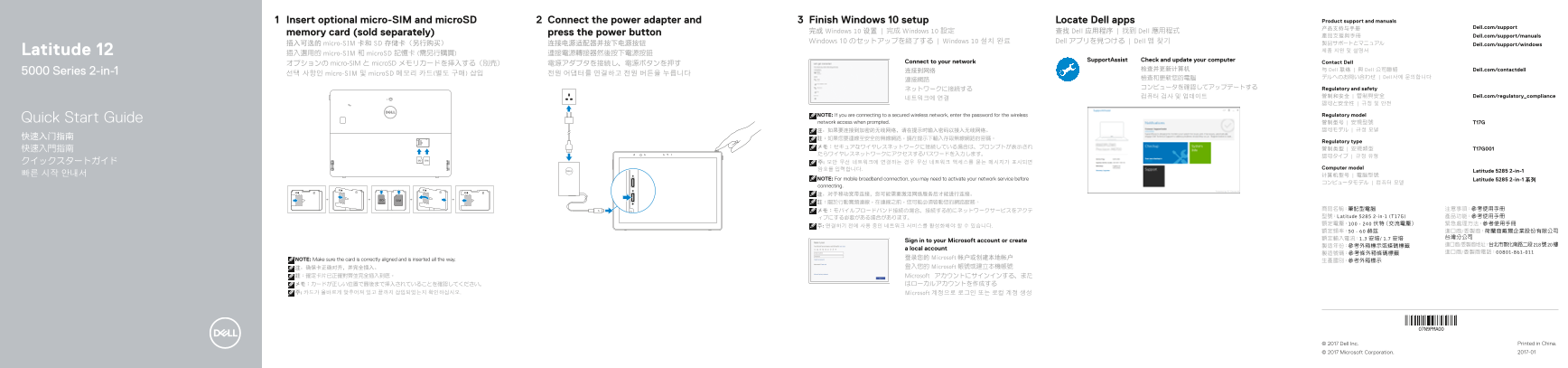
Page 1 Text Content
Insert optional micro-SIM and micro SD Connect the power adapter and Finish Windows 10 setup Locate Dell apps Product support and manuals
产品支持与手册 Dell.com/support
memory card (sold separately) press the power button 完成 Windows 10 设置 | 完成 Windows 10 設定 查找 Dell 应用程序 | 找到 Dell 應用程式
產品支援與手冊 Dell.com/support/manuals
Windows 10 のセットアップを終了する | Windows 10 설치 완료 Dell アプリを見つける | Dell 앱 찾기 製品サポートとマニュアル
插入可选的 micro-SIM 卡和 SD 存储卡(另行购买) 连接电源适配器并按下电源按钮 Dell.com/support/windows
Latitude 12 제품 지원 및 설명서
插入選用的 micro-SIM 和 micro SD 記憶卡 (需另行購買) 連接電源轉接器然後按下電源按鈕
Support Assist Check and update your computer
Connect to your network Contact Dell
オプションの micro-SIM と micro SD メモリカードを挿入する(別売) 電源アダプタを接続し、電源ボタンを押す
检查并更新计算机 与 Dell 联络 | 與 Dell 公司聯絡 Dell.com/contactdell
5000 Series 2-in-1 连接到网络
선택 사항인 micro-SIM 및 micro SD 메모리 카드(별도 구매) 삽입 전원 어댑터를 연결하고 전원 버튼을 누릅니다
檢查和更新您的電腦 デルへのお問い合わせ | Dell사에 문의합니다
ネットワークに接続する コンピュータを確認してアップデートする Regulatory and safety
컴퓨터 검사 및 업데이트 管制和安全 | 管制與安全 Dell.com/regulatory_compliance
NOTE: If you are connecting to a secured wireless network, enter the password for the wireless Regulatory model
Quick Start Guide network access when prompted. 管制型号 | 安規型號 T17G
Regulatory type
암호를 입력합니다. Computer model
Latitude 5285 2-in-1
NOTE: For mobile broadband connection, you may need to activate your network service before Latitude 5285 2-in-1 系列
connecting. 注:对于移动宽带连接,您可能需要激活网络服务后才能进行连接。 註:關於行動寬頻連線,在連線之前,您可能必須啟動您的網路服務。
メモ:モバイルブロードバンド接続の場合、接続する前にネットワークサービスをアクテ 商品名稱:筆記型電腦 注意事項:參考使用手冊 ィブにする必要がある場合があります。 型號:Latitude 5285 2-in-1 (T17G) 產品功能:參考使用手冊 額定電壓:100 - 240 伏特(交流電壓) 緊急處理方法:參考使用手冊
Sign in to your Microsoft account or create
a local account
NOTE: Make sure the card is correctly aligned and is inserted all the way. 登录您的 Microsoft 帐户或创建本地帐户
注:确保卡正确对齐,并完全插入。 登入您的 Microsoft 帳號或建立本機帳號
註:確定卡片已正確對齊並完全插入到底。 Microsoft アカウントにサインインする、また
주: 카드가 올바르게 맞추어져 있고 끝까지 삽입되었는지 확인하십시오. Microsoft 계정으로 로그인 또는 로컬 계정 생성
© 2017 Dell Inc. Printed in China. © 2017 Microsoft Corporation. 2017-01
Page Summary Contents For Dell Latitude 12 2-in-1 Quick User Guide
Manual Details
| Brand | Dell |
|---|---|
| Pages | 2 |
| File Size | 776.85 KB |
| Published | June 17, 2026 |
Enter the captcha to get the download link:

Frequently Asked Questions
如何連接無線網路?
如果是安全無線網路,在提示時輸入密碼以存取。
可以使用哪些配件或模块?
可插入选配的micro-SIM和microSD内存卡;可选配件包括IR摄像头、智能卡读卡器、振动指纹读取器等。
注意平板电脑的使用方向有什么要求吗?
当WWAN发射器处于活动状态时,必须保持屏幕侧面与用户身体之间至少15毫米的距离。
设备是否支持移动宽带连接?
是的,但对于移动宽带连接,在使用之前可能需要激活相应的网络服务。