Dell Latitude 12 7285 2-in-1 Quick User Guide
Summary
This Quick Start Guide for the Dell Latitude 12 7285 2-in-1 tablet (Regulatory Model T02J, Type T02J001) provides multilingual setup instructions covering optional micro-SIM and microSD card installation, power adapter connection, Windows 10 configuration, network connectivity, and Dell application location. It includes mobile broadband activation guidance, SupportAssist for system health monitoring, product registration, and Taiwan RoHS compliance documentation. A safety notice about official O
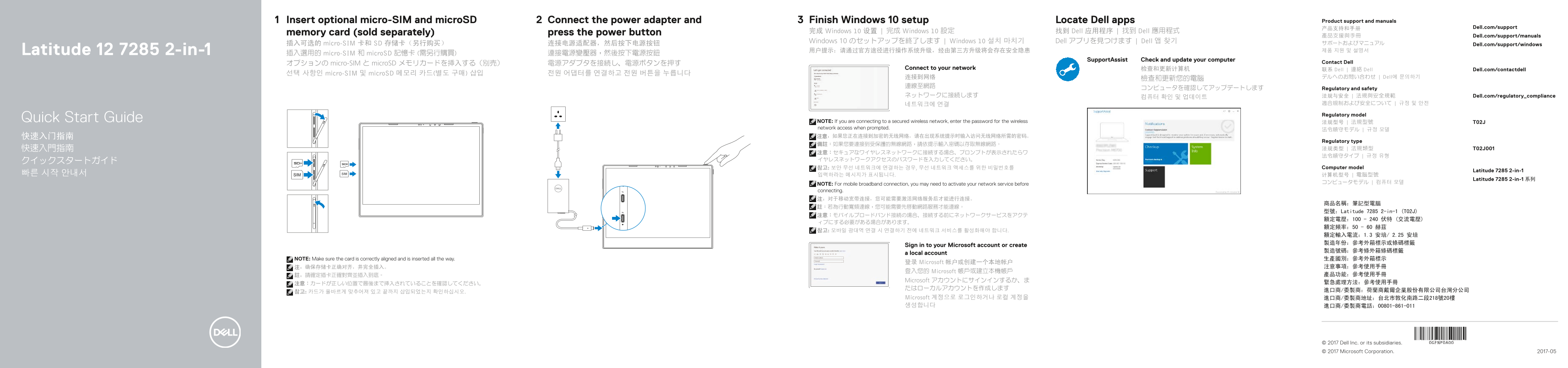
Page 1 Text Content
Insert optional micro-SIM and micro SD Connect the power adapter and Finish Windows 10 setup Locate Dell apps Product support and manuals
产品支持和手册 Dell.com/support
memory card (sold separately) press the power button 完成 Windows 10 设置 | 完成 Windows 10 設定 找到 Dell 应用程序 | 找到 Dell 應用程式
產品支援與手冊 Dell.com/support/manuals
Windows 10 のセットアップを終了します | Windows 10 설치 마치기 Dell アプリを見つけます | Dell 앱 찾기 サポートおよびマニュアル
插入可选的 micro-SIM 卡和 SD 存储卡(另行购买) 连接电源适配器,然后按下电源按钮 Dell.com/support/windows
Latitude 12 7285 2-in-1 用户提示:请通过官方途径进行操作系统升级,经由第三方升级将会存在安全隐患 제품 지원 및 설명서
插入選用的 micro-SIM 和 micro SD 記憶卡 (需另行購買) 連接電源變壓器,然後按下電源按鈕
Support Assist Check and update your computer
オプションの micro-SIM と micro SD メモリカードを挿入する(別売) 電源アダプタを接続し、電源ボタンを押す Contact Dell
Connect to your network 检查和更新计算机 联系 Dell | 連絡 Dell Dell.com/contactdell
선택 사항인 micro-SIM 및 micro SD 메모리 카드(별도 구매) 삽입 전원 어댑터를 연결하고 전원 버튼을 누릅니다
连接到网络 デルへのお問い合わせ | Dell에 문의하기
コンピュータを確認してアップデートします Regulatory and safety
ネットワークに接続します 法规与安全 | 法規與安全規範 Dell.com/regulatory_compliance
Regulatory model
Quick Start Guide NOTE: If you are connecting to a secured wireless network, enter the password for the wireless 法规型号 | 法規型號 T02J
network access when prompted.
Regulatory type
참고: 보안 무선 네트워크에 연결하는 경우, 무선 네트워크 액세스를 위한 비밀번호를 Computer model
Latitude 7285 2-in-1
Latitude 7285 2-in-1 系列
NOTE: For mobile broadband connection, you may need to activate your network service before コンピュータモデル | 컴퓨터 모델
connecting. 注:对于移动宽带连接,您可能需要激活网络服务后才能进行连接。
型號:Latitude 7285 2-in-1 (T02J)
Sign in to your Microsoft account or create
a local account
NOTE: Make sure the card is correctly aligned and is inserted all the way. 生產國別:參考外箱標示
登录 Microsoft 帐户或创建一个本地帐户
登入您的 Microsoft 帳戶或建立本機帳戶
Microsoft アカウントにサインインするか、ま
Microsoft 계정으로 로그인하거나 로컬 계정을 進口商/委製商地址:台北市敦化南路二段218號20樓 생성합니다 進口商/委製商電話:00801-861-011
© 2017 Dell Inc. or its subsidiaries. © 2017 Microsoft Corporation. 2017-05
Page Summary Contents For Dell Latitude 12 7285 2-in-1 Quick User Guide
Manual Details
| Brand | Dell |
|---|---|
| Pages | 2 |
| File Size | 481.18 KB |
| Published | July 02, 2026 |
Enter the captcha to get the download link:

Frequently Asked Questions
How do I properly insert optional SIM or microSD cards?
Make sure the card is correctly aligned and inserted all the way into the slot.
Is it safe to hold the tablet screen directly against my body?
No, when WWAN data transfer is active, keep a minimum distance of 15 mm (0.59 inches) from your body on all sides of the tablet.
What should I do if connecting to a secured wireless network?
When prompted by the system, you must enter the specific password for wireless network access.
What physical connectivity ports are available on this device?
Ports include Thunderbolt/USB Type-C (for charging and data), microphones, speakers, and an optional headset/microphone combo jack.