Dell Latitude 3190 2-in-1 Quick User Guide
Summary
This Quick Start Guide for the Dell Latitude 3190 2-in-1 notebook (Model P26T, Regulatory Type P26T003) highlights new features including Intel Gemini Lake Celeron or Pentium processors and Active Pen support. It illustrates the four usage modes (Stand, Notebook, Tablet, and Tent) and provides a detailed hardware features diagram identifying cameras, microphones, volume controls, USB 3.1 Gen 1 ports with PowerShare, HDMI port, Noble Wedge lock slot, and touchpad. RF safety guidelines included. Designed for education environments and mobile users.
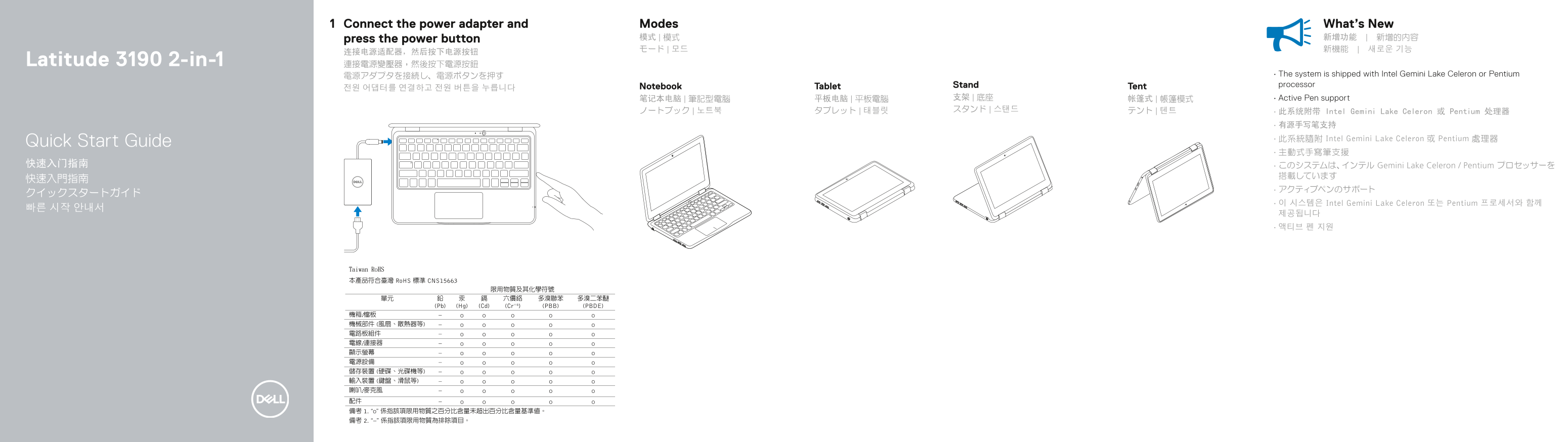
Page 1 Text Content
Connect the power adapter and Modes What’s New
press the power button 模式 | 模式 新增功能 | 新增的內容 モード | 모드 新機能 | 새로운 기능
Latitude 3190 2-in-1 連接電源變壓器,然後按下電源按鈕
電源アダプタを接続し、電源ボタンを押す • The system is shipped with Intel Gemini Lake Celeron or Pentium Notebook Tablet Stand Tent processor
笔记本电脑 | 筆記型電腦 平板电脑 | 平板電腦 支架 | 底座 帐篷式 | 帳篷模式 • Active Pen support ノートブック | 노트북 タブレット | 태블릿 スタンド | 스탠드 テント | 텐트
• 此系统附带 Intel Gemini Lake Celeron 或 Pentium 处理器 • 有源手写笔支持 • 此系統隨附 Intel Gemini Lake Celeron 或 Pentium 處理器
Quick Start Guide
快速入门指南 • このシステムは、インテル Gemini Lake Celeron / Pentium プロセッサーを
• 이 시스템은 Intel Gemini Lake Celeron 또는 Pentium 프로세서와 함께
Page Summary Contents For Dell Latitude 3190 2-in-1 Quick User Guide
Manual Details
| Brand | Dell |
|---|---|
| Pages | 2 |
| File Size | 414.61 KB |
| Published | July 01, 2026 |
Enter the captcha to get the download link:

Frequently Asked Questions
How do I power on the Latitude 3190 2-in-1?
Connect the power adapter and then press the power button.
What processor is included with this system?
The device is equipped with an Intel Gemini Lake Celeron or Pentium processor.
Can this laptop support active pen functionality?
Yes, the system supports Active Pen.
What key ports are available for connection?
It features a USB 3.1 Gen 1 port (with PowerShare) and an HDMI port.