Dell Latitude 3390 2-in-1 Quick User Guide
Summary
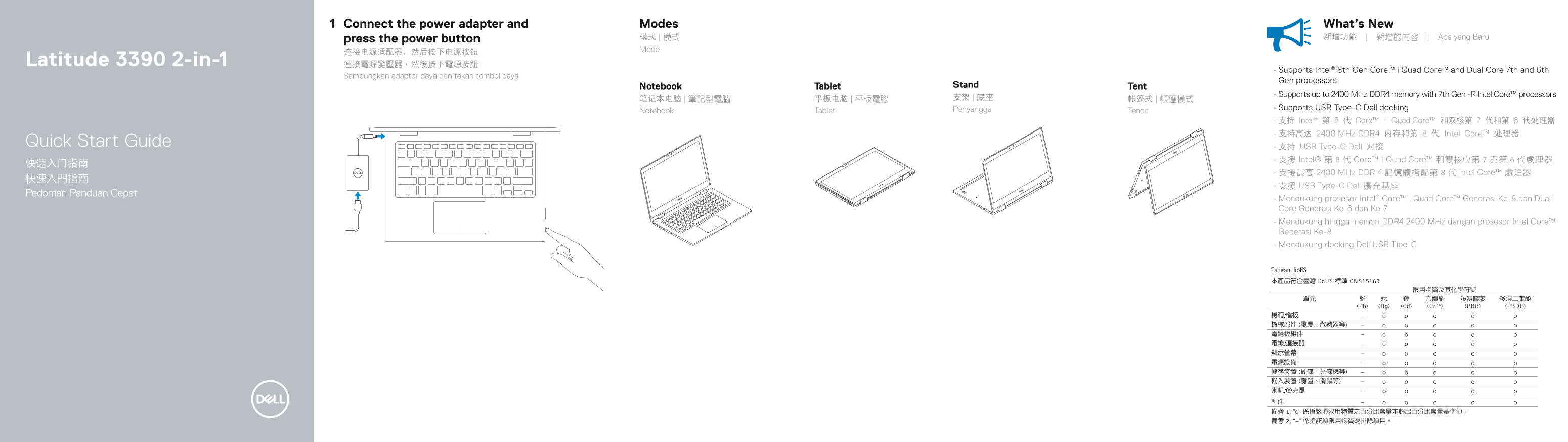
This quick start guide covers the Dell Latitude 3390 2-in-1 convertible laptop. It provides setup instructions for connecting the power adapter and pressing the power button, and describes the four usage modes: stand, notebook, tablet, and tent. The document highlights key features including Intel 8th Gen Core processors, DDR4 memory support, USB Type-C Dell docking, IR camera, and touchscreen. A visual overview identifies ports and components including HDMI, USB 3.1, USB 2.0, card reader, and audio jacks. Support resources and regulatory information are included. Targeted at business professionals setting up their Latitude 3390 2-in-1 for mobile productivity.
Page 1 Text Content
Connect the power adapter and Modes What’s New press the power button 模式 | 模式 新增功能 | 新增的內容 | Apa yang Baru Mode
Latitude 3390 2-in-1 連接電源變壓器,然後按下電源按鈕
• Supports Intel® 8th Gen Core™ i Quad Core™ and Dual Core 7th and 6th
Sambungkan adaptor daya dan tekan tombol daya
Gen processors
Notebook Tablet Stand Tent
• Supports up to 2400 MHz DDR4 memory with 7th Gen -R Intel Core™ processors
Penyangga • Supports USB Type-C Dell docking
Notebook Tablet Tenda
• 支持 Intel® 第 8 代 Core™ i Quad Core™ 和双核第 7 代和第 6 代处理器 • 支持高达 2400 MHz DDR4 内存和第 8 代 Intel Core™ 处理器
Quick Start Guide
• 支持 USB Type-C Dell 对接 • 支援 Intel® 第 8 代 Core™ i Quad Core™ 和雙核心第 7 與第 6 代處理器
• 支援最高 2400 MHz DDR 4 記憶體搭配第 8 代 Intel Core™ 處理器
• 支援 USB Type-C Dell 擴充基座
Pedoman Panduan Cepat
• Mendukung prosesor Intel® Core™ i Quad Core™ Generasi Ke-8 dan Dual Core Generasi Ke-6 dan Ke-7 • Mendukung hingga memori DDR4 2400 MHz dengan prosesor Intel Core™ Generasi Ke-8 • Mendukung docking Dell USB Tipe-C
Page Summary Contents For Dell Latitude 3390 2-in-1 Quick User Guide
Manual Details
| Brand | Dell |
|---|---|
| Pages | 2 |
| File Size | 686.64 KB |
| Published | June 25, 2026 |
Enter the captcha to get the download link:

Frequently Asked Questions
How do I turn on the device?
Connect the power adapter, then press the power button.
What processors does it support?
It supports Intel 8th Gen Core i Quad Core, Dual Core 7th, and 6th Gen processors.
What is the maximum supported memory speed?
It supports up to 2400 MHz DDR4 memory with 7th Gen Intel Core processors.
What are the available ports?
It features USB 3.1 Gen 1 with PowerShare, HDMI, Display port over USB Type-C, and more.