Dell Latitude 5290 Quick User Guide
Summary
This Quick Start Guide for the Dell Latitude 5290 notebook (Model P27S, Regulatory Type P27S002) highlights new features including dual-core 7th Gen and quad-core 8th Gen Intel Core processor support, and up to 2400 MHz DDR4 memory. It provides multilingual setup instructions with Taiwan RoHS compliance documentation, RF safety guidelines recommending 1.5 cm distance from the body, and regulatory information including electrical specifications. Designed for enterprise IT teams deploying business-class notebooks.
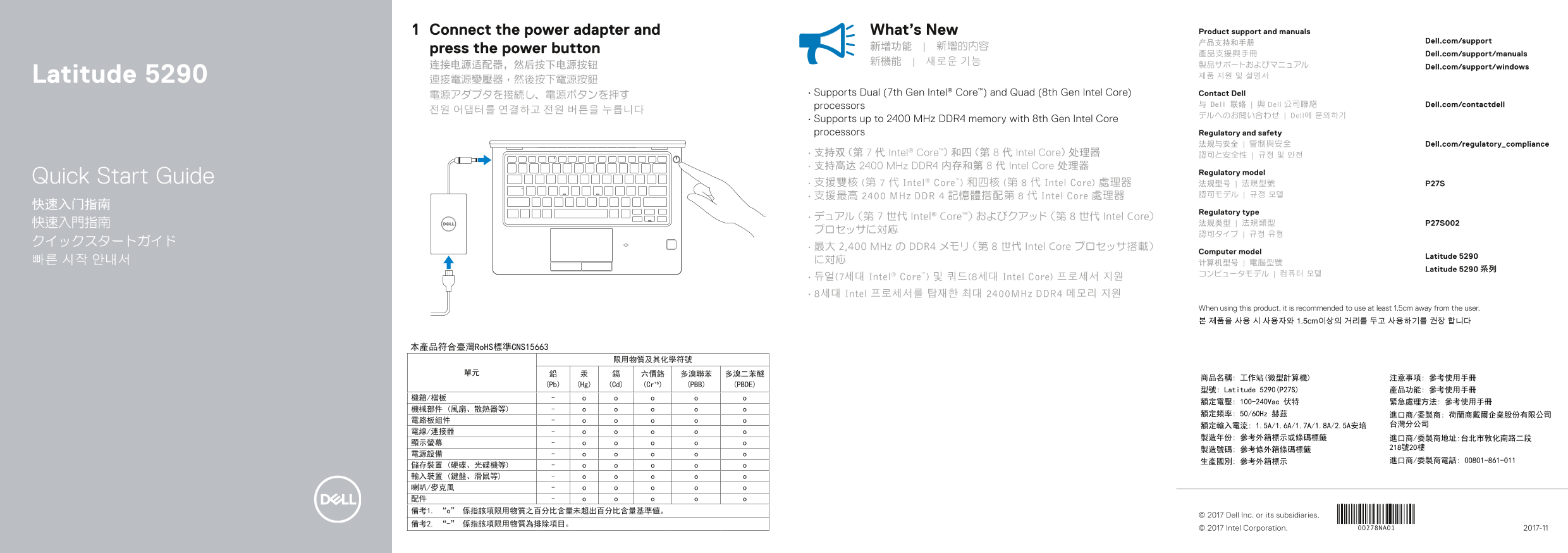
Page 1 Text Content
Connect the power adapter and What’s New Product support and manuals
产品支持和手册 Dell.com/support
press the power button 新增功能 | 新增的內容
產品支援與手冊 Dell.com/support/manuals
连接电源适配器,然后按下电源按钮 Dell.com/support/windows
Latitude 5290 제품 지원 및 설명서
電源アダプタを接続し、電源ボタンを押す • Supports Dual (7th Gen Intel® Core™) and Quad (8th Gen Intel Core) Contact Dell
processors 与 Dell 联络 | 與 Dell 公司聯絡 Dell.com/contactdell
デルへのお問い合わせ | Dell에 문의하기
• Supports up to 2400 MHz DDR4 memory with 8th Gen Intel Core processors Regulatory and safety
法规与安全 | 管制與安全 Dell.com/regulatory_compliance
• 支持双(第 7 代 Intel® Core™)和四(第 8 代 Intel Core)处理器 認可と安全性 | 규정 및 안전 • 支持高达 2400 MHz DDR4 内存和第 8 代 Intel Core 处理器
Regulatory model
Quick Start Guide • 支援雙核 (第 7 代 Intel® Core™) 和四核 (第 8 代 Intel Core) 處理器 法规型号 | 法規型號 P27S
• 支援最高 2400 MHz DDR 4 記憶體搭配第 8 代 Intel Core 處理器 認可モデル | 규정 모델
Regulatory type
• デュアル(第 7 世代 Intel® Core™)およびクアッド(第 8 世代 Intel Core)
• 最大 2,400 MHz の DDR4 メモリ(第 8 世代 Intel Core プロセッサ搭載)
Computer model
Latitude 5290
Latitude 5290 系列
• 듀얼(7세대 Intel® Core™) 및 쿼드(8세대 Intel Core) 프로세서 지원 • 8세대 Intel 프로세서를 탑재한 최대 2400MHz DDR4 메모리 지원
When using this product, it is recommended to use at least 1.5cm away from the user. 본 제품을 사용 시 사용자와 1.5cm이상의 거리를 두고 사용하기를 권장 합니다
本產品符合臺灣Ro HS標準CNS15663
(Pb) (Hg) (Cd) (Cr+6) (PBB) (PBDE)
型號: Latitude 5290(P27S) 產品功能: 參考使用手冊
額定電壓: 100-240Vac 伏特 緊急處理方法: 參考使用手冊
額定頻率: 50/60Hz 赫茲 進口商/委製商: 荷蘭商戴爾企業股份有限公司
© 2017 Dell Inc. or its subsidiaries.
© 2017 Intel Corporation. 2017-11
Page Summary Contents For Dell Latitude 5290 Quick User Guide
Manual Details
| Brand | Dell |
|---|---|
| Pages | 2 |
| File Size | 397.09 KB |
| Published | July 02, 2026 |
Enter the captcha to get the download link:

Frequently Asked Questions
如何开机?
连接电源适配器后,按下电源按钮即可开机。
这款设备支持哪些处理器?
它支持双(第 7 代 Intel Core)和四(第 8 代 Intel Core)处理器的组合。
设备的内存最高支持多少?
该型号最高支持 2400 MHz 的 DDR4 内存,并搭配第 8 代的 Intel Core 处理器。
这款电脑有哪些可选的功能?
它包含摄像头、microSD 卡读取器、NFC 感应器、红外线摄像头,这些功能均是可选项。
使用该产品时有什么空间要求吗?
建议与用户保持至少 1.5cm 的距离使用本产品。