Dell Latitude 3340 Quick User Guide
Summary
Quick start guide for Dell Latitude 3340 laptop providing initial setup instructions for Windows 8.1, including power adapter connection, Windows configuration, Microsoft account sign-in, network connectivity, and security update activation. The guide illustrates physical features such as the webcam, microphone, DisplayPort, HDMI, USB ports, media card reader, and optical drive. Written for first-time laptop users and business professionals setting up their new Latitude 3340 mobile computer.
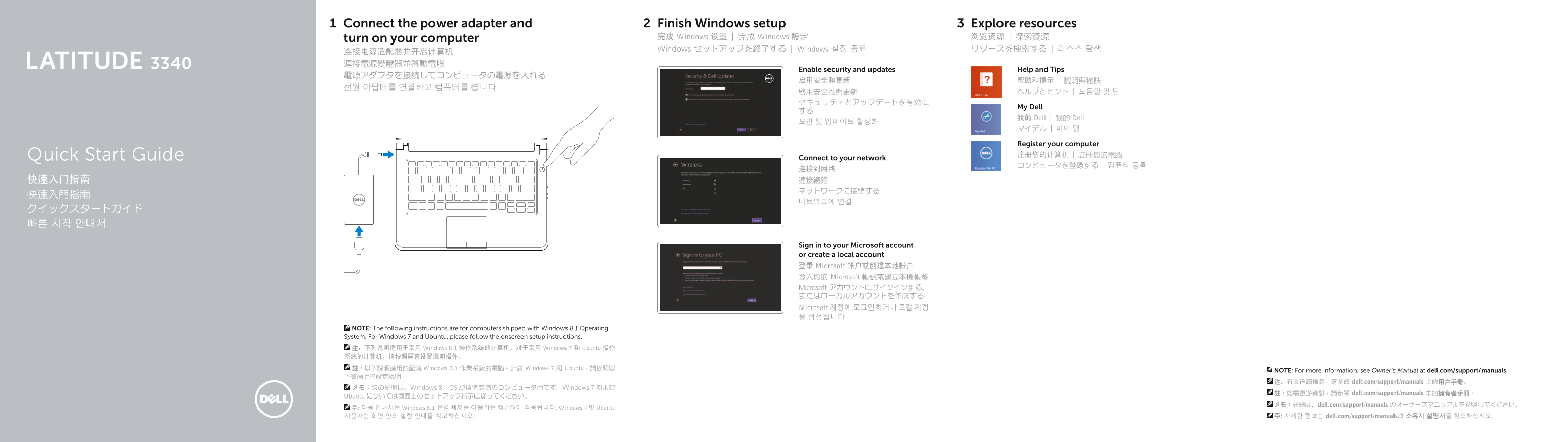
Page 1 Text Content
Connect the power adapter and Finish Windows setup Explore resources
turn on your computer 完成 Windows 设置 | 完成 Windows 設定 浏览资源 | 探索資源 Windows セットアップを終了する | Windows 설정 종료 リソースを検索する | 리소스 탐색
连接电源适配器并开启计算机 LATITUDE 3340 連接電源變壓器並啟動電腦
Enable security and updates Help and Tips
My Dell
我的 Dell | 我的 Dell
Register your computer Quick Start Guide 注册您的计算机 | 註冊您的電腦
Connect to your network
Sign in to your Microsoft account or create a local account 登录 Microsoft 帐户或创建本地帐户 登入您的 Microsoft 帳號或建立本機帳號 Microsoft アカウントにサインインする、 またはローカルアカウントを作成する Microsoft 계정에 로그인하거나 로컬 계정 을 생성합니다
NOTE: The following instructions are for computers shipped with Windows 8.1 Operating System. For Windows 7 and Ubuntu, please follow the onscreen setup instructions. 注:下列说明适用于采用 Windows 8.1 操作系统的计算机。对于采用 Windows 7 和 Ubuntu 操作 系统的计算机,请按照屏幕设置说明操作。 註:以下說明適用於配備 Windows 8.1 作業系統的電腦。針對 Windows 7 和 Ubuntu,請依照以
NOTE: For more information, see Owner’s Manual at dell.com/support/manuals.
注:有关详细信息,请参阅 dell.com/support/manuals 上的用户手册。
メモ:次の説明は、Windows 8.1 OS が標準装備のコンピュータ用です。Windows 7 および
註:如需更多資訊,請參閱 dell.com/support/manuals 中的擁有者手冊。
Ubuntu については画面上のセットアップ指示に従ってください。
メモ:詳細は、dell.com/support/manuals のオーナーズマニュアルを参照してください。
주: 다음 안내서는 Windows 8.1 운영 체제를 이용하는 컴퓨터에 적용됩니다. Windows 7 및 Ubuntu 사용자는 화면 안의 설정 안내를 참고하십시오. 주: 자세한 정보는 dell.com/support/manuals의 소유자 설명서를 참조하십시오.
Page Summary Contents For Dell Latitude 3340 Quick User Guide
Manual Details
| Brand | Dell |
|---|---|
| Pages | 2 |
| File Size | 269.18 KB |
| Published | June 26, 2026 |
Enter the captcha to get the download link:

Frequently Asked Questions
How do I connect the computer initially?
Connect the power adapter and then turn on your computer.
What models is this guide for (software compatibility)?
The instructions primarily apply to computers shipped with Windows 8.1 Operating System.
Where can I find detailed technical diagrams or manuals?
For more information, refer to the Owner’s Manual at dell.com/support/manuals.
What are the physical ports available on the device?
The ports include Microphone, Mini DisplayPort connector, HDMI connector, USB 3.0 connectors (including PowerShare), Audio connector, and Memory card reader.