Dell Vostro 23 3340 Quick User Guide
Summary
Dell Vostro 23 (3340) all-in-one Quick Start Guide (2014) covering stand installation, keyboard/mouse setup, network cable, power cable, computer power-on, and features including camera with privacy latch, OSD buttons, HDMI-in/out, USB 3.0/2.0, memory card reader, and diagnostic button for model W10C.
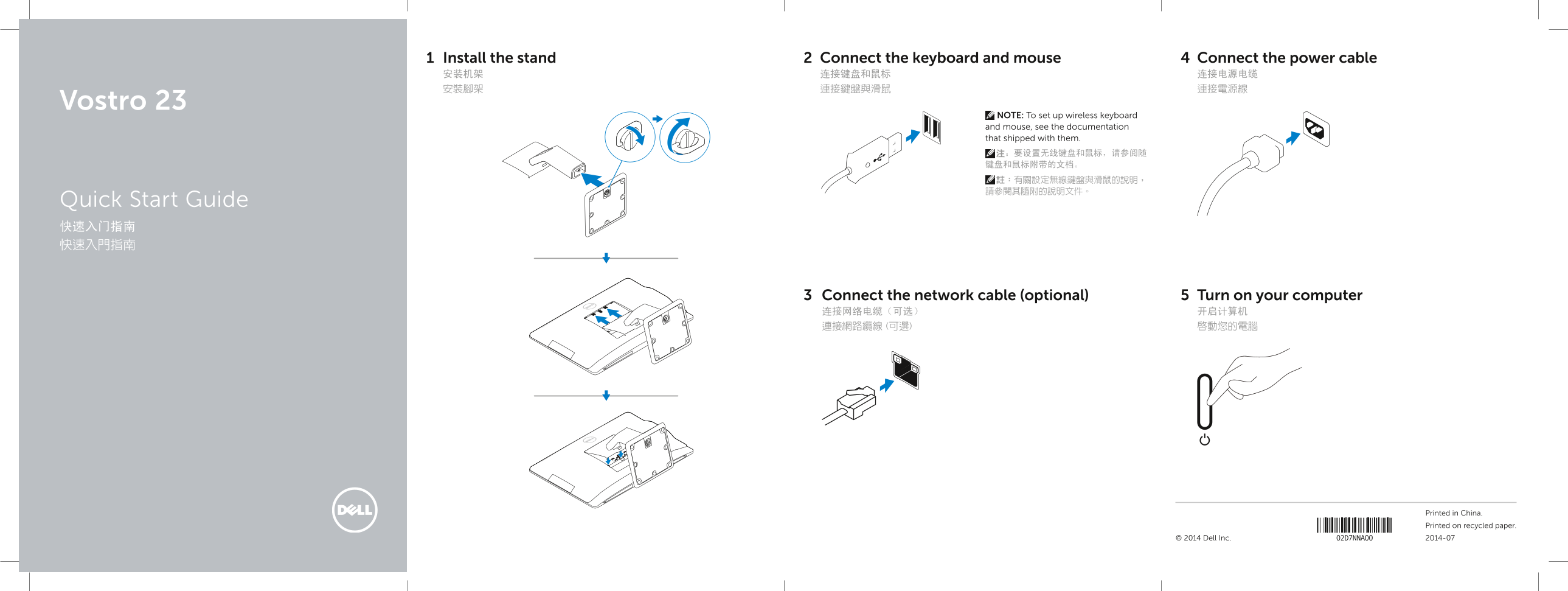
Page 1 Text Content
Install the stand Connect the keyboard and mouse Connect the power cable 安装机架 连接键盘和鼠标 连接电源电缆 安裝腳架 連接鍵盤與滑鼠 連接電源線
Vostro 23
NOTE: To set up wireless keyboard and mouse, see the documentation that shipped with them. 注:要设置无线键盘和鼠标,请参阅随 键盘和鼠标附带的文档。 註:有關設定無線鍵盤與滑鼠的說明, 請參閱其隨附的說明文件。
Quick Start Guide 快速入门指南 快速入門指南
Connect the network cable (optional) Turn on your computer 连接网络电缆(可选) 开启计算机 連接網路纜線 (可選) 啟動您的電腦
Printed in China. Printed on recycled paper.
© 2014 Dell Inc. 2014-07
Page Summary Contents For Dell Vostro 23 3340 Quick User Guide
Manual Details
| Brand | Dell |
|---|---|
| Pages | 2 |
| File Size | 214.84 KB |
| Published | July 03, 2026 |
Enter the captcha to get the download link:

Frequently Asked Questions
How do I set up the wireless keyboard and mouse?
Refer to the specific documentation that was shipped with the wireless devices.
What components are available for connection on this model?
It features HDMI-out/in connectors, USB 2.0/3.0 ports, a memory card reader, network connector, and audio jacks.
Is an external monitor connection supported?
Yes, there are both an HDMI-out connector and an HDMI-in connector available.