Dell Inspiron 23 2350 Quick User Guide
Summary
This Quick Start Guide for the Dell Inspiron 23 all-in-one desktop computer provides multilingual setup instructions covering wireless keyboard and mouse setup, power cable connection, Windows setup with security and updates, and network connectivity. It highlights the optional Intel RealSense 3D camera, hardware features including USB 3.0 ports and headset port, Dell Backup and Recovery, and My Dell application. Designed for home users and families setting up a space-saving all-in-one PC.
Page 1 Text Content
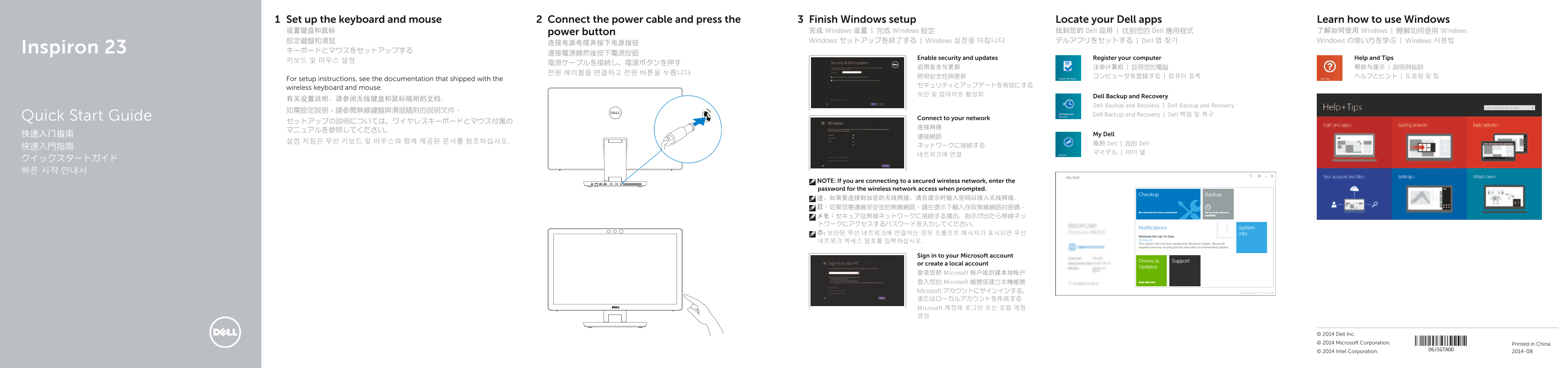
Set up the keyboard and mouse Connect the power cable and press the Finish Windows setup Locate your Dell apps Learn how to use Windows 设置键盘和鼠标 power button 完成 Windows 设置 | 完成 Windows 設定 找到您的 Dell 应用 | 找到您的 Dell 應用程式 了解如何使用 Windows | 瞭解如何使用 Windows 設定鍵盤和滑鼠 Windows セットアップを終了する | Windows 설정을 마칩니다 デルアプリをセットする | Dell 앱 찾기 Windows の使い方を学ぶ | Windows 사용법
Inspiron 23 キーボードとマウスをセットアップする
Enable security and updates Register your computer Help and Tips
For setup instructions, see the documentation that shipped with the
wireless keyboard and mouse.
Dell Backup and Recovery
Dell Backup and Recovery | Dell Backup and Recovery
Dell Backup and Recovery | Dell 백업 및 복구
Quick Start Guide Connect to your network
快速入门指南 My Dell
설정 지침은 무선 키보드 및 마우스와 함께 제공된 문서를 참조하십시오. 我的 Dell | 我的 Dell
NOTE: If you are connecting to a secured wireless network, enter the password for the wireless network access when prompted. 注:如果要连接到加密的无线网络,请在提示时输入密码以接入无线网络。 註:如果您要連線至安全的無線網路,請在提示下輸入存取無線網路的密碼。 メモ:セキュアな無線ネットワークに接続する場合、指示が出たら無線ネッ トワークにアクセスするパスワードを入力してください。 주: 보안된 무선 네트워크에 연결하는 경우 프롬프트 메시지가 표시되면 무선 네트워크 액세스 암호를 입력하십시오.
Sign in to your Microsoft account or create a local account 登录您的 Microsoft 帐户或创建本地帐户 登入您的 Microsoft 帳號或建立本機帳號 Microsoft アカウントにサインインする、 またはローカルアカウントを作成する Microsoft 계정에 로그인 또는 로컬 계정 생성
© 2014 Dell Inc. © 2014 Microsoft Corporation. Printed in China. © 2014 Intel Corporation. 2014-08
Page Summary Contents For Dell Inspiron 23 2350 Quick User Guide
Manual Details
| Brand | Dell |
|---|---|
| Pages | 2 |
| File Size | 788.01 KB |
| Published | July 01, 2026 |
Enter the captcha to get the download link:

Frequently Asked Questions
How do I connect the keyboard and mouse?
The manual advises checking the documentation shipped with the wireless keyboard and mouse for setup instructions.
Where can I find information on setting up Windows?
Setup instructions are available in dedicated guides such as 'My Dell' or by connecting to your network, which guides you toward finishing the process.
What ports is this computer equipped with?
It features two USB 3.0 ports, two USB 2.0 ports, an HDMI output port, and an HDMI input port, among others.