Dell Inspiron 3847 Quick User Guide
Summary
Quick Start Guide for the Dell Inspiron 3847 desktop computer from 2013. Multi-language setup instructions covering keyboard and mouse connection, display attachment, network cable connection, power-on procedures, and Windows 8/Windows 7 setup completion. Includes guidance on discrete graphics card display connection, Microsoft account sign-in, and product registration with Dell Help Documentation references.
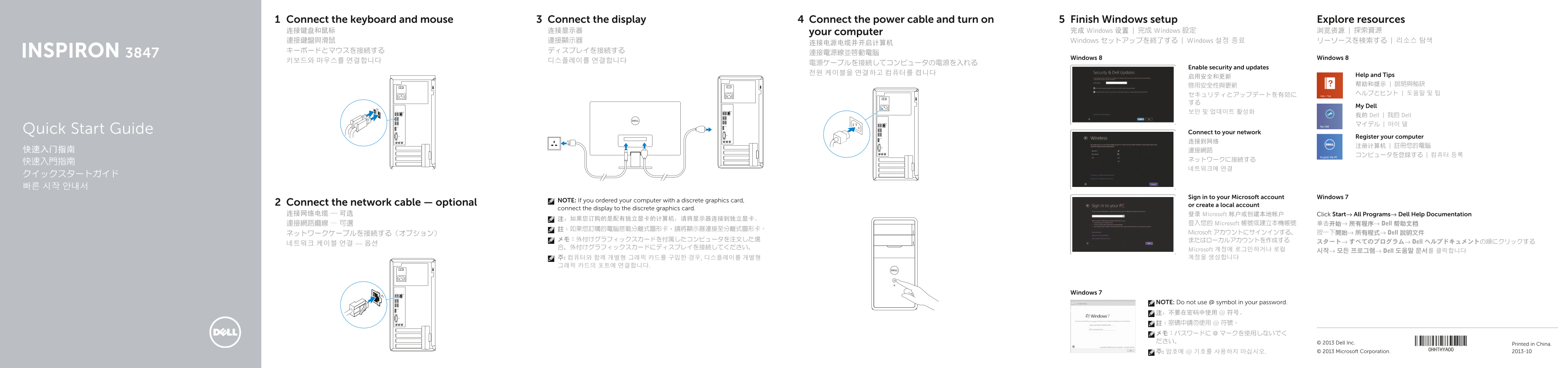
Page 1 Text Content
Connect the keyboard and mouse Connect the display Connect the power cable and turn on Finish Windows setup Explore resources 连接键盘和鼠标 连接显示器 your computer 完成 Windows 设置 | 完成 Windows 設定 浏览资源 | 探索資源 連接鍵盤與滑鼠 連接顯示器 Windows セットアップを終了する | Windows 설정 종료 リーソースを検索する | 리소스 탐색
Windows 8 Windows 8
Enable security and updates
启用安全和更新 Help and Tips 啟用安全性與更新 帮助和提示 | 說明與秘訣 セキュリティとアップデートを有効に ヘルプとヒント | 도움말 및 팁
My Dell
我的 Dell | 我的 Dell マイデル | 마이 델
Quick Start Guide Connect to your network
Register your computer
Sign in to your Microsoft account Windows 7
NOTE: If you ordered your computer with a discrete graphics card,
Connect the network cable — optional or create a local account
connect the display to the discrete graphics card.
连接网络电缆 — 可选 登录 Microsoft 帐户或创建本地帐户 Click Start→ All Programs→ Dell Help Documentation
連接網路纜線 — 可選 登入您的 Microsoft 帳號或建立本機帳號 单击开始→ 所有程序→ Dell 帮助文档
ネットワークケーブルを接続する(オプション) Microsoft アカウントにサインインする、 按一下開始→ 所有程式→ Dell 說明文件
スタート→ すべてのプログラム→ Dell ヘルプドキュメントの順にクリックする
Microsoft 계정에 로그인하거나 로컬 시작→ 모든 프로그램→ Dell 도움말 문서를 클릭합니다 주: 컴퓨터와 함께 개별형 그래픽 카드를 구입한 경우, 디스플레이를 개별형 계정을 생성합니다
Windows 7
NOTE: Do not use @ symbol in your password. 注:不要在密码中使用 @ 符号。 註:密碼中請勿使用 @ 符號。 メモ:パスワードに @ マークを使用しないでく ださい。 © 2013 Dell Inc.
Printed in China.
주: 암호에 @ 기호를 사용하지 마십시오. © 2013 Microsoft Corporation. 2013-10
Page Summary Contents For Dell Inspiron 3847 Quick User Guide
Manual Details
| Brand | Dell |
|---|---|
| Pages | 2 |
| File Size | 334.72 KB |
| Published | July 02, 2026 |
Enter the captcha to get the download link:

Frequently Asked Questions
If I have a discrete graphics card, where should I connect the display?
The manual advises connecting the display directly to the dedicated/discrete graphics card port.
What video output connector types does this device support?
The laptop is equipped with both an HDMI port and a VGA port for varied connectivity options.
How many USB connection ports are available on the machine?
It features four older USB 2.0 ports and two faster dedicated USB 3.0 ports.