Dell Inspiron M531R Quick User Guide
Summary
This quick start guide provides setup instructions for the Inspiron 15/15R/M531R laptop series. It covers power adapter connection, Windows setup completion, security and update enablement, keyboard shortcuts for brightness, volume, media control, wireless, display switching, and touchpad functions. The guide includes port identification diagrams and regulatory information, targeting new laptop owners and end users.
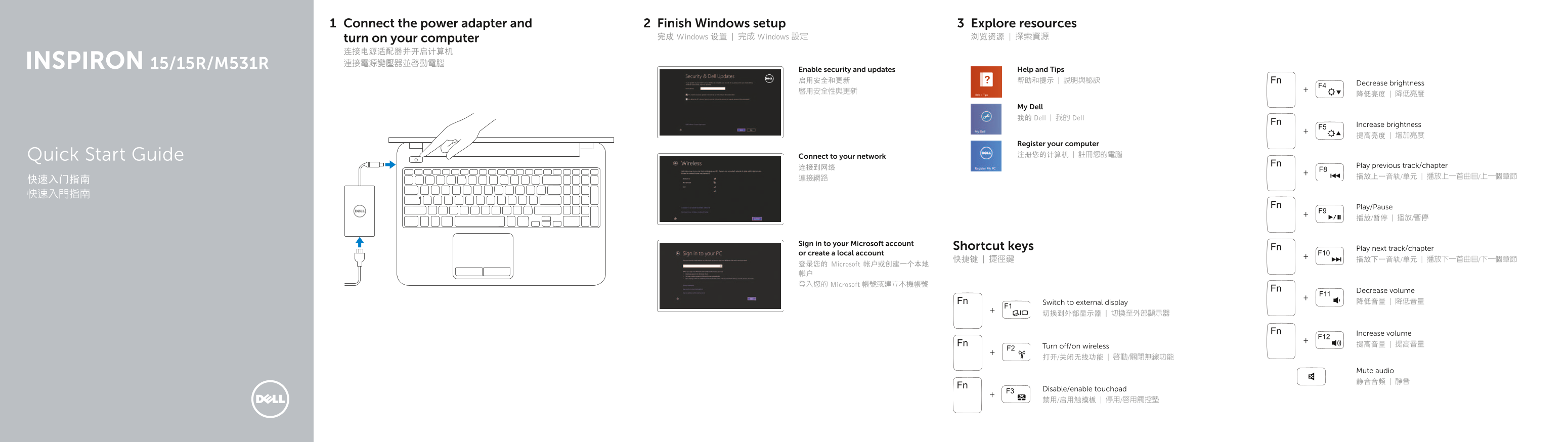
Page 1 Text Content
Connect the power adapter and Finish Windows setup Explore resources
turn on your computer 完成 Windows 设置 | 完成 Windows 設定 浏览资源 | 探索資源
Enable security and updates Help and Tips 启用安全和更新 帮助和提示 | 說明與秘訣
Decrease brightness
My Dell 我的 Dell | 我的 Dell
Increase brightness 提高亮度 | 增加亮度
Register your computer Quick Start Guide Connect to your network 注册您的计算机 | 註冊您的電腦
连接到网络 Play previous track/chapter 連接網路 播放上一音轨/单元 | 播放上一首曲目/上一個章節
Play/Pause 播放/暂停 | 播放/暫停
Sign in to your Microsoft account
Shortcut keys Play next track/chapter
or create a local account
登录您的 Microsoft 帐户或创建一个本地 帐户 登入您的 Microsoft 帳號或建立本機帳號
Decrease volume Switch to external display 降低音量 | 降低音量
Increase volume Turn off/on wireless 提高音量 | 提高音量
Mute audio 静音音频 | 靜音
Disable/enable touchpad 禁用/启用触摸板 | 停用/啟用觸控墊
Page Summary Contents For Dell Inspiron M531R Quick User Guide
Manual Details
| Brand | Dell |
|---|---|
| Pages | 2 |
| File Size | 207.01 KB |
| Published | June 24, 2026 |
Enter the captcha to get the download link:

Frequently Asked Questions
What are the shortcut keys for media controls?
Use Play/Pause, previous/next track, and increase/decrease volume keys.
How do I connect to the internet?
Connect to your network using the network port.
Where can I find the service tag?
Locate the service tag on the regulatory label.
How do I enable the touchpad?
Use the disable/enable touchpad shortcut key.
Which ports are available for external displays?
Connect to an external display using the HDMI port.