Dell Inspiron 23 5348 AIO Quick User Guide - Windows 7
Summary
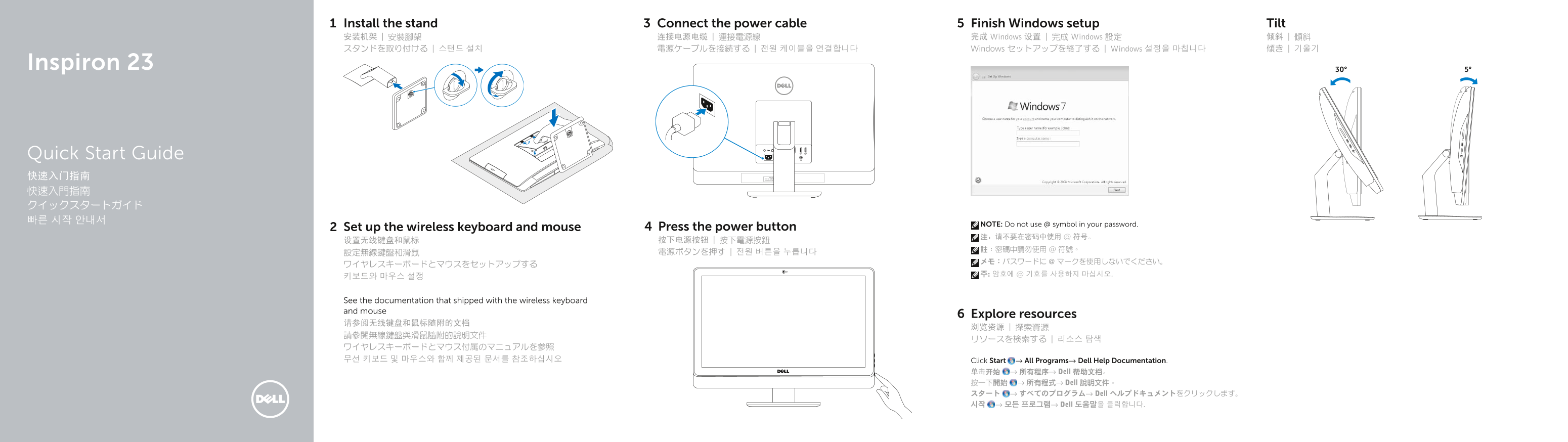
Dell Inspiron 23 Quick Start Guide covering stand installation, wireless keyboard and mouse setup, power cable connection, power button activation, Windows setup (warning not to use @ symbol in password), resource exploration via Dell Help Documentation, and features including dual microphones, camera with privacy cover, HDMI-in/HDMI-out ports, and optical drive.
Page 1 Text Content
Install the stand Connect the power cable Finish Windows setup Tilt 安装机架 | 安裝腳架 连接电源电缆 | 連接電源線 完成 Windows 设置 | 完成 Windows 設定 倾斜 | 傾斜 スタンドを取り付ける | 스탠드 설치 電源ケーブルを接続する | 전원 케이블을 연결합니다 Windows セットアップを終了する | Windows 설정을 마칩니다 傾き | 기울기
Inspiron 23 5°30°
Quick Start Guide 快速入门指南 快速入門指南 クイックスタートガイド 빠른 시작 안내서
NOTE: Do not use @ symbol in your password.
Set up the wireless keyboard and mouse Press the power button
See the documentation that shipped with the wireless keyboard and mouse
Explore resources
ワイヤレスキーボードとマウス付属のマニュアルを参照 무선 키보드 및 마우스와 함께 제공된 문서를 참조하십시오 Click Start → All Programs→ Dell Help Documentation.
单击开始 → 所有程序→ Dell 帮助文档。 按一下開始 → 所有程式→ Dell 說明文件。 スタート → すべてのプログラム→ Dell ヘルプドキュメントをクリックします。 시작 → 모든 프로그램→ Dell 도움말을 클릭합니다.
Page Summary Contents For Dell Inspiron 23 5348 AIO Quick User Guide - Windows 7
Manual Details
| Brand | Dell |
|---|---|
| Pages | 2 |
| File Size | 333.92 KB |
| Published | July 03, 2026 |
Enter the captcha to get the download link:

Frequently Asked Questions
What are the primary video output options available on this device?
The laptop has a dedicated HDMI-out port and an input source selection button for flexibility.
Where do I connect external microphones or recording devices?
You can utilize one of the left microphone, right microphone, headset port, or several USB 2.0/USB 3.0 ports (5 total).
How can I check the specifications or necessary documentation for this model?
The device features a Service Tag and carries regulatory labels allowing you to find support details using dell.com/support.
What key information do I need when setting up initial peripherals?
When setting up wireless keyboard and mouse, always refer to the specific documentation shipped with those accessories.