Dell Inspiron 3655 Quick User Guide - Windows 7
Summary
This Quick Start Guide for the Dell Inspiron 3655 desktop provides multilingual setup instructions covering keyboard and mouse connection, optional network cable installation, display connectivity, power adapter connection, and Windows setup completion. It documents hardware features including optional optical drive, hard-drive activity light, media card reader, headset port, HDMI port, USB 2.0 ports, network port, and expansion card slots via labeled diagrams. Windows password setup, computer protection, and Dell Help Documentation access are included. Designed for home users.
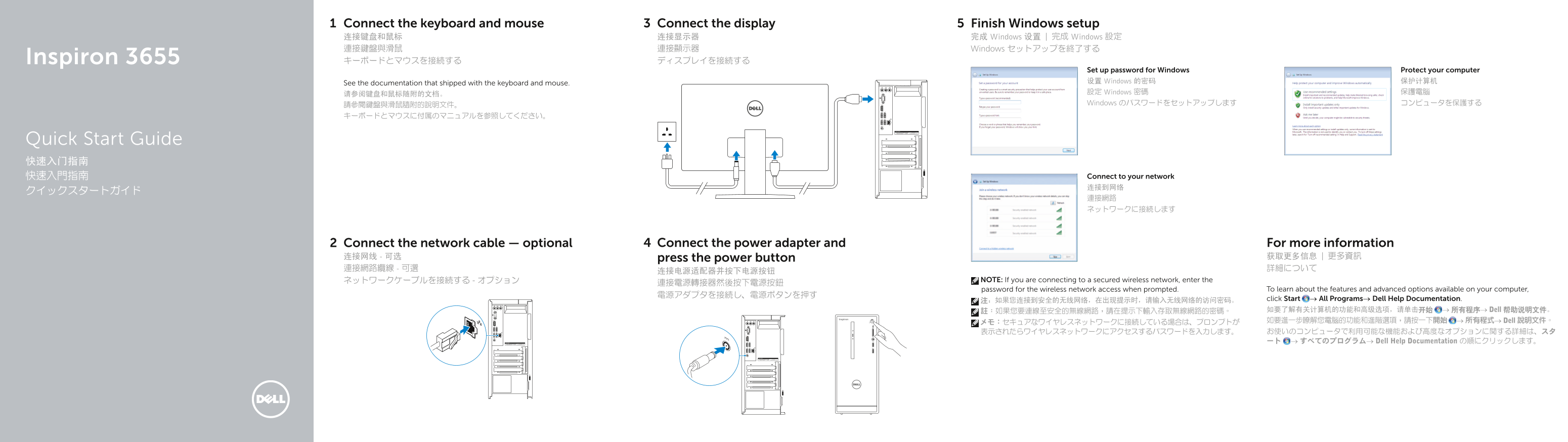
Page 1 Text Content
Connect the keyboard and mouse Connect the display Finish Windows setup 连接键盘和鼠标 连接显示器 完成 Windows 设置 | 完成 Windows 設定 連接鍵盤與滑鼠 連接顯示器 Windows セットアップを終了する Inspiron 3655 キーボードとマウスを接続する ディスプレイを接続する
Set up password for Windows Protect your computer See the documentation that shipped with the keyboard and mouse. 设置 Windows 的密码 保护计算机 请参阅键盘和鼠标随附的文档。 設定 Windows 密碼 保護電腦 請參閱鍵盤與滑鼠隨附的說明文件。 Windows のパスワードをセットアップします コンピュータを保護する
Quick Start Guide 快速入门指南
快速入門指南 Connect to your network 连接到网络
Connect the network cable — optional Connect the power adapter and For more information
连接网线 - 可选 press the power button 获取更多信息 | 更多資訊 連接網路纜線 - 可選 詳細について
ネットワークケーブルを接続する - オプション NOTE: If you are connecting to a secured wireless network, enter the
password for the wireless network access when prompted. To learn about the features and advanced options available on your computer,
注:如果您连接到安全的无线网络,在出现提示时,请输入无线网络的访问密码。 click Start → All Programs→ Dell Help Documentation. 註:如果您要連線至安全的無線網路,請在提示下輸入存取無線網路的密碼。 如要了解有关计算机的功能和高级选项,请单击开始 → 所有程序→ Dell 帮助说明文件。 メモ:セキュアなワイヤレスネットワークに接続している場合は、プロンプトが 如要進一步瞭解您電腦的功能和進階選項,請按一下開始 → 所有程式→ Dell 說明文件。 表示されたらワイヤレスネットワークにアクセスするパスワードを入力します。 お使いのコンピュータで利用可能な機能および高度なオプションに関する詳細は、スタ ート → すべてのプログラム→ Dell Help Documentation の順にクリックします。
Page Summary Contents For Dell Inspiron 3655 Quick User Guide - Windows 7
Manual Details
| Brand | Dell |
|---|---|
| Pages | 2 |
| File Size | 374.13 KB |
| Published | July 02, 2026 |
Enter the captcha to get the download link:

Frequently Asked Questions
如何连接到安全的无线网络?
如果连接到安全无线网络,在提示时需要输入网络的访问密码。
哪些端口用于外部显示器和设备连接?
HDMI端口、USB 3.0端口(2个)、USB 2.0端口(4个)和VGA端口等。
我应该在哪里找到电源适配器的连接信息或帮助文档?
您可以在Dell的官方网站支持页面dell.com/support/manuals查找更多产品手册和功能细节。
是否可以通过安全缆线孔进一步保护电脑?
是的,设备配备了安全缆线孔(Security-cable slot),可用于物理固定以增加安全性。