Dell Inspiron 14 3459 Quick User Guide - Windows 7
Summary
Dell Inspiron 14-3459 Quick Start Guide providing multilingual setup instructions (English, Simplified Chinese, Traditional Chinese, Korean) for the Inspiron 14 3000 Series laptop. Covers the initial Windows setup process including connecting the power adapter, pressing the power button, setting up a Windows password, connecting to wired or secured wireless networks, and registering the computer. Documents the physical port layout with microphone, camera, power-adapter port, HDMI, USB 3.0, media
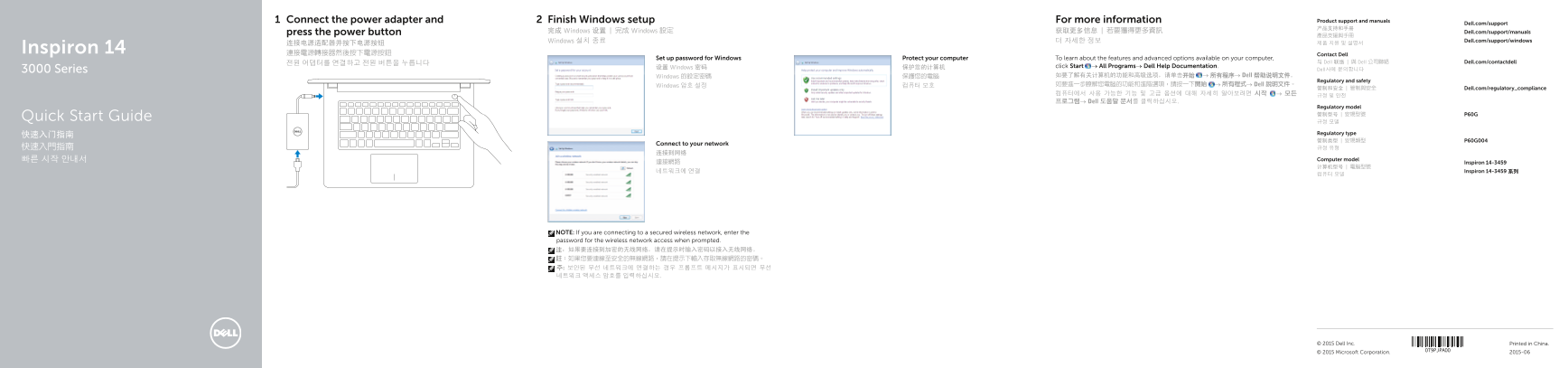
Page 1 Text Content
Connect the power adapter and Finish Windows setup For more information Product support and manuals
Dell.com/support
press the power button 完成 Windows 设置 | 完成 Windows 設定 获取更多信息 | 若要獲得更多資訊 Dell.com/support/manuals
Windows 설치 종료 더 자세한 정보 Dell.com/support/windows
Inspiron 14 連接電源轉接器然後按下電源按鈕
Contact Dell
Set up password for Windows Protect your computer To learn about the features and advanced options available on your computer,
전원 어댑터를 연결하고 전원 버튼을 누릅니다 与 Dell 联络 | 與 Dell 公司聯絡 Dell.com/contactdell
设置 Windows 密码 保护您的计算机 click Start → All Programs→ Dell Help Documentation.
3000 Series Dell사에 문의합니다
Windows 的設定密碼 保護您的電腦 如要了解有关计算机的功能和高级选项,请单击开始 → 所有程序→ Dell 帮助说明文件。
Regulatory and safety
Windows 암호 설정 컴퓨터 보호 如要進一步瞭解您電腦的功能和進階選項,請按一下開始 → 所有程式→ Dell 說明文件。
管制和安全 | 管制與安全 Dell.com/regulatory_compliance
프로그램→ Dell 도움말 문서를 클릭하십시오.
Regulatory model 管制型号 | 安規型號 P60G
Quick Start Guide
Regulatory type
Connect to your network
빠른 시작 안내서 Computer model
連接網路 Inspiron 14-3459
네트워크에 연결 Inspiron 14-3459 系列
NOTE: If you are connecting to a secured wireless network, enter the password for the wireless network access when prompted. 注:如果要连接到加密的无线网络,请在提示时输入密码以接入无线网络。 註:如果您要連線至安全的無線網路,請在提示下輸入存取無線網路的密碼。 주: 보안된 무선 네트워크에 연결하는 경우 프롬프트 메시지가 표시되면 무선 네트워크 액세스 암호를 입력하십시오.
© 2015 Dell Inc. Printed in China.
© 2015 Microsoft Corporation. 2015-06
Page Summary Contents For Dell Inspiron 14 3459 Quick User Guide - Windows 7
Manual Details
| Brand | Dell |
|---|---|
| Pages | 2 |
| File Size | 507.73 KB |
| Published | May 12, 2026 |
Enter the captcha to get the download link:

Frequently Asked Questions
如何初始设置Windows密码和网络连接?
按电源按钮,输入您的新密码,然后按照提示连接到任何无线或有线网络。
如果电脑含 eMMC,硬盘活动指示灯是否可用?
否。eMMC 包含的计算机上不再提供硬盘驱动器活动指示灯。
有哪些可用的快捷键功能?
包括静音、调节音量(增减)、播放控制(上一首/下一首/暂停)以及切换外部显示器等。
如何查看电脑更详细的功能和高级选项信息?
您需要访问 Start → All Programs→ Dell 帮助说明文件进行查看。