Dell Inspiron 3650 Quick User Guide - Windows 7
Summary
This Quick Start Guide for the Dell Inspiron 3650 desktop computer provides multilingual setup instructions covering keyboard and mouse connection, display setup with discrete graphics card guidance, optional network cable installation, power cable connection, and Windows setup with password configuration. It includes computer protection guidance and a detailed hardware features diagram identifying power button, hard-drive activity light, media-card reader, headset port, USB 2.0 and 3.0 ports, and expansion-card slots. Designed for home users.
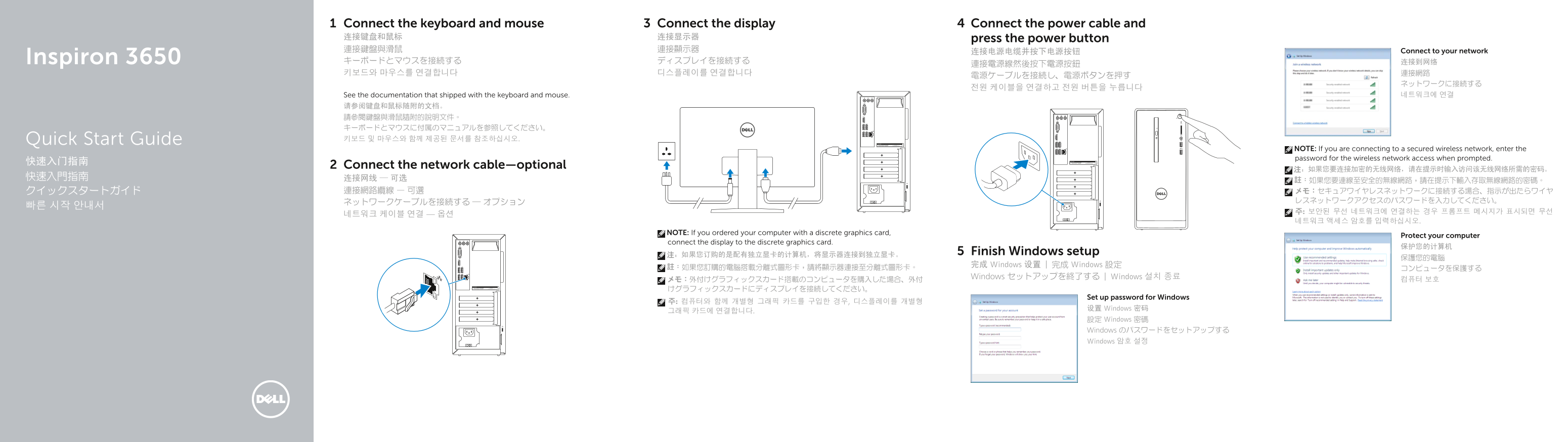
Page 1 Text Content
Connect the keyboard and mouse Connect the display Connect the power cable and 连接键盘和鼠标 连接显示器 press the power button 連接鍵盤與滑鼠 連接顯示器 Connect to your network
Inspiron 3650 キーボードとマウスを接続する ディスプレイを接続する 连接到网络
See the documentation that shipped with the keyboard and mouse. 네트워크에 연결
请参阅键盘和鼠标随附的文档。 請參閱鍵盤與滑鼠隨附的說明文件。 キーボードとマウスに付属のマニュアルを参照してください。 Quick Start Guide 키보드 및 마우스와 함께 제공된 문서를 참조하십시오.
NOTE: If you are connecting to a secured wireless network, enter the password for the wireless network access when prompted.
Connect the network cable—optional
NOTE: If you ordered your computer with a discrete graphics card,
Protect your computer
connect the display to the discrete graphics card.
注:如果您订购的是配有独立显卡的计算机,将显示器连接到独立显卡。 Finish Windows setup
完成 Windows 设置 | 完成 Windows 設定
Windows セットアップを終了する | Windows 설치 종료
Set up password for Windows
设置 Windows 密码
設定 Windows 密碼 Windows のパスワードをセットアップする Windows 암호 설정
Page Summary Contents For Dell Inspiron 3650 Quick User Guide - Windows 7
Manual Details
| Brand | Dell |
|---|---|
| Pages | 2 |
| File Size | 380.46 KB |
| Published | July 01, 2026 |
Enter the captcha to get the download link:

Frequently Asked Questions
If my computer is equipped with a discrete graphics card, where should I connect the display?
You must connect the display directly to the discrete graphics card.
What special step is required when linking to a secure wireless network?
When prompted, you need to enter the password for accessing that wireless network.
Are there options for securing the computer physically?
Yes, the manual specifies both padlock rings and a dedicated security cable slot.