Dell Inspiron-3656 Quick User Guide - Windows 7
Summary
This Quick Start Guide for the Dell Inspiron 3656 desktop computer provides multilingual setup instructions covering keyboard and mouse connection, display setup with a note for discrete graphics card configurations, optional network cable connection, power cable installation, and Windows setup with password configuration. It includes a hardware features diagram identifying optical drive, USB 2.0 and 3.0 ports, media-card reader, expansion-card slots, and power supply diagnostic button. Designed for home and small office users.
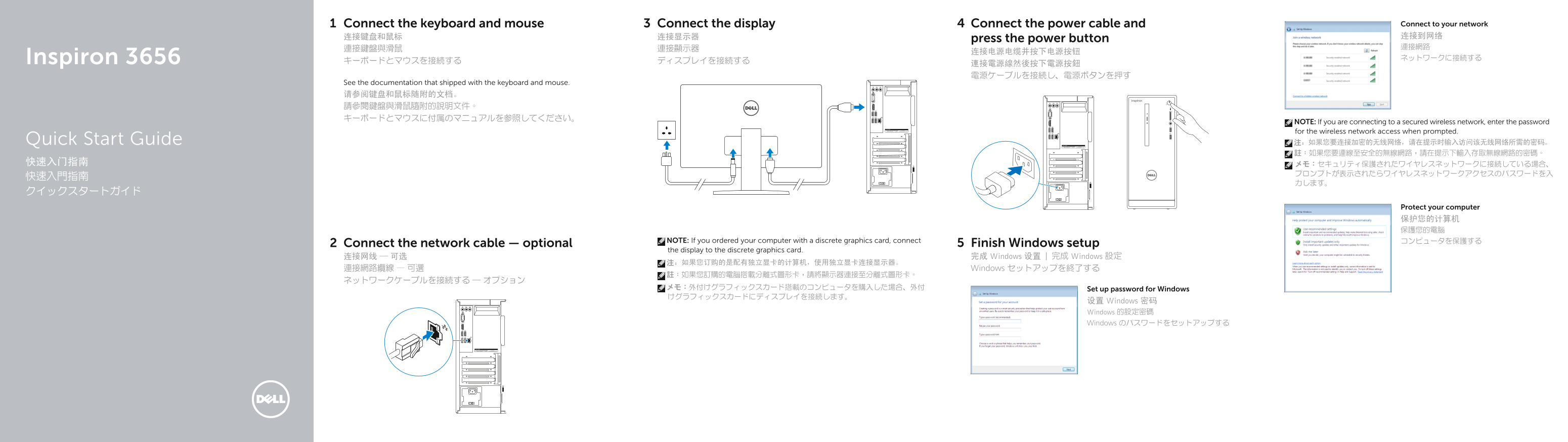
Page 1 Text Content
Connect the keyboard and mouse Connect the display Connect the power cable and Connect to your network 连接键盘和鼠标 连接显示器 连接到网络
press the power button
Inspiron 3656 ネットワークに接続する
See the documentation that shipped with the keyboard and mouse. 请参阅键盘和鼠标随附的文档。 請參閱鍵盤與滑鼠隨附的說明文件。 キーボードとマウスに付属のマニュアルを参照してください。
NOTE: If you are connecting to a secured wireless network, enter the password for the wireless network access when prompted. Quick Start Guide 注:如果您要连接加密的无线网络,请在提示时输入访问该无线网络所需的密码。 註:如果您要連線至安全的無線網路,請在提示下輸入存取無線網路的密碼。
Protect your computer 保护您的计算机 保護您的電腦
NOTE: If you ordered your computer with a discrete graphics card, connect コンピュータを保護する
Connect the network cable — optional Finish Windows setup
the display to the discrete graphics card.
连接网线 — 可选 完成 Windows 设置 | 完成 Windows 設定
連接網路纜線 — 可選 Windows セットアップを終了する
メモ:外付けグラフィックスカード搭載のコンピュータを購入した場合、外付 Set up password for Windows けグラフィックスカードにディスプレイを接続します。
设置 Windows 密码 Windows 的設定密碼 Windows のパスワードをセットアップする
Page Summary Contents For Dell Inspiron-3656 Quick User Guide - Windows 7
Manual Details
| Brand | Dell |
|---|---|
| Pages | 2 |
| File Size | 362.98 KB |
| Published | July 01, 2026 |
Enter the captcha to get the download link:

Frequently Asked Questions
If my computer has a discrete graphics card, where should I connect my display?
You must connect the display to the dedicated ports located on the separate (discrete) graphics card.
What do I need if I am connecting this computer to a secure wireless network?
You will be prompted to enter the access password for that specific wireless network.
Where can I find comprehensive documentation about my computer's advanced features and options?
To learn more, click Start → All Programs, and then select Dell Help Documentation.