Dell Inspiron-3656 Quick User Guide - Windows 8
Summary
This Quick Start Guide for the Dell Inspiron 3656 desktop (Regulatory Model D19M, Type D19M001) provides multilingual setup instructions covering keyboard and mouse connection, display connectivity with discrete graphics card guidance, optional network cable installation, power cable connection, and Windows and Ubuntu operating system configuration. It includes enabling security and updates, network connectivity setup, and Microsoft account sign-in. Designed for home and small office users setting up a versatile desktop computer for everyday computing tasks.
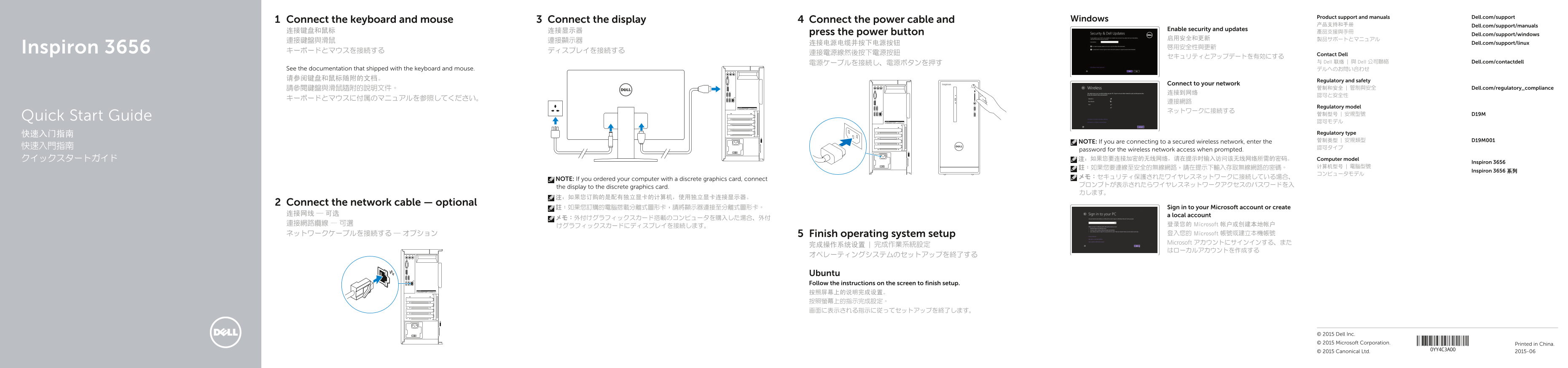
Page 1 Text Content
Product support and manuals Dell.com/support
Connect the keyboard and mouse Connect the display Connect the power cable and Windows
产品支持和手册 Dell.com/support/manuals
连接键盘和鼠标 连接显示器 Enable security and updates
press the power button 產品支援與手冊
Dell.com/support/windows
连接电源电缆并按下电源按钮 Dell.com/support/linux
Inspiron 3656 啟用安全性與更新
連接電源線然後按下電源按鈕 Contact Dell
電源ケーブルを接続し、電源ボタンを押す 与 Dell 联络 | 與 Dell 公司聯絡 Dell.com/contactdell
See the documentation that shipped with the keyboard and mouse. デルへのお問い合わせ 请参阅键盘和鼠标随附的文档。
Regulatory and safety
Connect to your network
請參閱鍵盤與滑鼠隨附的說明文件。 管制和安全 | 管制與安全 Dell.com/regulatory_compliance
Regulatory model
Quick Start Guide
快速入门指南 Regulatory type NOTE: If you are connecting to a secured wireless network, enter the 管制类型 | 安規類型 D19M001
password for the wireless network access when prompted. クイックスタートガイド 注:如果您要连接加密的无线网络,请在提示时输入访问该无线网络所需的密码。 Computer model
Inspiron 3656
Inspiron 3656 系列
NOTE: If you ordered your computer with a discrete graphics card, connect
the display to the discrete graphics card.
Connect the network cable — optional
註:如果您訂購的電腦搭載分離式圖形卡,請將顯示器連接至分離式圖形卡。 Sign in to your Microsoft account or create
连接网线 — 可选 a local account
連接網路纜線 — 可選 登录您的 Microsoft 帐户或创建本地帐户
ネットワークケーブルを接続する ― オプション Finish operating system setup 登入您的 Microsoft 帳號或建立本機帳號 Microsoft アカウントにサインインする、また
Ubuntu Follow the instructions on the screen to finish setup. 按照屏幕上的说明完成设置。 按照螢幕上的指示完成設定。 画面に表示される指示に従ってセットアップを終了します。
© 2015 Dell Inc. © 2015 Microsoft Corporation. Printed in China.
© 2015 Canonical Ltd. 2015-06
Page Summary Contents For Dell Inspiron-3656 Quick User Guide - Windows 8
Manual Details
| Brand | Dell |
|---|---|
| Pages | 2 |
| File Size | 718.91 KB |
| Published | July 02, 2026 |
Enter the captcha to get the download link:

Frequently Asked Questions
How should I connect the display if it has a discrete graphics card?
Use the independent (discrete) graphics card to connect the display.
Do I need a network cable for setup?
Connecting a network cable is optional, but local account setup often requires signing in with a Microsoft account.
What are common maintenance tasks or features?
You can register your computer using SupportAssist and perform backups or recoveries via the dedicated port/tools.
How do I finish the operating system setup?
Follow the instructions displayed on the screen to complete the setup process.