Dell Inspiron 3655 Quick User Guide - Windows 10
Summary
This Quick Start Guide for the Dell Inspiron 3655 desktop computer (Model D20M, Regulatory Type D20M001) provides multilingual setup instructions covering keyboard and mouse configuration, display connection, optional network cable setup, power adapter connection, and Windows operating system setup. It includes guidance on enabling Dell updates, connecting to networks, creating Windows recovery media, and locating Dell applications. Designed for home and small office users setting up a desktop PC for daily tasks.
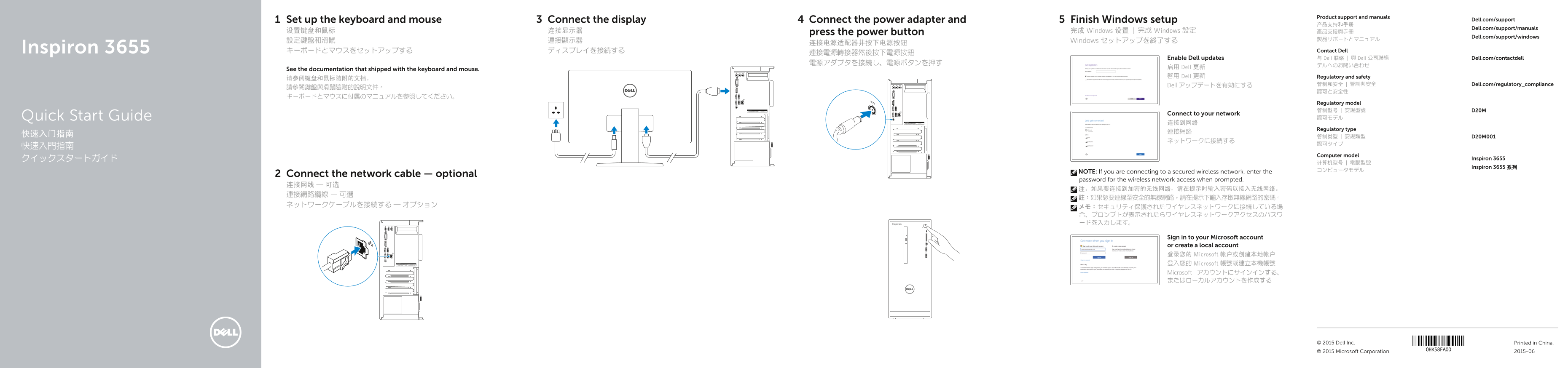
Page 1 Text Content
Product support and manuals
Connect the display 4Set up the keyboard and mouse Connect the power adapter and Finish Windows setup Dell.com/support
Dell.com/support/manuals
设置键盘和鼠标 连接显示器 press the power button 完成 Windows 设置 | 完成 Windows 設定 產品支援與手冊
Dell.com/support/windows
設定鍵盤和滑鼠 連接顯示器 Windows セットアップを終了する
Inspiron 3655 キーボードとマウスをセットアップする ディスプレイを接続する Contact Dell
Enable Dell updates 与 Dell 联络 | 與 Dell 公司聯絡 Dell.com/contactdell
启用 Dell 更新
See the documentation that shipped with the keyboard and mouse.
啟用 Dell 更新 Regulatory and safety
Dell アップデートを有効にする 管制和安全 | 管制與安全 Dell.com/regulatory_compliance
Regulatory model 管制型号 | 安規型號 D20M
Connect to your network
Quick Start Guide 認可モデル
Regulatory type
Computer model
クイックスタートガイド Inspiron 3655
Inspiron 3655 系列
NOTE: If you are connecting to a secured wireless network, enter the
Connect the network cable — optional
password for the wireless network access when prompted.
Sign in to your Microsoft account or create a local account 登录您的 Microsoft 帐户或创建本地帐户 登入您的 Microsoft 帳號或建立本機帳號 Microsoft アカウントにサインインする、 またはローカルアカウントを作成する
© 2015 Dell Inc. Printed in China.
© 2015 Microsoft Corporation. 2015-06
Page Summary Contents For Dell Inspiron 3655 Quick User Guide - Windows 10
Manual Details
| Brand | Dell |
|---|---|
| Pages | 2 |
| File Size | 643.16 KB |
| Published | July 01, 2026 |
Enter the captcha to get the download link:

Frequently Asked Questions
如果我连接到加密的无线网络,需要做什么?
在系统提示时输入接入无线网络的密码。
如何进行设备恢复或查找应用程序?
在 Windows 搜索中输入 Recovery,然后点击创建恢复介质,并按照屏幕指示操作,或者查找 Dell 应用程序。
哪些接口可以用于连接外设和显示器?
可用的接口包括 HDMI 端口、VGA 连接埠、USB 3.0 端口(2个)、USB 2.0 端口(4个)以及耳机/音频端口(3个)。