Dell Latitude 3490 Quick User Guide
Summary
This Quick Start Guide for the Dell Latitude 3490 notebook (Model P89G, Regulatory Type P89G001) highlights new features including Intel 8th Gen Core i Quad Core processor support and USB Type-C with full Dell docking station compatibility. It provides multilingual setup instructions with a detailed hardware features diagram identifying camera, IR emitter and camera options, microphone, USB 3.1 Gen 1 ports with PowerShare, HDMI and network ports, and fingerprint reader. Taiwan RoHS compliance included. Designed for business and education users.
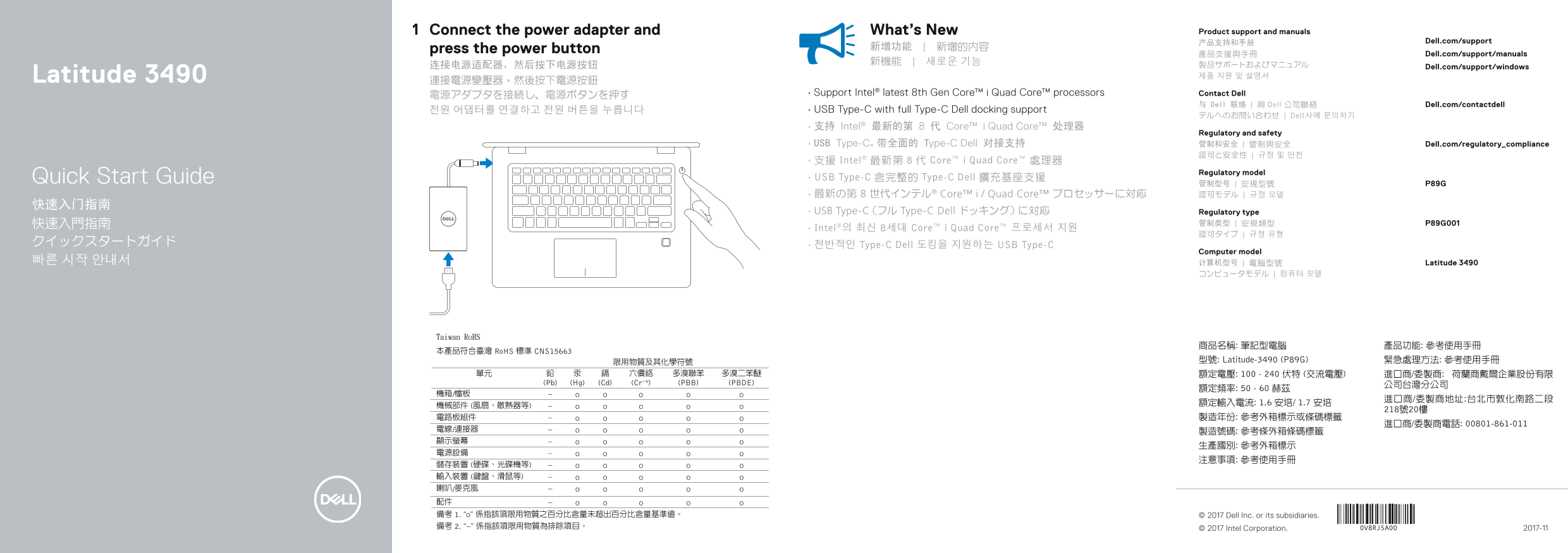
Page 1 Text Content
Connect the power adapter and What’s New Product support and manuals
产品支持和手册 Dell.com/support
press the power button 新增功能 | 新增的內容
產品支援與手冊 Dell.com/support/manuals
连接电源适配器,然后按下电源按钮 Dell.com/support/windows
Latitude 3490 제품 지원 및 설명서
電源アダプタを接続し、電源ボタンを押す • Support Intel® latest 8th Gen Core™ i Quad Core™ processors Contact Dell
与 Dell 联络 | 與 Dell 公司聯絡 Dell.com/contactdell
전원 어댑터를 연결하고 전원 버튼을 누릅니다 • USB Type-C with full Type-C Dell docking support
デルへのお問い合わせ | Dell사에 문의하기
• 支持 Intel® 最新的第 8 代 Core™ i Quad Core™ 处理器
Regulatory and safety
• USB Type-C,带全面的 Type-C Dell 对接支持 管制和安全 | 管制與安全 Dell.com/regulatory_compliance
• 支援 Intel® 最新第 8 代 Core™ i Quad Core™ 處理器
Regulatory model
Quick Start Guide • USB Type-C 含完整的 Type-C Dell 擴充基座支援
• 最新の第 8 世代インテル® Core™ i / Quad Core™ プロセッサーに対応 認可モデル | 규정 모델
• USB Type-C(フル Type-C Dell ドッキング)に対応 Regulatory type
• Intel®의 최신 8세대 Core™ i Quad Core™ 프로세서 지원
クイックスタートガイド • 전반적인 Type-C Dell 도킹을 지원하는 USB Type-C
Computer model
빠른 시작 안내서 计算机型号 | 電腦型號 Latitude 3490
商品名稱: 筆記型電腦 產品功能: 參考使用手冊 型號: Latitude-3490 (P89G) 緊急處理方法: 參考使用手冊 額定電壓: 100 - 240 伏特 (交流電壓) 進口商/委製商: 荷蘭商戴爾企業股份有限
© 2017 Dell Inc. or its subsidiaries.
© 2017 Intel Corporation. 2017-11
Page Summary Contents For Dell Latitude 3490 Quick User Guide
Manual Details
| Brand | Dell |
|---|---|
| Pages | 2 |
| File Size | 387.60 KB |
| Published | July 01, 2026 |
Enter the captcha to get the download link:

Frequently Asked Questions
How do I power on the laptop?
Connect the power adapter and then press the power button.
What modern processors are supported by this device?
It supports Intel's latest 8th Gen Core™ i Quad Core™ processors.
Are there multiple USB connectivity options?
Yes, it features a USB 3.1 Gen 1 port with PowerShare and a dedicated USB Type-C port/HDMI port.
Does the laptop support advanced security features?
It includes optional components such as an IR camera, fingerprint reader, and a Noble Wedge safety cable slot.