Dell Inspiron One 2320 Quick Start Guide
Summary
Quick Start guide for the Dell Inspiron One 2320 all-in-one desktop (Regulatory Model W03C, July 2011). Covers keyboard and mouse connection, power cable attachment, computer stand adjustment, and power-on with Windows setup guidance. Includes Mexican NOM regulatory information, system specifications (100-240VAC input, 19.5VDC output), and links to Dell Help Documentation for features and advanced options.
Page 1 Text Content
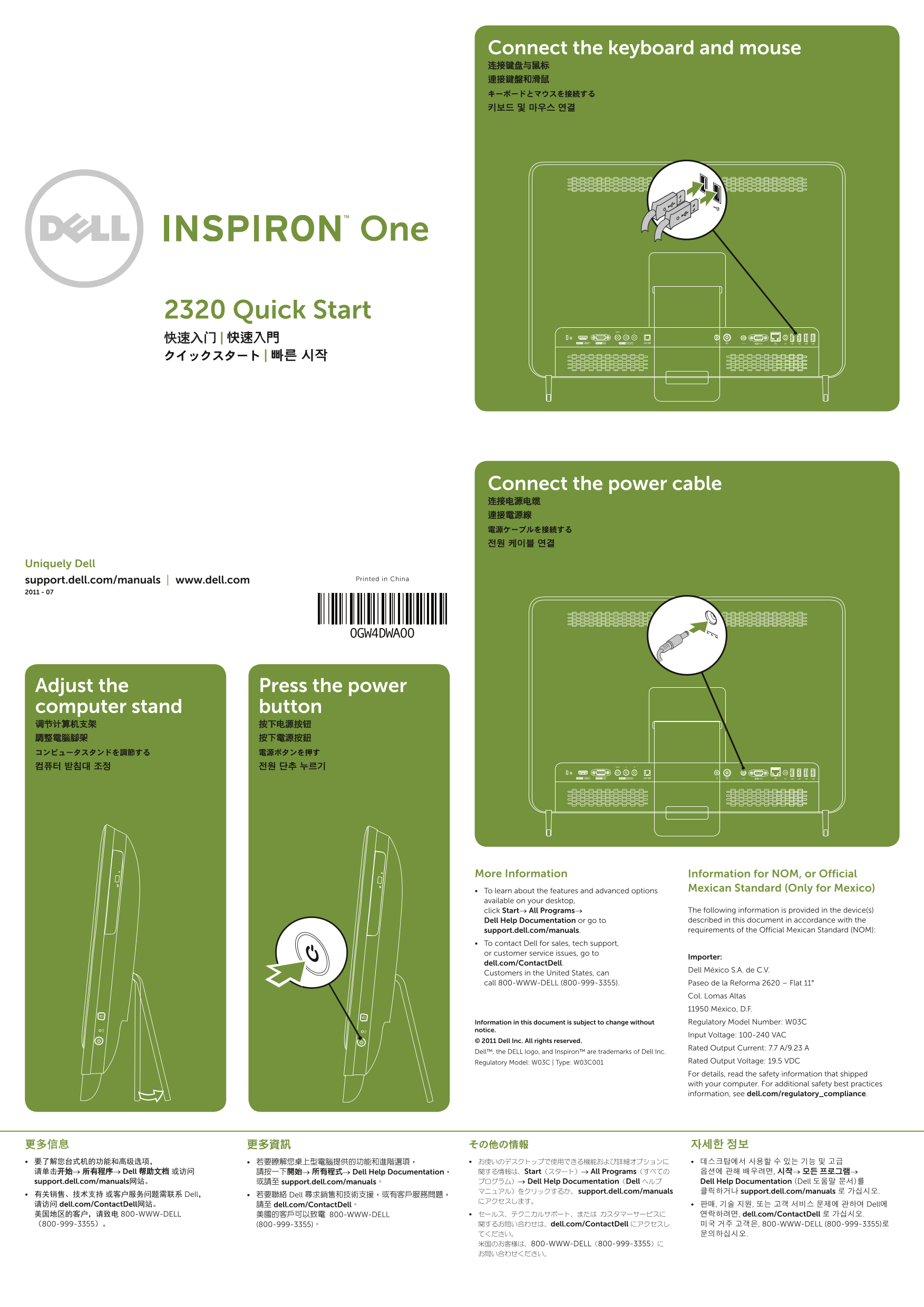
Connect the keyboard and mouse 连接键盘与鼠标 連接鍵盤和滑鼠 キーボードとマウスを接続する 키보드 및 마우스 연결
2320 Quick Start 快速入门 | 快速入門 クイックスタート | 빠른 시작
Connect the power cable 连接电源电缆 連接電源線 電源ケーブルを接続する 전원 케이블 연결
Uniquely Dell
support.dell.com/manuals | www.dell.com Printed in China
0GW4DWA00
Adjust the Press the power computer stand button 调节计算机支架 按下电源按钮 調整電腦腳架 按下電源按鈕 コンピュータスタンドを調節する 電源ボタンを押す 컴퓨터 받침대 조정 전원 단추 누르기
More Information Information for NOM, or Official
To learn about the features and advanced options Mexican Standard (Only for Mexico)
available on your desktop,
click Start→ All Programs→ The following information is provided in the device(s) Dell Help Documentation or go to described in this document in accordance with the support.dell.com/manuals. requirements of the Official Mexican Standard (NOM):
To contact Dell for sales, tech support, or customer service issues, go to
Importer:
dell.com/Contact Dell.
Dell México S.A. de C.V.
Customers in the United States, can call 800-WWW-DELL (800-999-3355). Paseo de la Reforma 2620 – Flat 11°
Col. Lomas Altas 11950 México, D.F. Information in this document is subject to change without Regulatory Model Number: W03C
notice.
Input Voltage: 100-240 VAC
© 2011 Dell Inc. All rights reserved.
Rated Output Current: 7.7 A/9.23 A
Dell™, the DELL logo, and Inspiron™ are trademarks of Dell Inc.
Regulatory Model: W03C | Type: W03C001 Rated Output Voltage: 19.5 VDC For details, read the safety information that shipped with your computer. For additional safety best practices information, see dell.com/regulatory_compliance.
更多信息 更多資訊 その他の情報 자세한 정보 要了解您台式机的功能和高级选项, 若要瞭解您桌上型電腦提供的功能和進階選項, お使いのデスクトップで使用できる機能および詳細オプションに 데스크탑에서 사용할 수 있는 기능 및 고급 请单击开始→ 所有程序→ Dell 帮助文档 或访问 請按一下開始→ 所有程式→ Dell Help Documentation, 関する情報は、Start(スタート)→ All Programs(すべての 옵션에 관해 배우려면, 시작→ 모든 프로그램→ support.dell.com/manuals网站。 或請至 support.dell.com/manuals。 プログラム)→ Dell Help Documentation(Dell ヘルプ Dell Help Documentation (Dell 도움말 문서)를
マニュアル)をクリックするか、support.dell.com/manuals 클릭하거나 support.dell.com/manuals 로 가십시오.
有关销售、技术支持 或客户服务问题需联系 Dell, 若要聯絡 Dell 尋求銷售和技術支援,或有客戶服務問題,
请访问 dell.com/Contact Dell网站。 請至 dell.com/Contact Dell。 판매, 기술 지원, 또는 고객 서비스 문제에 관하여 Dell에 美国地区的客户,请致电 800-WWW-DELL 美國的客戶可以致電 800-WWW-DELL セールス、テクニカルサポート、または カスタマーサービスに 연락하려면, dell.com/Contact Dell 로 가십시오. (800-999-3355)。 (800-999-3355)。 関するお問い合わせは、dell.com/Contact Dell にアクセスし 미국 거주 고객은, 800-WWW-DELL (800-999-3355)로
てください。 문의하십시오. 米国のお客様は、800-WWW-DELL(800-999-3355)に お問い合わせください。
Page Summary Contents For Dell Inspiron One 2320 Quick Start Guide
Manual Details
| Brand | Dell |
|---|---|
| Pages | 2 |
| File Size | 676.38 KB |
| Published | July 03, 2026 |
Enter the captcha to get the download link:

Frequently Asked Questions
Where can I find technical support or manuals for this device?
You can visit dell.com/ContactDell to contact Dell for service issues, or use support.dell.com/manuals for documentation.
How many USB 2.0 ports are available on the unit?
The manual lists both a set of two and another set of four USB 2.0 connectors.
Does the desktop have capability to read various media formats?
Yes, the device features an 8-in-1 Media Card Reader for versatile compatibility.
What additional video ports are optionally available?
Optional connections include HDMI-in, VGA-in, S/PDIF optical output, and TV-in connector.