Dell Inspiron 20 3052 Quick User Guide - Windows 10
Summary
Quick Start Guide for the Dell Inspiron 20 3000 Series all-in-one desktop (Regulatory Model W15B, Inspiron 20-3052). Covers easel or pedestal stand setup, keyboard and mouse configuration, power adapter connection, and Windows setup completion. Includes guidance on built-in battery care, network connectivity, Dell update enablement, and support resources.
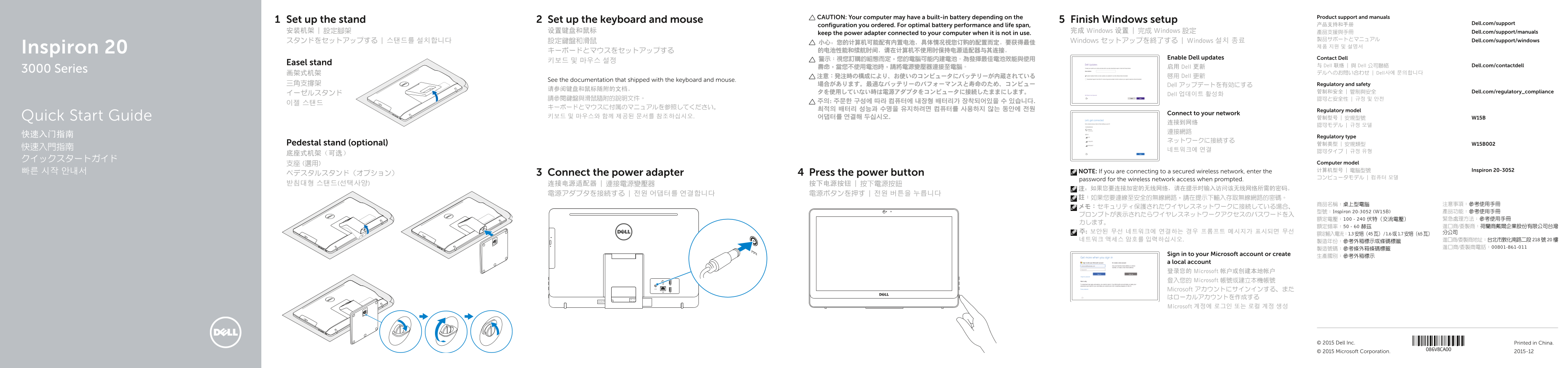
Page 1 Text Content
CAUTION: Your computer may have a built-in battery depending on the Product support and manuals
Set up the stand Set up the keyboard and mouse Finish Windows setup
产品支持和手册 Dell.com/support
configuration you ordered. For optimal battery performance and life span,
安装机架 | 設定腳架 设置键盘和鼠标 完成 Windows 设置 | 完成 Windows 設定 產品支援與手冊 Dell.com/support/manuals
keep the power adapter connected to your computer when it is not in use.
製品サポートとマニュアル Dell.com/support/windows
スタンドをセットアップする | 스탠드를 설치합니다 設定鍵盤和滑鼠 小心:您的计算机可能配有内置电池,具体情况视您订购的配置而定。要获得最佳 Windows セットアップを終了する | Windows 설치 종료
Inspiron 20 キーボードとマウスをセットアップする 的电池性能和续航时间,请在计算机不使用时保持电源适配器与其连接。
警示:視您訂購的組態而定,您的電腦可能內建電池。為發揮最佳電池效能與使用 Enable Dell updates Contact Dell
Easel stand
启用 Dell 更新 与 Dell 联络 | 與 Dell 公司聯絡 Dell.com/contactdell
3000 Series
画架式机架 デルへのお問い合わせ | Dell사에 문의합니다
注意:発注時の構成により、お使いのコンピュータにバッテリーが内蔵されている 啟用 Dell 更新
See the documentation that shipped with the keyboard and mouse.
三角支撐架 場合があります。最適なバッテリーのパフォーマンスと寿命のため、コンピュー Dell アップデートを有効にする Regulatory and safety
タを使用していない時は電源アダプタをコンピュータに接続したままにします。 管制和安全 | 管制與安全 Dell.com/regulatory_compliance
イーゼルスタンド Dell 업데이트 활성화
최적의 배터리 성능과 수명을 유지하려면 컴퓨터를 사용하지 않는 동안에 전원 Regulatory model
Connect to your network
Quick Start Guide 키보드 및 마우스와 함께 제공된 문서를 참조하십시오. 어댑터를 연결해 두십시오. 管制型号 | 安規型號 W15B
快速入门指南 Regulatory type
Pedestal stand (optional) 管制类型 | 安規類型 W15B002
支座 (選用) Computer model 빠른 시작 안내서 NOTE: If you are connecting to a secured wireless network, enter the 计算机型号 | 電腦型號 Inspiron 20-3052
ペデスタルスタンド(オプション) Connect the power adapter Press the power button
password for the wireless network access when prompted.
型號:Inspiron 20-3052 (W15B) 產品功能:參考使用手冊
Sign in to your Microsoft account or create 生產國別:參考外箱標示 a local account 登录您的 Microsoft 帐户或创建本地帐户 登入您的 Microsoft 帳號或建立本機帳號 Microsoft アカウントにサインインする、また はローカルアカウントを作成する Microsoft 계정에 로그인 또는 로컬 계정 생성
© 2015 Dell Inc. Printed in China.
© 2015 Microsoft Corporation. 2015-12
Page Summary Contents For Dell Inspiron 20 3052 Quick User Guide - Windows 10
Manual Details
| Brand | Dell |
|---|---|
| Pages | 2 |
| File Size | 850.49 KB |
| Published | July 02, 2026 |
Enter the captcha to get the download link:

Frequently Asked Questions
How do I maintain optimal battery performance?
Keep the power adapter connected to your computer when it is not in use.
What must I enter when connecting to a secured wireless network?
You must enter the password for the wireless network access when prompted.
How do I create recovery media on this device?
In Windows search, type 'Recovery,' click 'Create a recovery media,' and follow the instructions shown on screen.
What voltage range does the power adapter support?
The device supports 100 - 240 volts AC (alternating current).